I’m launching the series with a question that is often my first and last question in my JavaScript interviews. Frankly, you can’t get very far with JavaScript without learning about closures.
You can muck around a bit, but will you really understand how to build a serious JavaScript application? Will you really understand what is going on, or how the application works? I have my doubts. Not knowing the answer to this question is a serious red flag.
Not only should you know the mechanics of what a closure is, you should know why it matters, and be able to easily answer several possible use-cases for closures.
Closures are frequently used in JavaScript for object data privacy, in event handlers and callback functions, and in partial applications, currying, and other functional programming patterns.
I don’t care if a candidate knows the word “closure” or the technical definition. I want to find out if they understand the basic mechanics. If they don’t, it’s usually a clear indicator that the developer does not have a lot of experience building actual JavaScript applications.
If you can’t answer this question, you’re a junior developer. I don’t care how long you’ve been coding.
That may sound mean, but it’s not. What I mean is that most competent interviewers will ask you what a closure is, and most of the time, getting the answer wrong will cost you the job. Or if you’re lucky enough to get an offer anyway, it will cost you potentially tens of thousands of dollars per year in pay because you’ll be hired as a junior instead of a senior level developer, regardless of how long you’ve been coding.
Be prepared for a quick follow-up: “Can you name two common uses for closures?”
A closure is the combination of a function bundled together (enclosed) with references to its surrounding state (the lexical environment). In other words, a closure gives you access to an outer function’s scope from an inner function. In JavaScript, closures are created every time a function is created, at function creation time.
To use a closure, simply define a function inside another function and expose it. To expose a function, return it or pass it to another function.
The inner function will have access to the variables in the outer function scope, even after the outer function has returned.
Among other things, closures are commonly used to give objects data privacy. Data privacy is an essential property that helps us program to an interface, not an implementation. This is an important concept that helps us build more robust software because implementation details are more likely to change in breaking ways than interface contracts.
“Program to an interface, not an implementation.”
Design Patterns: Elements of Reusable Object Oriented Software
In JavaScript, closures are the primary mechanism used to enable data privacy. When you use closures for data privacy, the enclosed variables are only in scope within the containing (outer) function. You can’t get at the data from an outside scope except through the object’s privileged methods. In JavaScript, any exposed method defined within the closure scope is privileged. For example:
const getSecret = (secret) => {
  return {
    get: () => secret
  };
};

test('Closure for object privacy.', assert => {
  const msg = '.get() should have access to the closure.';
  const expected = 1;
  const obj = getSecret(1);

  const actual = obj.get();

  try {
    assert.ok(secret, 'This throws an error.');
  } catch (e) {
    assert.ok(true, `The secret var is only available
      to privileged methods.`);
  }

  assert.equal(actual, expected, msg);
  assert.end();
});
In the example above, the `.get()` method is defined inside the scope of `getSecret()`, which gives it access to any variables from `getSecret()`, and makes it a privileged method. In this case, the parameter, `secret`.
Objects are not the only way to produce data privacy. Closures can also be used to create stateful functions whose return values may be influenced by their internal state, e.g.:
const secret = msg => () => msg;// Secret - creates closures with secret messages.
// https://gist.github.com/ericelliott/f6a87bc41de31562d0f9
// https://jsbin.com/hitusu/edit?html,js,output
// secret(msg: String) => getSecret() => msg: String
const secret = (msg) => () => msg;
test('secret', assert => {
const msg = 'secret() should return a function that returns the passed secret.';
const theSecret = 'Closures are easy.';
const mySecret = secret(theSecret);
const actual = mySecret();
const expected = theSecret;
assert.equal(actual, expected, msg);
assert.end();
});In functional programming, closures are frequently used for partial application & currying. This requires some definitions:
Application: The process of applying a function to its arguments in order to produce a return value.
Partial Application: The process of applying a function to some of its arguments. The partially applied function gets returned for later use. In other words, a function that takes a function with multiple parameters and returns a function with fewer parameters. Partial application fixes (partially applies the function to) one or more arguments inside the returned function, and the returned function takes the remaining parameters as arguments in order to complete the function application.
Partial application takes advantage of closure scope in order to fix parameters. You can write a generic function that will partially apply arguments to the target function. It will have the following signature:
partialApply(targetFunction: Function, ...fixedArgs: Any[]) =>
  functionWithFewerParams(...remainingArgs: Any[])
If you need help reading the signature above, check out Rtype: Reading Function Signatures.
It will take a function that takes any number of arguments, followed by arguments we want to partially apply to the function, and returns a function that will take the remaining arguments.
An example will help. Say you have a function that adds two numbers:
const add = (a, b) => a + b;Now you want a function that adds 10 to any number. We’ll call it `add10()`. The result of `add10(5)` should be `15`. Our `partialApply()` function can make that happen:
const add10 = partialApply(add, 10);
add10(5);
In this example, the argument, `10` becomes a fixed parameter remembered inside the `add10()` closure scope.
Let’s look at a possible `partialApply()` implementation:
// Generic Partial Application Function
// https://jsbin.com/biyupu/edit?html,js,output
// https://gist.github.com/ericelliott/f0a8fd662111ea2f569e

// partialApply(targetFunction: Function, ...fixedArgs: Any[]) =>
//   functionWithFewerParams(...remainingArgs: Any[])
const partialApply = (fn, ...fixedArgs) => {
  return function (...remainingArgs) {
    return fn.apply(this, fixedArgs.concat(remainingArgs));
  };
};


test('add10', assert => {
  const msg = 'partialApply() should partially apply functions'

  const add = (a, b) => a + b;

  const add10 = partialApply(add, 10);


  const actual = add10(5);
  const expected = 15;

  assert.equal(actual, expected, msg);
});
As you can see, it simply returns a function which retains access to the `fixedArgs` arguments that were passed into the `partialApply()` function.
This post has a companion video post and practice assignments for members of EricElliottJS.com. If you’re already a member, sign in and practice now.
Note: This article uses ES6 examples. If you haven’t learned ES6 yet, see “How to Learn ES6”.
Objects are frequently used in JavaScript, and understanding how to work with them effectively will be a huge win for your productivity. In fact, poor OO design can potentially lead to project failure, and in the worst cases, company failures.
Unlike most other languages, JavaScript’s object system is based on prototypes, not classes. Unfortunately, most JavaScript developers don’t understand JavaScript’s object system, or how to put it to best use. Others do understand it, but want it to behave more like class based systems. The result is that JavaScript’s object system has a confusing split personality, which means that JavaScript developers need to know a bit about both prototypes and classes.
This can be a tricky question, and you’ll probably need to defend your answer with follow-up Q&A, so pay special attention to learning the differences, and how to apply the knowledge to write better code.
Class Inheritance: A class is like a blueprint — a description of the object to be created. Classes inherit from classes and create subclass relationships: hierarchical class taxonomies.
Instances are typically instantiated via constructor functions with the `new` keyword. Class inheritance may or may not use the `class` keyword from ES6. Classes as you may know them from languages like Java don’t technically exist in JavaScript. Constructor functions are used, instead. The ES6 `class` keyword desugars to a constructor function:
class Foo {}
typeof Foo // 'function'
In JavaScript, class inheritance is implemented on top of prototypal inheritance, but that does not mean that it does the same thing:
JavaScript’s class inheritance uses the prototype chain to wire the child `Constructor.prototype` to the parent `Constructor.prototype` for delegation. Usually, the `super()` constructor is also called. Those steps form single-ancestor parent/child hierarchies and create the tightest coupling available in OO design.
“Classes inherit from classes and create subclass relationships: hierarchical class taxonomies.”
Prototypal Inheritance: A prototype is a working object instance. Objects inherit directly from other objects.
Instances may be composed from many different source objects, allowing for easy selective inheritance and a flat [[Prototype]] delegation hierarchy. In other words, class taxonomies are not an automatic side-effect of prototypal OO: a critical distinction.
Instances are typically instantiated via factory functions, object literals, or `Object.create()`.
**“A prototype is a working object instance.** Objects inherit directly from other objects.”
Inheritance is fundamentally a code reuse mechanism: A way for different kinds of objects to share code. The way that you share code matters because if you get it wrong, it can create a lot of problems, specifically:
Class inheritance creates parent/child object taxonomies as a side-effect.
Those taxonomies are virtually impossible to get right for all new use cases, and widespread use of a base class leads to the fragile base class problem, which makes them difficult to fix when you get them wrong. In fact, class inheritance causes many well known problems in OO design:
The solution to all of these problems is to favor object composition over class inheritance.
“Favor object composition over class inheritance.”
The Gang of Four, “Design Patterns: Elements of Reusable Object Oriented Software”
When people say “favor composition over inheritance” that is short for “favor composition over class inheritance” (the original quote from “Design Patterns” by the Gang of Four). This is common knowledge in OO design because class inheritance has many flaws and causes many problems. Often people leave off the word class when they talk about class inheritance, which makes it sound like all inheritance is bad — but it’s not.
There are actually several different kinds of inheritance, and most of them are great.
Before we dive into the other kinds of inheritance, let’s take a closer look at what I mean by class inheritance:
// Class Inheritance Example
// NOT RECOMMENDED. Use object composition, instead.

// https://gist.github.com/ericelliott/b668ce0ad1ab540df915
// http://codepen.io/ericelliott/pen/pgdPOb?editors=001

class GuitarAmp {
  constructor ({ cabinet = 'spruce', distortion = '1', volume = '0' } = {}) {
    Object.assign(this, {
      cabinet, distortion, volume
    });
  }
}

class BassAmp extends GuitarAmp {
  constructor (options = {}) {
    super(options);
    this.lowCut = options.lowCut;
  }
}

class ChannelStrip extends BassAmp {
  constructor (options = {}) {
    super(options);
    this.inputLevel = options.inputLevel;
  }
}

test('Class Inheritance', nest => {
  nest.test('BassAmp', assert => {
    const msg = `instance should inherit props
    from GuitarAmp and BassAmp`;

    const myAmp = new BassAmp();
    const actual = Object.keys(myAmp);
    const expected = ['cabinet', 'distortion', 'volume', 'lowCut'];

    assert.deepEqual(actual, expected, msg);
    assert.end();
  });

  nest.test('ChannelStrip', assert => {
    const msg = 'instance should inherit from GuitarAmp, BassAmp, and ChannelStrip';
    const myStrip = new ChannelStrip();
    const actual = Object.keys(myStrip);
    const expected = ['cabinet', 'distortion', 'volume', 'lowCut', 'inputLevel'];

    assert.deepEqual(actual, expected, msg);
    assert.end();
  });
});
`BassAmp` inherits from `GuitarAmp`, and `ChannelStrip` inherits from `BassAmp` & `GuitarAmp`. This is an example of how OO design goes wrong. A channel strip isn’t actually a type of guitar amp, and doesn’t actually need a cabinet at all. A better option would be to create a new base class that both the amps and the channel strip inherits from, but even that has limitations.
Eventually, the new shared base class strategy breaks down, too.
There’s a better way. You can inherit just the stuff you really need using object composition:
// Composition Example

// http://codepen.io/ericelliott/pen/XXzadQ?editors=001
// https://gist.github.com/ericelliott/fed0fd7a0d3388b06402

const distortion = { distortion: 1 };
const volume = { volume: 1 };
const cabinet = { cabinet: 'maple' };
const lowCut = { lowCut: 1 };
const inputLevel = { inputLevel: 1 };

const GuitarAmp = (options) => {
  return Object.assign({}, distortion, volume, cabinet, options);
};

const BassAmp = (options) => {
  return Object.assign({}, lowCut, volume, cabinet, options);
};

const ChannelStrip = (options) => {
  return Object.assign({}, inputLevel, lowCut, volume, options);
};


test('GuitarAmp', assert => {
  const msg = 'should have distortion, volume, and cabinet';
  const level = 2;
  const cabinet = 'vintage';

  const actual = GuitarAmp({
    distortion: level,
    volume: level,
    cabinet
  });
  const expected = {
    distortion: level,
    volume: level,
    cabinet
  };

  assert.deepEqual(actual, expected, msg);
  assert.end();
});

test('BassAmp', assert => {
  const msg = 'should have volume, lowCut, and cabinet';
  const level = 2;
  const cabinet = 'vintage';

  const actual = BassAmp({
    lowCut: level,
    volume: level,
    cabinet
  });
  const expected = {
    lowCut: level,
    volume: level,
    cabinet
  };

  assert.deepEqual(actual, expected, msg);
  assert.end();
});

test('ChannelStrip', assert => {
  const msg = 'should have inputLevel, lowCut, and volume';
  const level = 2;

  const actual = ChannelStrip({
    inputLevel: level,
    lowCut: level,
    volume: level
  });
  const expected = {
    inputLevel: level,
    lowCut: level,
    volume: level
  };

  assert.deepEqual(actual, expected, msg);
  assert.end();
});
If you look carefully, you might see that we’re being much more specific about which objects get which properties because with composition, we can. It wasn’t really an option with class inheritance. When you inherit from a class, you get everything, even if you don’t want it.
At this point, you may be thinking to yourself, “that’s nice, but where are the prototypes?”
To understand that, you have to understand that there are three different kinds of prototypal OO.
Concatenative inheritance: The process of inheriting features directly from one object to another by copying the source objects properties. In JavaScript, source prototypes are commonly referred to as mixins. Since ES6, this feature has a convenience utility in JavaScript called `Object.assign()`. Prior to ES6, this was commonly done with Underscore/Lodash’s `.extend()` jQuery’s `$.extend()`, and so on… The composition example above uses concatenative inheritance.
Prototype delegation: In JavaScript, an object may have a link to a prototype for delegation. If a property is not found on the object, the lookup is delegated to the delegate prototype, which may have a link to its own delegate prototype, and so on up the chain until you arrive at `Object.prototype`, which is the root delegate. This is the prototype that gets hooked up when you attach to a `Constructor.prototype` and instantiate with `new`. You can also use `Object.create()` for this purpose, and even mix this technique with concatenation in order to flatten multiple prototypes to a single delegate, or extend the object instance after creation.
Functional inheritance: In JavaScript, any function can create an object. When that function is not a constructor (or `class`), it’s called a factory function. Functional inheritance works by producing an object from a factory, and extending the produced object by assigning properties to it directly (using concatenative inheritance). Douglas Crockford coined the term, but functional inheritance has been in common use in JavaScript for a long time.
As you’re probably starting to realize, concatenative inheritance is the secret sauce that enables object composition in JavaScript, which makes both prototype delegation and functional inheritance a lot more interesting.
When most people think of prototypal OO in JavaScript, they think of prototype delegation. By now you should see that they’re missing out on a lot. Delegate prototypes aren’t the great alternative to class inheritance — object composition is.
To understand the fragile base class problem and why it doesn’t apply to composition, first you have to understand how it happens:
`C` calls `super`, which runs code in `B`. `B` calls `super` which runs code in `A`.
`A` and `B` contain unrelated features needed by both `C` & `D`. `D` is a new use case, and needs slightly different behavior in `A`’s init code than `C` needs. So the newbie dev goes and tweaks `A`’s init code. `C` breaks because it depends on the existing behavior, and `D` starts working.
What we have here are features spread out between `A` and `B` that `C` and `D` need to use in various ways. `C` and `D` don’t use every feature of `A` and `B`… they just want to inherit some stuff that’s already defined in `A` and `B`. But by inheriting and calling `super`, you don’t get to be selective about what you inherit. You inherit everything:
“…the problem with object-oriented languages is they’ve got all this implicit environment that they carry around with them. You wanted a banana but what you got was a gorilla holding the banana and the entire jungle.” ~ Joe Armstrong — “Coders at Work”
With Composition
Imagine you have features instead of classes:
feat1, feat2, feat3, feat4`C` needs `feat1` and `feat3`, `D` needs `feat1`, `feat2`, `feat4`:
const C = compose(feat1, feat3);
const D = compose(feat1, feat2, feat4);
Now, imagine you discover that `D` needs slightly different behavior from `feat1`. It doesn’t actually need to change `feat1`, instead, you can make a customized version of `feat1` and use that, instead. You can still inherit the existing behaviors from `feat2` and `feat4` with no changes:
const D = compose(custom1, feat2, feat4);And `C` remains unaffected.
The reason this is not possible with class inheritance is because when you use class inheritance, you buy into the whole existing class taxonomy.
If you want to adapt a little for a new use-case, you either end up duplicating parts of the existing taxonomy (the duplication by necessity problem), or you refactor everything that depends on the existing taxonomy to adapt the taxonomy to the new use case due to the fragile base class problem.
Composition is immune to both.
If you were taught to build classes or constructor functions and inherit from those, what you were taught was not prototypal inheritance. You were taught how to mimic class inheritance using prototypes. See “Common Misconceptions About Inheritance in JavaScript”.
In JavaScript, class inheritance piggybacks on top of the very rich, flexible prototypal inheritance features built into the language a long time ago, but when you use class inheritance — even the ES6+ `class` inheritance built on top of prototypes, you’re not using the full power & flexibility of prototypal OO. In fact, you’re painting yourself into corners and opting into all of the class inheritance problems.
Using class inheritance in JavaScript is like driving your new Tesla Model S to the dealer and trading it in for a rusted out 1983 Ford Pinto.
Most of the time, composition is achieved using factory functions: functions which exist to create object instances. What if there was a standard that makes factory functions composable? There is. It’s called The Stamp Specification.
Pure functions are essential for a variety of purposes, including functional programming, reliable concurrency, and React+Redux apps. But what does “pure function” mean?
Before we can tackle what a pure function is, it’s probably a good idea to take a closer look at functions. There may be a different way to look at them that will make functional programming easier to understand.
A function is a process which takes some input, called arguments, and produces some output called a return value. Functions may serve the following purposes:
Pure functions are all about mapping. Functions map input arguments to return values, meaning that for each set of inputs, there exists an output. A function will take the inputs and return the corresponding output.
`Math.max()` takes numbers as arguments and returns the largest number:
Math.max(2, 8, 5); // 8In this example, 2, 8, & 5 are arguments. They’re values passed into the function.
`Math.max()` is a function that takes any number of arguments and returns the largest argument value. In this case, the largest number we passed in was 8, and that’s the number that got returned.
Functions are really important in computing and math. They help us process data in useful ways. Good programmers give functions descriptive names so that when we see the code, we can see the function names and understand what the function does.
Math has functions, too, and they work a lot like functions in JavaScript. You’ve probably seen functions in algebra. They look something like this:
f(x) = 2x
Which means that we’re declaring a function called f and it takes an argument called x and multiplies x by 2.
To use this function, we simply provide a value for x:
f(2)
In algebra, this means exactly the same thing as writing:
4
So any place you see f(2) you can substitute 4.
Now let’s convert that function to JavaScript:
const double = x => x * 2;You can examine the function’s output using `console.log()`:
console.log( double(5) ); // 10Remember when I said that in math functions, you could replace `f(2)` with `4`? In this case, the JavaScript engine replaces `double(5)` with the answer, `10`.
So, `console.log( double(5) );` is the same as `console.log(10);`
This is true because `double()` is a pure function, but if `double()` had side-effects, such as saving the value to disk or logging to the console, you couldn’t simply replace `double(5)` with 10 without changing the meaning.
If you want referential transparency, you need to use pure functions.
A pure function is a function which:
A dead giveaway that a function is impure is if it makes sense to call it without using its return value. For pure functions, that’s a noop.
I recommend that you favor pure functions. Meaning, if it is practical to implement a program requirement using pure functions, you should use them over other options. Pure functions take some input and return some output based on that input. They are the simplest reusable building blocks of code in a program. Perhaps the most important design principle in computer science is KISS (Keep It Simple, Stupid). I prefer Keep It Stupid Simple. Pure functions are stupid simple in the best possible way.
Pure functions have many beneficial properties, and form the foundation of functional programming. Pure functions are completely independent of outside state, and as such, they are immune to entire classes of bugs that have to do with shared mutable state. Their independent nature also makes them great candidates for parallel processing across many CPUs, and across entire distributed computing clusters, which makes them essential for many types of scientific and resource-intensive computing tasks.
Pure functions are also extremely independent — easy to move around, refactor, and reorganize in your code, making your programs more flexible and adaptable to future changes.
Several years ago I was working on an app that allowed users to search a database for musical artists and load the artist’s music playlist into a web player. This was around the time Google Instant landed, which displays instant search results as you type your search query. AJAX-powered autocomplete was suddenly all the rage.
The only problem was that users often type faster than an API autocomplete search response can be returned, which caused some strange bugs. It would trigger race conditions, where newer suggestions would be replaced by outdated suggestions.
Why did that happen? Because each AJAX success handler was given access to directly update the suggestion list that was displayed to users. The slowest AJAX request would always win the user’s attention by blindly replacing results, even when those replaced results may have been newer.
To fix the problem, I created a suggestion manager — a single source of truth to manage the state of the query suggestions. It was aware of a currently pending AJAX request, and when the user typed something new, the pending AJAX request would be canceled before a new request was issued, so only a single response handler at a time would ever be able to trigger a UI state update.
Any sort of asynchronous operation or concurrency could cause similar race conditions. Race conditions happen if output is dependent on the sequence of uncontrollable events (such as network, device latency, user input, randomness, etc…). In fact, if you’re using shared state and that state is reliant on sequences which vary depending on indeterministic factors, for all intents and purposes, the output is impossible to predict, and that means it’s impossible to properly test or fully understand. As Martin Odersky (creator of Scala) puts it:
non-determinism = parallel processing + mutable state
Program determinism is usually a desirable property in computing. Maybe you think you’re OK because JS runs in a single thread, and as such, is immune to parallel processing concerns, but as the AJAX example demonstrates, a single threaded JS engine does not imply that there is no concurrency. On the contrary, there are many sources of concurrency in JavaScript. API I/O, event listeners, web workers, iframes, and timeouts can all introduce indeterminism into your program. Combine that with shared state, and you’ve got a recipe for bugs.
Pure functions can help you avoid those kinds of bugs.
With our `double()` function, you can replace the function call with the result, and the program will mean the same thing — `double(5)` will always mean the same thing as `10` in your program, regardless of context, no matter how many times you call it or when.
But you can’t say the same thing about all functions. Some functions rely on information other than the arguments you pass in to produce results.
Consider this example:
Math.random(); // => 0.4011148700956255
Math.random(); // => 0.8533405303023756
Math.random(); // => 0.3550692005082965
Even though we didn’t pass any arguments into any of the function calls, they all produced different output, meaning that `Math.random()` is not pure.
`Math.random()` produces a new random number between 0 and 1 every time you run it, so clearly you couldn’t just replace it with 0.4011148700956255 without changing the meaning of the program.
That would produce the same result every time. When we ask the computer for a random number, it usually means that we want a different result than we got the last time. What’s the point of a pair of dice with the same numbers printed on every side?
Sometimes we have to ask the computer for the current time. We won’t go into the details of how the time functions work. For now, just copy this code:
const time = () => new Date().toLocaleTimeString();time(); // => "5:15:45 PM"What would happen if you replaced the `time()` function call with the current time?
It would always say it’s the same time: the time that the function call got replaced. In other words, it could only produce the correct output once per day, and only if you ran the program at the exact moment that the function got replaced.
So clearly, `time()` isn’t like our `double()` function.
A function is only pure if, given the same input, it will always produce the same output. You may remember this rule from algebra class: the same input values will always map to the same output value. However, many input values may map to the same output value. For example, the following function is pure:
const highpass = (cutoff, value) => value >= cutoff;The same input values will always map to the same output value:
highpass(5, 5); // => true
highpass(5, 5); // => true
highpass(5, 5); // => true
Many input values may map to the same output value:
highpass(5, 123); // true
highpass(5, 6);   // true
highpass(5, 18); // truehighpass(5, 1); // false
highpass(5, 3); // false
highpass(5, 4); // falseA pure function must not rely on any external mutable state, because it would no longer be deterministic or referentially transparent.
Pure Functions Produce No Side Effects
A pure function produces no side effects, which means that it can’t alter any external state.
JavaScript’s object arguments are references, which means that if a function were to mutate a property on an object or array parameter, that would mutate state that is accessible outside the function. Pure functions must not mutate external state.
Consider this mutating, impure `addToCart()` function:
// impure addToCart mutates existing cart
const addToCart = (cart, item, quantity) => {
  cart.items.push({
    item,
    quantity
  });
  return cart;
};


test('addToCart()', assert => {
  const msg = 'addToCart() should add a new item to the cart.';
  const originalCart =     {
    items: []
  };
  const cart = addToCart(
    originalCart,
    {
      name: "Digital SLR Camera",
      price: '1495'
    },
    1
  );

  const expected = 1; // num items in cart
  const actual = cart.items.length;

  assert.equal(actual, expected, msg);

  assert.deepEqual(originalCart, cart, 'mutates original cart.');
  assert.end();
});
It works by passing in a cart, and item to add to that cart, and an item quantity. The function then returns the same cart, with the item added to it.
The problem with this is that we’ve just mutated some shared state. Other functions may be relying on that cart object state to be what it was before the function was called, and now that we’ve mutated that shared state, we have to worry about what impact it will have on the program logic if we change the order in which functions have been called. Refactoring the code could result in bugs popping up, which could screw up orders, and result in unhappy customers.
Now consider this version:
// Pure addToCart() returns a new cart
// It does not mutate the original.
const addToCart = (cart, item, quantity) => {
  const newCart = lodash.cloneDeep(cart);

  newCart.items.push({
    item,
    quantity
  });
  return newCart;

};

test('addToCart()', assert => {
  const msg = 'addToCart() should add a new item to the cart.';
  const originalCart = {
    items: []
  };

  // deep-freeze on npm
  // throws an error if original is mutated
  deepFreeze(originalCart);

  const cart = addToCart(
    originalCart,
    {
      name: "Digital SLR Camera",
      price: '1495'
    },
    1
  );


  const expected = 1; // num items in cart
  const actual = cart.items.length;

  assert.equal(actual, expected, msg);

  assert.notDeepEqual(originalCart, cart,
    'should not mutate original cart.');
  assert.end();
});
In this example, we have an array nested in an object, which is why I reached for a deep clone. This is more complex state than you’ll typically be dealing with. For most things, you can break it down into smaller chunks.
For example, Redux lets you compose reducers rather than deal with the entire app state inside each reducer. The result is that you don’t have to create a deep clone of the entire app state every time you want to update just a small part of it. Instead, you can use non-destructive array methods, or `Object.assign()` to update a small part of the app state.
Your turn. Fork this pen and change the impure functions into pure functions. Make the unit tests pass without changing the tests.
Function composition is the process of combining two or more functions to produce a new function. Composing functions together is like snapping together a series of pipes for our data to flow through.
Put simply, a composition of functions `f` and `g` can be defined as `f(g(x))`, which evaluates from the inside out — right to left. In other words, the evaluation order is:
Let’s look at this more closely in code. Imagine you want to convert user’s full names to URL slugs to give each of your users a profile page. In order to do that, you need to walk through a series of steps:
Here’s a simple implementation:
const toSlug = input => encodeURIComponent(
  input.split(' ')
    .map(str => str.toLowerCase())
    .join('-')
);
Not bad… but what if I told you it could be more readable?
Imagine each of these operations had a corresponding composable function. This could be written as:
const toSlug = input => encodeURIComponent(
  join('-')(
    map(toLowerCase)(
      split(' ')(
        input
      )
    )
  )
);

console.log(toSlug('JS Cheerleader')); // 'js-cheerleader'
This looks even harder to read than our first attempt, but hang in there, this is going somewhere.
In order to accomplish this, we’re using composable forms of common utilities like `split()`, `join()` and `map()`. Here are the implementations:
const curry = fn => (...args) => fn.bind(null, ...args);

const map = curry((fn, arr) => arr.map(fn));

const join = curry((str, arr) => arr.join(str));

const toLowerCase = str => str.toLowerCase();

const split = curry((splitOn, str) => str.split(splitOn));
With the exception of `toLowerCase()`, production-tested versions of all of these functions are available from Lodash/fp. You can import them like this:
import { curry, map, join, split } from 'lodash/fp';Or like this:
const curry = require('lodash/fp/curry');
const map = require('lodash/fp/map');
//...
I’m being a little lazy here. Notice that this curry isn’t technically a real curry, which would always produce a unary function. Instead, it’s a simple partial application. See “What’s the Difference Between Curry and Partial Application?”, but for the purposes of this demonstration, it will work interchangeably with a real curry function.
Going back to our `toSlug()` implementation, there’s something that really bothers me about it:
const toSlug = input => encodeURIComponent(
  join('-')(
    map(toLowerCase)(
      split(' ')(
        input
      )
    )
  )
);

console.log(toSlug('JS Cheerleader')); // 'js-cheerleader'
That looks like a lot of nesting to me, and it’s a bit confusing to read. We can flatten the nesting with a function that will compose these functions for us automatically, meaning that it will take the output from one function and automatically patch it to the input of the next function until it spits out the final value.
Come to think of it, we have an array extras utility that sounds like it does something like that. It takes a list of values and applies a function to each of those values, accumulating a single result. The values themselves can be functions. The function is called `reduce()`, but to match the compose behavior above, we need it to reduce right to left, instead of left to right.
Good thing there’s a `reduceRight()` that does exactly what
we’re looking for:
const compose = (...fns) => x => fns.reduceRight((v, f) => f(v), x);.
Like `.reduce()`, the array `.reduceRight()` method takes a reducer function and an initial value (`x`). We iterate over the array functions (from right to left), applying each in turn to the accumulated value (`v`).
With compose, we can rewrite our composition above without the nesting:
const toSlug = compose(
  encodeURIComponent,
  join('-'),
  map(toLowerCase),
  split(' ')
);

console.log(toSlug('JS Cheerleader')); // 'js-cheerleader'
Of course, `compose()` comes with lodash/fp as well:
import { compose } from 'lodash/fp';Or:
const compose = require('lodash/fp/compose');Compose is great when you’re thinking in terms of the mathematical form of composition, inside out… but what if you want to think in terms of the sequence from left to right?
There’s another form commonly called `pipe()`. Lodash calls it `flow()`:
const pipe = (...fns) => x => fns.reduce((v, f) => f(v), x);

const fn1 = s => s.toLowerCase();
const fn2 = s => s.split('').reverse().join('');
const fn3 = s => s + '!'

const newFunc = pipe(fn1, fn2, fn3);
const result = newFunc('Time'); // emit!
Notice the implementation is exactly the same as `compose()`, except that we’re using `.reduce()` instead of `.reduceRight()`, which reduces left to right instead of right to left.
Let’s look at our `toSlug()` function implemented with `pipe()`:
const toSlug = pipe(
  split(' '),
  map(toLowerCase),
  join('-'),
  encodeURIComponent
);

console.log(toSlug('JS Cheerleader')); // 'js-cheerleader'
For me, this is much easier to read.
Hardcore functional programmers define their entire application in terms of function compositions. I use it frequently to eliminate the need for temporary variables. Look at the `pipe()` version of `toSlug()` carefully and you might notice something special.
In imperative programming, when you’re performing transformations on some variable, you’ll find references to the variable in each step of the transformation. The `pipe()` implementation above is written in a points-free style, which means that it does not identify the arguments on which it operates at all.
I frequently use pipes in things like unit tests and Redux state reducers to eliminate the need for intermediary variables which exist only to hold transient values between one operation and the next.
That may sound weird at first, but as you get practice with it, you’ll find that in functional programming, you’re working with very abstract, generalized functions in which the names of things don’t matter so much. Names just get in the way. You may start to think of variables as unnecessary boilerplate.
That said, I’m of the opinion that points-free style can be taken too far. It can become too dense, and harder to understand, but if you get confused, here’s a little tip… you can tap into the flow to trace what’s going on:
const trace = curry((label, x) => {
  console.log(`== ${ label }:  ${ x }`);
  return x;
});
Here’s how you use it:
const toSlug = pipe(
  trace('input'),
  split(' '),
  map(toLowerCase),
  trace('after map'),
  join('-'),
  encodeURIComponent
);

console.log(toSlug('JS Cheerleader'));
// '== input:  JS Cheerleader'
// '== after map:  js,cheerleader'
// 'js-cheerleader'
`trace()` is just a special form of the more general `tap()`, which lets you perform some action for each value that flows through the pipe. Get it? Pipe? Tap? You can write `tap()` like this:
const tap = curry((fn, x) => {
  fn(x);
  return x;
});
Now you can see how `trace()` is just a special-cased `tap()`:
const trace = label => {
  return tap(x => console.log(`== ${ label }:  ${ x }`));
};
You should be starting to get a sense of what functional programming is like, and how partial application & currying collaborate with function composition to help you write programs which are more readable with less boilerplate.
Functional programming (often abbreviated FP) is the process of building software by composing pure functions, avoiding shared state, mutable data, and side-effects. Functional programming is declarative rather than imperative, and application state flows through pure functions. Contrast with object oriented programming, where application state is usually shared and colocated with methods in objects.
Functional programming is a programming paradigm, meaning that it is a way of thinking about software construction based on some fundamental, defining principles (listed above). Other examples of programming paradigms include object oriented programming and procedural programming.
Functional code tends to be more concise, more predictable, and easier to test than imperative or object oriented code — but if you’re unfamiliar with it and the common patterns associated with it, functional code can also seem a lot more dense, and the related literature can be impenetrable to newcomers.
If you start googling functional programming terms, you’re going to quickly hit a brick wall of academic lingo that can be very intimidating for beginners. To say it has a learning curve is a serious understatement. But if you’ve been programming in JavaScript for a while, chances are good that you’ve used a lot of functional programming concepts & utilities in your real software.
Don’t let all the new words scare you away. It’s a lot easier than it sounds.
The hardest part is wrapping your head around all the unfamiliar vocabulary. There are a lot of ideas in the innocent looking definition above which all need to be understood before you can begin to grasp the meaning of functional programming:
In other words, if you want to know what functional programming means in practice, you have to start with an understanding of those core concepts.
A pure function is a function which:
Pure functions have lots of properties that are important in functional programming, including referential transparency (you can replace a function call with its resulting value without changing the meaning of the program). Read “What is a Pure Function?” for more details.
Function composition is the process of combining two
or more functions in order to produce a new function or perform some
computation. For example, the composition f . g (the dot
means “composed with”) is equivalent to f(g(x)) in
JavaScript. Understanding function composition is an important step
towards understanding how software is constructed using the functional
programming. Read “What
is Function Composition?” for more.
Shared state is any variable, object, or memory space that exists in a shared scope, or as the property of an object being passed between scopes. A shared scope can include global scope or closure scopes. Often, in object oriented programming, objects are shared between scopes by adding properties to other objects.
For example, a computer game might have a master game object, with characters and game items stored as properties owned by that object. Functional programming avoids shared state — instead relying on immutable data structures and pure calculations to derive new data from existing data. For more details on how functional software might handle application state, see “10 Tips for Better Redux Architecture”.
The problem with shared state is that in order to understand the effects of a function, you have to know the entire history of every shared variable that the function uses or affects.
Imagine you have a user object which needs saving. Your
saveUser() function makes a request to an API on the
server. While that’s happening, the user changes their profile picture
with updateAvatar() and triggers another
saveUser() request. On save, the server sends back a
canonical user object that should replace whatever is in memory in order
to sync up with changes that happen on the server or in response to
other API calls.
Unfortunately, the second response gets received before the first response, so when the first (now outdated) response gets returned, the new profile pic gets wiped out in memory and replaced with the old one. This is an example of a race condition — a very common bug associated with shared state.
Another common problem associated with shared state is that changing the order in which functions are called can cause a cascade of failures because functions which act on shared state are timing dependent:
// With shared state, the order in which function calls are made
// changes the result of the function calls.
const x = {
  val: 2
};

const x1 = () => x.val += 1;

const x2 = () => x.val *= 2;

x1();
x2();

console.log(x.val); // 6

// This example is exactly equivalent to the above, except...
const y = {
  val: 2
};

const y1 = () => y.val += 1;

const y2 = () => y.val *= 2;

// ...the order of the function calls is reversed...
y2();
y1();

// ... which changes the resulting value:
console.log(y.val); // 5
When you avoid shared state, the timing and order of function calls don’t change the result of calling the function. With pure functions, given the same input, you’ll always get the same output. This makes function calls completely independent of other function calls, which can radically simplify changes and refactoring. A change in one function, or the timing of a function call won’t ripple out and break other parts of the program.
const x = {
  val: 2
};

const x1 = x => Object.assign({}, x, { val: x.val + 1});

const x2 = x => Object.assign({}, x, { val: x.val * 2});

console.log(x1(x2(x)).val); // 5


const y = {
  val: 2
};

// Since there are no dependencies on outside variables,
// we don't need different functions to operate on different
// variables.

// this space intentionally left blank


// Because the functions don't mutate, you can call these
// functions as many times as you want, in any order,
// without changing the result of other function calls.
x2(y);
x1(y);

console.log(x1(x2(y)).val); // 5
In the example above, we use Object.assign() and pass in
an empty object as the first parameter to copy the properties of
x instead of mutating it in place. In this case, it would
have been equivalent to simply create a new object from scratch, without
Object.assign(), but this is a common pattern in JavaScript
to create copies of existing state instead of using mutations, which we
demonstrated in the first example.
If you look closely at the console.log() statements in
this example, you should notice something I’ve mentioned already:
function composition. Recall from earlier, function composition looks
like this: f(g(x)). In this case, we replace
f() and g() with x1() and
x2() for the composition: x1 . x2.
Of course, if you change the order of the composition, the output
will change. Order of operations still matters. f(g(x)) is
not always equal to g(f(x)), but what doesn’t matter
anymore is what happens to variables outside the function — and that’s a
big deal. With impure functions, it’s impossible to fully understand
what a function does unless you know the entire history of every
variable that the function uses or affects.
Remove function call timing dependency, and you eliminate an entire class of potential bugs.
An immutable object is an object that can’t be modified after it’s created. Conversely, a mutable object is any object which can be modified after it’s created.
Immutability is a central concept of functional programming because without it, the data flow in your program is lossy. State history is abandoned, and strange bugs can creep into your software. For more on the significance of immutability, see “The Dao of Immutability.”
In JavaScript, it’s important not to confuse const, with
immutability. const creates a variable name binding which
can’t be reassigned after creation. const does not create
immutable objects. You can’t change the object that the binding refers
to, but you can still change the properties of the object, which means
that bindings created with const are mutable, not
immutable.
Immutable objects can’t be changed at all. You can make a value truly immutable by deep freezing the object. JavaScript has a method that freezes an object one-level deep:
const a = Object.freeze({
  foo: 'Hello',
  bar: 'world',
  baz: '!'
});

a.foo = 'Goodbye';
// Error: Cannot assign to read only property 'foo' of object Object
But frozen objects are only superficially immutable. For example, the following object is mutable:
const a = Object.freeze({
  foo: { greeting: 'Hello' },
  bar: 'world',
  baz: '!'
});

a.foo.greeting = 'Goodbye';

console.log(`${ a.foo.greeting }, ${ a.bar }${a.baz}`);
As you can see, the top level primitive properties of a frozen object can’t change, but any property which is also an object (including arrays, etc…) can still be mutated — so even frozen objects are not immutable unless you walk the whole object tree and freeze every object property.
In many functional programming languages, there are special immutable data structures called trie data structures (pronounced “tree”) which are effectively deep frozen — meaning that no property can change, regardless of the level of the property in the object hierarchy.
Tries use structural sharing to share reference memory locations for all the parts of the object which are unchanged after an object has been copied by an operator, which uses less memory, and enables significant performance improvements for some kinds of operations.
For example, you can use identity comparisons at the root of an object tree for comparisons. If the identity is the same, you don’t have to walk the whole tree checking for differences.
There are several libraries in JavaScript which take advantage of tries, including Immutable.js and Mori.
I have experimented with both, and tend to use Immutable.js in large projects that require significant amounts of immutable state. For more on that, see “10 Tips for Better Redux Architecture”.
A side effect is any application state change that is observable outside the called function other than its return value. Side effects include:
Side effects are mostly avoided in functional programming, which makes the effects of a program much easier to understand, and much easier to test.
Haskell and other functional languages frequently isolate and encapsulate side effects from pure functions using monads. The topic of monads is deep enough to write a book on, so we’ll save that for later.
What you do need to know right now is that side-effect actions need to be isolated from the rest of your software. If you keep your side effects separate from the rest of your program logic, your software will be much easier to extend, refactor, debug, test, and maintain.
This is the reason that most front-end frameworks encourage users to manage state and component rendering in separate, loosely coupled modules.
Functional programming tends to reuse a common set of functional utilities to process data. Object oriented programming tends to colocate methods and data in objects. Those colocated methods can only operate on the type of data they were designed to operate on, and often only the data contained in that specific object instance.
In functional programming, any type of data is fair game. The same
map() utility can map over objects, strings, numbers, or
any other data type because it takes a function as an argument which
appropriately handles the given data type. FP pulls off its generic
utility trickery using higher order functions.
JavaScript has first class functions, which allows us to treat functions as data — assign them to variables, pass them to other functions, return them from functions, etc…
A higher order function is any function which takes a function as an argument, returns a function, or both. Higher order functions are often used to:
A functor is something that can be mapped over. In other words, it’s a container which has an interface which can be used to apply a function to the values inside it. When you see the word functor, you should think “mappable”.
Earlier we learned that the same map() utility can act
on a variety of data types. It does that by lifting the mapping
operation to work with a functor API. The important flow control
operations used by map() take advantage of that interface.
In the case of Array.prototype.map(), the container is an
array, but other data structures can be functors, too — as long as they
supply the mapping API.
Let’s look at how Array.prototype.map() allows you to
abstract the data type from the mapping utility to make
map() usable with any data type. We’ll create a simple
double() mapping that simply multiplies any passed in
values by 2:
const double = n => n * 2;
const doubleMap = numbers => numbers.map(double);
console.log(doubleMap([2, 3, 4])); // [ 4, 6, 8 ]
What if we want to operate on targets in a game to double the number
of points they award? All we have to do is make a subtle change to the
double() function that we pass into map(), and
everything still works:
const double = n => n.points * 2;

const doubleMap = numbers => numbers.map(double);

console.log(doubleMap([
  { name: 'ball', points: 2 },
  { name: 'coin', points: 3 },
  { name: 'candy', points: 4}
])); // [ 4, 6, 8 ]
The concept of using abstractions like functors & higher order functions in order to use generic utility functions to manipulate any number of different data types is important in functional programming. You’ll see a similar concept applied in all sorts of different ways.
“A list expressed over time is a stream.”
All you need to understand for now is that arrays and functors are not the only way this concept of containers and values in containers applies. For example, an array is just a list of things. A list expressed over time is a stream — so you can apply the same kinds of utilities to process streams of incoming events — something that you’ll see a lot when you start building real software with FP.
Functional programming is a declarative paradigm, meaning that the program logic is expressed without explicitly describing the flow control.
Imperative programs spend lines of code describing the specific steps used to achieve the desired results — the flow control: How to do things.
Declarative programs abstract the flow control process, and instead spend lines of code describing the data flow: What to do. The how gets abstracted away.
For example, this imperative mapping takes an array of numbers and returns a new array with each number multiplied by 2:
const doubleMap = numbers => {
  const doubled = [];
  for (let i = 0; i < numbers.length; i++) {
    doubled.push(numbers[i] * 2);
  }
  return doubled;
};

console.log(doubleMap([2, 3, 4])); // [4, 6, 8]
Imperative data mapping
This declarative mapping does the same thing, but
abstracts the flow control away using the functional
Array.prototype.map() utility, which allows you to more
clearly express the flow of data:
const doubleMap = numbers => numbers.map(n => n * 2);

console.log(doubleMap([2, 3, 4])); // [4, 6, 8]
Imperative code frequently utilizes statements. A
statement is a piece of code which performs some
action. Examples of commonly used statements include for,
if, switch, throw, etc…
Declarative code relies more on expressions. An expression is a piece of code which evaluates to some value. Expressions are usually some combination of function calls, values, and operators which are evaluated to produce the resulting value.
These are all examples of expressions:
2 * 2
doubleMap([2, 3, 4])
Math.max(4, 3, 2)
Usually in code, you’ll see expressions being assigned to an identifier, returned from functions, or passed into a function. Before being assigned, returned, or passed, the expression is first evaluated, and the resulting value is used.
Functional programming favors:
Learn & practice this core group of functional array extras:
.map().filter().reduce()Use map to transform the following array of values into an array of item names:
// vvv Don't change vvv
const items = [
  { name: 'ball', points: 2 },
  { name: 'coin', points: 3 },
  { name: 'candy', points: 4}
];
// ^^^ Don't change ^^^

const result = items.map(
  /* ==vvv Replace this code vvv== */
  () => {}
  /* ==^^^ Replace this code ^^^== */
);


// vvv Don't change vvv
test('Map', assert => {
  const msg = 'Should extract names from objects';
  const expected = [
    'ball', 'coin', 'candy'
  ];

  assert.same(result, expected, msg);
  assert.end();
});
// ^^^ Don't change ^^^
Use filter to select the items where points are greater than or equal to 3:
// vvv Don't change vvv
const items = [
  { name: 'ball', points: 2 },
  { name: 'coin', points: 3 },
  { name: 'candy', points: 4 }
];
// ^^^ Don't change ^^^

const result = items.filter(
  /* ==vvv Replace this code vvv== */
  () => {}
  /* ==^^^ Replace this code ^^^== */
);


// vvv Don't change vvv
test('Filter', assert => {
  const msg = 'Should select items where points >= 3';
  const expected = [
    { name: 'coin', points: 3 },
    { name: 'candy', points: 4 }
  ];

  assert.same(result, expected, msg);
  assert.end();
});
// ^^^ Don't change ^^^
Use reduce to sum the points:
// vvv Don't change vvv
const items = [
  { name: 'ball', points: 2 },
  { name: 'coin', points: 3 },
  { name: 'candy', points: 4 }
];
// ^^^ Don't change ^^^

const result = items.reduce(
  /* ==vvv Replace this code vvv== */
  () => {}
  /* ==^^^ Replace this code ^^^== */
);


// vvv Don't change vvv
test('Learn reduce', assert => {
  const msg = 'should sum all the points';
  const expected = 9;

  assert.same(result, expected, msg);
  assert.end();
});
// ^^^ Don't change ^^^A promise is an object that may produce a single value some time in the future: either a resolved value, or a reason that it’s not resolved (e.g., a network error occurred). A promise may be in one of 3 possible states: fulfilled, rejected, or pending. Promise users can attach callbacks to handle the fulfilled value or the reason for rejection.
Promises are eager, meaning that a promise will start doing whatever task you give it as soon as the promise constructor is invoked. If you need lazy, check out observables or tasks.
Early implementations of promises and futures (a similar / related idea) began to appear in languages such as MultiLisp and Concurrent Prolog as early as the 1980’s. The use of the word “promise” was coined by Barbara Liskov and Liuba Shrira in 1988[1].
The first time I heard about promises in JavaScript, Node was brand new and the community was discussing the best way to handle asynchronous behavior. The community experimented with promises for a while, but eventually settled on the Node-standard error-first callbacks.
Around the same time, Dojo added promises via the Deferred API. Growing interest and activity eventually led to the newly formed Promises/A specification designed to make various promises more interoperable.
jQuery’s async behaviors were refactored around promises. jQuery’s promise support had remarkable similarities to Dojo’s Deferred, and it quickly became the most commonly used promise implementation in JavaScript due to jQuery’s immense popularity — for a time. However, it did not support the two channel (fulfilled/rejected) chaining behavior & exception management that people were counting on to build tools on top of promises.
In spite of those weaknesses, jQuery officially made JavaScript promises mainstream, and better stand-alone promise libraries like Q, When, and Bluebird became very popular. jQuery’s implementation incompatibilities motivated some important clarifications in the promise spec, which was rewritten and rebranded as the Promises/A+ specification.
ES6 brought a Promises/A+ compliant Promise global, and
some very important APIs were built on top of the new standard Promise
support: notably the WHATWG
Fetch spec and the Async Functions
standard (a stage 3 draft at the time of this writing).
The promises described here are those which are compatible with the
Promises/A+ specification, with a focus on the ECMAScript standard
Promise implementation.
A promise is an object which can be returned synchronously from an asynchronous function. It will be in one of 3 possible states:
onFulfilled() will be
called (e.g., resolve() was called)onRejected() will be called
(e.g., reject() was called)A promise is settled if it’s not pending (it has been resolved or rejected). Sometimes people use resolved and settled to mean the same thing: not pending.
Once settled, a promise can not be resettled. Calling
resolve() or reject() again will have no
effect. The immutability of a settled promise is an important
feature.
Native JavaScript promises don’t expose promise states. Instead, you’re expected to treat the promise as a black box. Only the function responsible for creating the promise will have knowledge of the promise status, or access to resolve or reject.
Here is a function that returns a promise which will resolve after a specified time delay:
const wait = time => new Promise((resolve) => setTimeout(resolve, time));

wait(3000).then(() => console.log('Hello!')); // 'Hello!'
Our wait(3000) call will wait 3000ms (3 seconds), and
then log 'Hello!'. All spec-compatible promises define
a .then() method which you use to pass handlers which can
take the resolved or rejected value.
The ES6 promise constructor takes a function. That function takes two
parameters, resolve(), and reject(). In the
example above, we’re only using resolve(), so I left
reject() off the parameter list. Then we call
setTimeout() to create the delay, and call
resolve() when it’s finished.
You can optionally resolve() or reject()
with values, which will be passed to the callback functions attached
with .then().
When I reject() with a value, I always pass an
Error object. Generally I want two possible resolution
states: the normal happy path, or an exception — anything that stops the
normal happy path from happening. Passing an Error object
makes that explicit.
A standard for promises was defined by the Promises/A+ specification community. There are many implementations which conform to the standard, including the JavaScript standard ECMAScript promises.
Promises following the spec must follow a specific set of rules:
.then() method.undefined). That value must not change.Change in this context refers to identity (===)
comparison. An object may be used as the fulfilled value, and object
properties may mutate.
Every promise must supply a .then() method with the
following signature:
promise.then(
  onFulfilled?: Function,
  onRejected?: Function
) => Promise
The .then() method must comply with these rules:
onFulfilled() and onRejected() are
optional.onFulfilled() will be called after the promise is
fulfilled, with the promise’s value as the first argument.onRejected() will be called after the promise is
rejected, with the reason for rejection as the first argument. The
reason may be any valid JavaScript value, but because rejections are
essentially synonymous with exceptions, I recommend using Error
objects.onFulfilled() nor onRejected() may
be called more than once..then() may be called many times on the same promise.
In other words, a promise can be used to aggregate callbacks..then() must return a new promise,
promise2.onFulfilled() or onRejected() return a
value x, and x is a promise,
promise2 will lock in with (assume the same state and value
as) x. Otherwise, promise2 will be fulfilled
with the value of x.onFulfilled or onRejected throws
an exception e, promise2 must be rejected with
e as the reason.onFulfilled is not a function and
promise1 is fulfilled, promise2 must be
fulfilled with the same value as promise1.onRejected is not a function and
promise1 is rejected, promise2 must be
rejected with the same reason as promise1.Because .then() always returns a new promise, it’s
possible to chain promises with precise control over how and where
errors are handled. Promises allow you to mimic normal synchronous
code’s try/catch behavior.
Like synchronous code, chaining will result in a sequence that runs in serial. In other words, you can do:
fetch(url)
  .then(process)
  .then(save)
  .catch(handleErrors)
;
Assuming each of the functions, fetch(),
process(), and save() return promises,
process() will wait for fetch() to complete
before starting, and save() will wait for
process() to complete before starting.
handleErrors() will only run if any of the previous
promises reject.
Here’s an example of a complex promise chain with multiple rejections:
const wait = time => new Promise(
  res => setTimeout(() => res(), time)
);

wait(200)
  // onFulfilled() can return a new promise, `x`
  .then(() => new Promise(res => res('foo')))
  // the next promise will assume the state of `x`
  .then(a => a)
  // Above we returned the unwrapped value of `x`
  // so `.then()` above returns a fulfilled promise
  // with that value:
  .then(b => console.log(b)) // 'foo'
  // Note that `null` is a valid promise value:
  .then(() => null)
  .then(c => console.log(c)) // null
  // The following error is not reported yet:
  .then(() => {throw new Error('foo');})
  // Instead, the returned promise is rejected
  // with the error as the reason:
  .then(
    // Nothing is logged here due to the error above:
    d => console.log(`d: ${ d }`),
    // Now we handle the error (rejection reason)
    e => console.log(e)) // [Error: foo]
  // With the previous exception handled, we can continue:
  .then(f => console.log(`f: ${ f }`)) // f: undefined
  // The following doesn't log. e was already handled,
  // so this handler doesn't get called:
  .catch(e => console.log(e))
  .then(() => { throw new Error('bar'); })
  // When a promise is rejected, success handlers get skipped.
  // Nothing logs here because of the 'bar' exception:
  .then(g => console.log(`g: ${ g }`))
  .catch(h => console.log(h)) // [Error: bar]
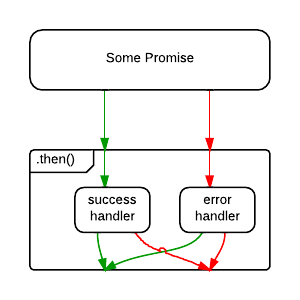
;Note that promises have both a success and an error handler, and it’s very common to see code that does this:
save().then(
  handleSuccess,
  handleError
);
But what happens if handleSuccess() throws an error? The
promise returned from .then() will be rejected, but there’s
nothing there to catch the rejection — meaning that an error in your app
gets swallowed. Oops!
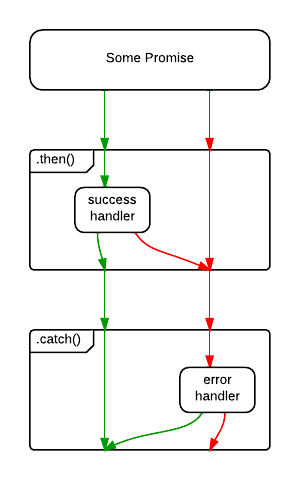
For that reason, some people consider the code above to be an anti-pattern, and recommend the following, instead:
save()
  .then(handleSuccess)
  .catch(handleError)
;
The difference is subtle, but important. In the first example, an
error originating in the save() operation will be caught,
but an error originating in the handleSuccess() function
will be swallowed.
In the second example, .catch() will handle rejections
from either save(), or handleSuccess().
Of course, the save() error might be a networking error,
whereas the handleSuccess() error may be because the
developer forgot to handle a specific status code. What if you want to
handle them differently? You could opt to handle them both:
save()
  .then(
    handleSuccess,
    handleNetworkError
  )
  .catch(handleProgrammerError)
;
Whatever you prefer, I recommend ending all promise chains with
a .catch(). That’s worth repeating:
I recommend ending all promise chains with a
.catch().
One of the first things new promise users often wonder about is how to cancel a promise. Here’s an idea: Just reject the promise with “Cancelled” as the reason. If you need to deal with it differently than a “normal” error, do your branching in your error handler.
Here are some common mistakes people make when they roll their own promise cancellation:
Adding .cancel() makes the promise non-standard, but it
also violates another rule of promises: Only the function that creates
the promise should be able to resolve, reject, or cancel the promise.
Exposing it breaks that encapsulation, and encourages people to write
code that manipulates the promise in places that shouldn’t know about
it. Avoid spaghetti and broken promises.
Some clever people have figured out that there’s a way to use
Promise.race() as a cancellation mechanism. The problem
with that is that cancellation control is taken from the function that
creates the promise, which is the only place that you can conduct proper
cleanup activities, such as clearing timeouts or freeing up memory by
clearing references to data, etc…
Did you know that Chrome throws warning messages all over the console when you forget to handle a promise rejection? Oops!
The withdrawn TC39 proposal for cancellation proposed a separate messaging channel for cancellations. It also used a new concept called a cancellation token. In my opinion, the solution would have considerably bloated the promise spec, and the only feature it would have provided that speculations don’t directly support is the separation of rejections and cancellations, which, IMO, is not necessary to begin with.
Will you want to do switching depending on whether there is an exception, or a cancellation? Yes, absolutely. Is that the promise’s job? In my opinion, no, it’s not.
Generally, I pass all the information the promise needs to determine
how to resolve / reject / cancel at promise creation time. That way,
there’s no need for a .cancel() method on a promise. You
might be wondering how you could possibly know whether or not you’re
going to cancel at promise creation time.
“If I don’t yet know whether or not to cancel, how will I know what to pass in when I create the promise?”
If only there were some kind of object that could stand in for a potential value in the future… oh, wait.
The value we pass in to represent whether or not to cancel could be a promise itself. Here’s how that might look:
const wait = (
  time,
  cancel = Promise.reject()
) => new Promise((resolve, reject) => {
  const timer = setTimeout(resolve, time);
  const noop = () => {};

  cancel.then(() => {
    clearTimeout(timer);
    reject(new Error('Cancelled'));
  }, noop);
});

const shouldCancel = Promise.resolve(); // Yes, cancel
// const shouldCancel = Promise.reject(); // No cancel

wait(2000, shouldCancel).then(
  () => console.log('Hello!'),
  (e) => console.log(e) // [Error: Cancelled]
);
We’re using default parameter assignment to tell it not to cancel by
default. That makes the cancel parameter conveniently
optional. Then we set the timeout as we did before, but this time we
capture the timeout’s ID so that we can clear it later.
We use the cancel.then() method to handle the
cancellation and resource cleanup. This will only run if the promise
gets cancelled before it has a chance to resolve. If you cancel too
late, you’ve missed your chance. That train has left the station.
Note: You may be wondering what the
noop()function is for. The word noop stands for no-op, meaning a function that does nothing. Without it, V8 will throw warnings:UnhandledPromiseRejectionWarning: Unhandled promise rejection. It’s a good idea to always handle promise rejections, even if your handler is anoop().
This is fine for a wait() timer, but we can abstract
this idea further to encapsulate everything you have to remember:
onCancel cleanup might itself throw
an error, and that error will need handling, too. (Note that error
handling is omitted in the wait example above — it’s easy to
forget!)Let’s create a cancellable promise utility that you can use to wrap
any promise. For example, to handle network requests, etc… The signature
will look like this:
speculation(fn: SpecFunction, shouldCancel: Promise) => Promise.
The SpecFunction is just like the function you would pass into the
Promise constructor, with one exception — it takes an
onCancel() handler:
SpecFunction(resolve: Function, reject: Function, onCancel: Function) => Void// HOF Wraps the native Promise API
// to add take a shouldCancel promise and add
// an onCancel() callback.
const speculation = (
fn,
cancel = Promise.reject() // Don't cancel by default
) => new Promise((resolve, reject) => {
const noop = () => {};
const onCancel = (
handleCancel
) => cancel.then(
handleCancel,
// Ignore expected cancel rejections:
noop
)
// handle onCancel errors
.catch(e => reject(e))
;
fn(resolve, reject, onCancel);
});Note that this example is just an illustration to give you the gist
of how it works. There are some other edge cases you need to take into
consideration. For example, in this version, handleCancel
will be called if you cancel the promise after it is already
settled.
I’ve implemented a maintained production version of this with edge cases covered as the open source library, Speculation.
Let’s use the improved library abstraction to rewrite the cancellable
wait() utility from before. First install speculation:
npm install --save speculation.
Now you can import and use it:
import speculation from 'speculation';

const wait = (
  time,
  cancel = Promise.reject() // By default, don't cancel
) => speculation((resolve, reject, onCancel) => {
  const timer = setTimeout(resolve, time);

  // Use onCancel to clean up any lingering resources
  // and then call reject(). You can pass a custom reason.
  onCancel(() => {
    clearTimeout(timer);
    reject(new Error('Cancelled'));
  });
}, cancel); // remember to pass in cancel!

wait(200, wait(500)).then(
  () => console.log('Hello!'),
  (e) => console.log(e)
); // 'Hello!'

wait(200, wait(50)).then(
  () => console.log('Hello!'),
  (e) => console.log(e)
); // [Error: Cancelled]
This simplifies things a little, because you don’t have to worry
about the noop(), catching errors in your
onCancel(), function or other edge cases. Those details
have been abstracted away by speculation(). Check it out
and feel free to use it in real projects.
The native Promise object has some extra stuff you might
be interested in:
Promise.reject() returns a rejected promise.Promise.resolve() returns a resolved promise.Promise.race() takes an array (or any iterable) and
returns a promise that resolves with the value of the first resolved
promise in the iterable, or rejects with the reason of the first promise
that rejects.Promise.all() takes an array (or any iterable) and
returns a promise that resolves when all of the promises in the
iterable argument have resolved, or rejects with the reason of the first
passed promise that rejects.Promises have become an integral part of several idioms in JavaScript, including the WHATWG Fetch standard used for most modern ajax requests, and the Async Functions standard used to make asynchronous code look synchronous.
Async functions are stage 3 at the time of this writing, but I predict that they will soon become a very popular, very commonly used solution for asynchronous programming in JavaScript — which means that learning to appreciate promises is going to be even more important to JavaScript developers in the near future.
For instance, if you’re using Redux, I suggest that you check out redux-saga: A library used to manage side-effects in Redux which depends on async functions throughout the documentation.
I hope even experienced promise users have a better understanding of what promises are and how they work, and how to use them better after reading this.
There are thousands of people learning JavaScript and web development in the hopes of getting a job. Often, self-learning leaves gaps in people’s understanding of the JavaScript language itself.
It’s actually surprising how little of the language is needed to make complex web pages. People making entire sites on their own often don’t have a good grasp of the fundamentals of JavaScript.
It’s rather easy to avoid the complex topics and implement features using basic skills. It’s also easy to create a website by relying on Stack Overflow without understanding the code being copied.
The problem is that questions testing your understanding of JS are exactly what many tech companies ask in their interviews. It becomes clear very quickly when an applicant knows just enough to have scraped by, but doesn’t have a solid understanding the language.
Here are concepts that are frequently asked about in web development interviews. This is assuming you already know the basics such as loops, functions, and callbacks.
this — Know
the rules of this binding. Know how it works, know how to
figure out what it will be equal to in a function, and know why it’s
useful.new — Know
how it relates to object oriented programming. Know what happens to a
function called with new. Understand how the object
generated by using new inherits from the
function’s prototype property.apply,
call, bind — Know how each of these
functions work. Know how to use them. Know what they do to
this.[[Prototype]] chain. Understand how to set up
inheritance through functions and objects and how new helps
us implement it. Know what the __proto__ and
prototype properties are and what they do.If the links included aren’t enough, there are countless resources out there to help you learn these concepts.
I personally created Step Up Your JS: A Comprehensive Guide to Intermediate JavaScript to help developers advance their knowledge. It covers all of these concepts and many more.
Here are resources which I’ve read or watched at least some of and can recommend.
Good luck on your interviews.
Naren Arya | 21st January 2018
The JavaScript(JS) interviews are not easy. I accept it, you accept it and, everyone does. The number of possibilities of questions could be asked in a JavaScript interview are high. How one will be able to crack a JS interview? Where to start? This article is an effort to instruct all aspiring JavaScript developers to deepen their JS knowledge by knowing the fundamental concepts. These are baby steps to be taken at least to face a JS interview. If I am a candidate, I prepare these concepts well. If I am an interviewer, I presume you know them to proceed further.
Note: If you don’t know me, I am a full stack developer with expertise in Python, Go & JavaScript. Recently, I authored a book too!
This guide is a beginning point but not nib for a JS developer. It is his/her responsibility to prepare themselves for much tougher interviews. They also need to keep in mind that interview questions can also be from the domain and technologies they worked(Ex: React JS, WebPack, Node JS etc). Here we present the basic JS elements you should be well versed to call yourself as a good JavaScript developer. A fine JS developer can be a fine React developer, but the reverse is not guaranteed. JS has a bad reputation for producing countless script kiddies with lack of discipline. JavaScript allows developers do things without complaining much. It is fun to code too. Few great JavaScript programmers like John Resig (creator, jQuery), Brendan Eich(creator, JS) and, Lars Bak(Google Chrome team) understood the language in and out. A successful JS programmer always reads the plain JS code from libraries. Many say it is really hard to find a good JavaScript developer!
“Virtual machines are a strange beast. There’s no perfect solution, instead you optimize for the ‘sweet spot’. There’s a lot of craftsmanship. It’s a long game, you can’t burn out” — Lars Bak, Google
In order to show you the complexity of JS interviews, in the first look, try to find out the outcome of this JS statement.
console.log(2.0 == '2' == new Boolean(true) == '1')
9 people out of 10 says this prints false. But It prints true. Why? See it here.
JavaScript is tough. There is not much we can do if the interviewer is too smart to ask questions like above. But what we can do? Learn these eleven basic elements in depth to turn a JS interview favorable to you.
Functions are the cream of JavaScript. They are the first class citizens. Without knowing JS functions in depth, your knowledge is severely caveated. A JS function is more than a normal function. Unlike in other languages, a function can be assigned to a variable, passed around as an argument to another function and can also be returned from another. Hence, it is the first class citizen in the JS.
I am not going to explain what is a function here, but do you know that few things can surprise you? Like this!
console.log(square(5));
/* ... */
function square(n) { return n * n; }
This code snippet executes 25. True! See the second code snippet
console.log(square(5));
var square = function(n) {
  return n * n;
}
In the first sight, you might be tempted to say it too prints 25. False! Instead, it shouts for the first line.
TypeError: square is not a functionIn JavaScript, if you define a function as a variable, the variable name will be hoisted but you cannot access until JS execution encounters its definition. Aren’t you surprised?
Leave it. You might have seen this syntax frequently somewhere in some code.
var simpleLibrary = function() {
   var simpleLibrary = {
        a,
        b,
        add: function(a, b) {
            return a + b;
        },
        subtract: function(a, b) {
            return a - b;
        }
   }
  return simpleLibrary;
}();
Why people do this weird thing? It is a function variable that has variables and functions encapsulated which do not pollute the global scope. Libraries ranging from jQuery to Lodash use this technique to provide you $ etc.
The point I put here is “learn functions well”. There are many subtle traps in how we use them. Go through Mozilla’s well-written write-up on functions.
These functions you might see in all famous libraries. These allow something called currying using which we can compose the functionality into different functions. A good JavaScript developer can tell you about these three at any time.
Basically, these are the prototype methods of functions to alter behavior to achieve something. According to Chad, a JS developer, the usage is like this
Use .bind() when you want that function to later be
called with a certain context, useful in events.
Use .call() or .apply() when you want to
invoke the function immediately, with modification of the context.
Let us see what the above statement means! Suppose your maths teacher asked you to create a library and submit it. You wrote an abstract library which finds area and circumference of the circle.
var mathLib = {
    pi: 3.14,
    area: function(r) {
        return this.pi * r * r;
    },
    circumference: function(r) {
        return 2 * this.pi * r;
    }
};
You submitted library to the professor. Now it is time to submit code which calls that math library.
mathLib.area(2);
12.56
While submitting second code samples, you found in guidelines that professor asked you to use constant pi with 5 decimals precision. Oh gosh! You just used 3.14, not 3.14159. Now you have no chance to send library as the deadline was over. JS call function saves you. Just call your code in this way
mathLib.area.call({pi: 3.14159}, 2);and it takes your new pi value on the fly. The output is
12.56636Which makes your professor happy! If you observe the call function takes two arguments:
A context is an object that replaces this keyword inside the area function. Later arguments are passed as function arguments. For Ex:
var cylinder = {
    pi: 3.14,
    volume: function(r, h) {
        return this.pi * r * r * h;
    }
};
Call invocation is like this
cylinder.volume.call({pi: 3.14159}, 2, 6);
75.39815999999999
Did you see those function arguments are passed as subsequent arguments after context object.
Apply is exactly same except Function arguments are passed as a list for god’s sake.
cylinder.volume.apply({pi: 3.14159}, [2, 6]);
75.39815999999999
If you know call, you know apply and vice versa. Now, what is bind?
Bind attaches a brand new this to a given function. In bind’s case, the function is not executed instantly like Call or Apply.
var newVolume = cylinder.volume.bind({pi: 3.14159}); // This is not instant call

// After some long time, somewhere in the wild
newVolume(2,6); // Now pi is 3.14159
What is the use of Bind? It allows us to inject a context into a function which returns a new function with updated context. It means this variable will be user supplied variable. This is very useful while working with JavaScript events.
You should know these three functions to compose functionality in JavaScript
JavaScript scope is a pandora box. Hundreds of tough interview questions can be framed from this single concept. There are three kinds of scopes:
Global scope is what we usually do
var x = 10;function Foo() {
console.log(x); // Prints 10
}Function scope comes into picture when you define a variable locally.
var pi = 3.14;function circumference(radius) {
pi = 3.14159;
return 2 * pi * radius; // Prints "12.56636" not "12.56"
}ES16 standard had introduced new block scope which limits a variable’s scope to a given parenthesis block.
var a = 10;

function Foo() {
  if (true) {
    let a = 4;
  }

  alert(a); // alerts '10' because the 'let' keyword
}
Functions & conditions are considered as blocks. Above example should alert 4 because conditional statements are executed. But ES6 destroys scope of block variables and scope went into global.
Now comes the magical scope. It can be achieved using closures. JavaScript closure is a function that returns another function.
If someone asks you this question. Write a design that takes a string and returns a character at a time. If the new string is given, it should replace old one. It is simply called a generator.
function generator(input) {
      var index = 0;
      return {
           next: function() {
                   if (index < input.length) {
                        index += 1;
                        return input[index - 1];
                   }
                   return "";
           }
      }
}
Execution goes in this way!
var mygenerator = generator("boomerang");
mygenerator.next(); // returns "b"
mygenerator.next() // returns "o"
mygenerator = generator("toon");
mygenerator.next(); // returns "t"Here, the scope is playing an important role. A closure is a function that returns another function and wraps data. The above string generator qualifies for a closure. The index value is preserved between multiple function calls. The internal function defined can access the variables defined in the parent function. This is a different scope. If you defined one more function in the second level function, that can access all parent’s variables.
JavaScript Scope can throw a lot of problems at you! understand it thoroughly
In JavaScript, we always compose code with functions and objects. If you take browser, in the global context it refers to the window object. I mean this will evaluate to true if you open browser console right now and enter this.
this === window;When the context and scope of program changes, this at that particular point changes accordingly. Now see this in a local context is:
function Foo(){
  console.log(this.a);
}
var food = {a: "Magical this"};
Foo.call(food); // food is this
Now you will be tempted to predict this output.
function Foo(){
    console.log(this); // prints {}?
}
Nope, it won’t. Because this is a global object here. Remember, whatever parent scope is, it will be inherited by the child. So it prints window object. The three methods we discussed are actually used to set this object.
Now comes the last type of this. this in object scope. Here
var person = {
    name: "Stranger",
    age: 24,
    get identity() {
        return {who: this.name, howOld: this.age};
    }
}
I just used getter syntax which is a function that can be called as a variable.
person.identity; // returns {who: "Stranger", howOld: 24}Here, this is actually referring to the object itself. this as we previously mentioned behaves differently in different places. Know them well.
Many of us know objects like this.
var marks = {physics: 98, maths:95, chemistry: 91};It is a map that stores Key, Value pairs. JavaScripts objects have a special property of storing anything as a value. It means we can store a list, another object, a function etc as a value. What not?
You can create an object in these ways:
var marks = {};
var marks = new Object();
You can easily convert a given object into a JSON string and also reverse it back using JSON object’s stringify and parse methods respectively.
// returns "{"physics":98,"maths":95,"chemistry":91}"
JSON.stringify(marks);
// Get object from string
JSON.parse('{"physics":98,"maths":95,"chemistry":91}');
So what are few things about objects you should know? Iterating over the object is easy, using Object.keys
var highScore = 0;
for (i of Object.keys(marks)) {
   if (marks[i] > highScore)
      highScore = marks[i];
}
Object.values returns the list of values of an object.
Other important functions on an object are:
Object.prototype provides more important functions that have many applications. Some of them are:
Object.prototype.hasOwnProperty is useful to find out whether a given property/key exists in an object.
marks.hasOwnProperty("physics"); // returns true
marks.hasOwnProperty("greek"); // returns false
Object.prototype.instanceof evaluates whether a given object is the type of a particular prototype(we will see them in the next section, they are functions).
function Car(make, model, year) {
  this.make = make;
  this.model = model;
  this.year = year;
}
var newCar = new Car('Honda', 'City', 2007);
console.log(newCar instanceof Car); // returns true
Now comes the other two functions. Object.freeze allows us to freeze an object so that existing properties cannot be modified.
var marks = {physics: 98, maths:95, chemistry: 91};
finalizedMarks = Object.freeze(marks);
finalizedMarks["physics"] = 86; // throws error in strict mode
console.log(marks); // {physics: 98, maths: 95, chemistry: 91}
Here we are trying to modify value of the physics property after freezing the object. But, JavaScript will not allow doing that. We can find whether a given object is frozen or not like this.
Object.isFrozen(finalizedMarks); // returns trueObject.seal is slightly different from the freeze. It allows configurable properties but won’t allow new property addition or deletion or properties.
var marks = {physics: 98, maths:95, chemistry: 91};
Object.seal(marks);
delete marks.chemistry; // returns false as operation failed
marks.physics = 95; // Works!
marks.greek = 86; // Will not add a new property
We can also check whether a given object is sealed using this
Object.isSealed(marks); // returns trueThere are many other important functions/methods available on Global Object function. Find them here.
In traditional JavaScript, there is the concept of inheritance in a camouflage. It is by using a technique of prototyping. All the new class syntax you see in ES5, ES6 is just a syntactical sugar coating for the underlying prototypical OOP. Creating a class is done using a function in JavaScript.
var animalGroups = {
  MAMMAL: 1,
  REPTILE: 2,
  AMPHIBIAN: 3,
  INVERTEBRATE: 4
};
function Animal(name, type) {
  this.name = name;
  this.type = type;
}
var dog = new Animal("dog", animalGroups.MAMMAL);
var crocodile = new Animal("crocodile", animalGroups.REPTILE);
Here we are creating objects for the class (using new keyword). We can add methods for a given class(function) like this. Attach a class method like this.
Animal.prototype.shout = function() {
    console.log(this.name + 'is ' + this.sound + 'ing...');
}
Here you may get a doubt. There is no sound property in the class. Yes! there is hardly a sound property defined. That is intended to be passed by the child classes who inherits above class.
In JavaScript, inheritance is achieved like this.
function Dog(name, type) {
   Animal.call(this, name, type);
   this.sound = "bow";
}
I defined one more specific function called Dog. Here, in order to inherit the Animal class, we need to perform call function(we discussed it earlier) with passing this and other arguments. We can instantiate a German Shepard like this.
var pet = Dog("germanShepard", animalGroups.MAMMAL);
console.log(pet); // returns Dog {name: "germanShepard", type: 1, sound: "bow"}
We are not assigning name and type in the child function, we are calling super function Animal and setting the respective properties. The pet is having the properties(name, type) of the parent. But what about the methods. Are they inherited too? Let us see!
pet.shout(); // Throws errorWhat? Why did that happen? It happens because we didn’t say JavaScript to inherit the parent class methods. How to fix that?
// Link prototype chains
Dog.prototype = Object.create(Animal.prototype);
var pet = new Dog("germanShepard", animalGroups.MAMMAL);
// Now shout method is available
pet.shout(); // germanShepard is bowing...Now shout method is available. We can check what is the class of given object in JavaScript using the object.constructor function. Let us check what is the class of our pet.
pet.constructor; // returns AnimalIt is vague. The Animal is a parent class. But what type exactly is the pet? It is a Dog type. This occurs because of the constructor of Dog class.
Dog.prototype.constructor; // returns AnimalIt is Animal. We should set it to Dog class itself so that all instances(objects) of the class should give correct class name where it belongs to.
Dog.prototype.constructor = Dog;These four things you should remember about prototypical inheritance.
Note: These are things happens under the hood even with new class syntax. Knowing these is valuable for your JS knowledge.
In JS, call function and prototype object provides inheritance
Callbacks are the functions those executed after an I/O operation is done. A time taking I/O operation can block the code not allowing further execution in Python/Ruby. But in JavaScript, due to the allowed asynchronous execution, we can provide callbacks to the async functions. The example is an AJAX(XMLHttpRequest) call from the browser to a server, events generated by the mouse. Keyboard etc. Example is
function reqListener () {
  console.log(this.responseText);
}

var req = new XMLHttpRequest();
req.addEventListener("load", reqListener);
req.open("GET", "http://www.example.org/example.txt");
req.send();
Here reqListener is the callback which will be executed when a GET request to is successfully responded back.
Promises are neat wrappers for callbacks which allows us to asynchronous code elegantly. I discussed a lot about promises here. This is also an important piece that should be known in JS.
Regular expressions have many applications. Processing text, enforcing rules on user input etc. A JavaScript developer should know how to perform basic Regex and solve problems. Regex is a universal concept. We here see how we can do that from JS.
We can create a new regular expression using this
var re = /ar/;
var re = new RegExp('ar'); // This too works
The above regular expression is an expression that matches with the given set of strings. Once a regex is defined, we can try to fit and see the matching string. we can match strings using exec function.
re.exec("car"); // returns ["ar", index: 1, input: "car"]
re.exec("cab"); // returns null
There are few special character classes which allow us to write complex regular expressions.
There are many types of elements in RegEx. Some of them are:
Using the above things, let us illustrate few examples.
/* Character class */
var re1 = /[AEIOU]/;
re1.exec("Oval"); // returns ["O", index: 0, input: "Oval"]
re1.exec("2456"); // null
var re2 = /[1-9]/;
re2.exec('mp4'); // returns ["4", index: 2, input: "mp4"]

/* Characters */
var re4 = /\d\D\w/;
re4.exec('1232W2sdf'); // returns ["2W2", index: 3, input: "1232W2sdf"]
re4.exec('W3q'); // returns null

/* Boundaries */
var re5 = /^\d\D\w/;
re5.exec('2W34'); // returns ["2W3", index: 0, input: "2W34"]
re5.exec('W34567'); // returns null
var re6 = /^[0-9]{5}-[0-9]{5}-[0-9]{5}$/;
re6.exec('23451-45242-99078'); // returns ["23451-45242-99078", index: 0, input: "23451-45242-99078"]
re6.exec('23451-abcd-efgh-ijkl'); // returns null

/* Quantifiers */
var re7 = /\d+\D+$/;
re7.exec('2abcd'); // returns ["2abcd", index: 0, input: "2abcd"]
re7.exec('23'); // returns null
re7.exec('2abcd3'); // returns null
var re8 = /<([\w]+).*>(.*?)<\/\1>/;
re8.exec('<p>Hello JS developer</p>'); //returns  ["<p>Hello JS developer</p>", "p", "Hello JS developer", index: 0, input: "<p>Hello JS developer</p>"]
Along with exec, there are other functions namely match, search and, replace are available for finding a string in another using regular expressions. But these functions should be used on the string itself.
"2345-678r9".match(/[a-z A-Z]/); // returns ["r", index: 8, input: "2345-678r9"]
"2345-678r9".replace(/[a-z A-Z]/, ""); // returns 2345-6789
Regex is an important topic that should be understood by developers for solving complex problems easily.
Functional programming is a discussion topic these days. Many programming languages are including functional concepts like lambdas into their newer versions (Ex: Java >7). In JavaScript support for functional programming constructs exists for a long time. There are three main functions we need to learn deeply. Mathematical functions take some input and return output. A pure function always returns the same output for the given input. The functions we discuss now also satisfy the purity.
The map function is available on a JavaScript array. Using this function, we can get a new array by applying a transformation function on each and every element in the array. The general syntax for JS array map operation is:
arr.map((elem){
    process(elem)
    return processedValue
}) // returns new array with each element processed
Suppose, there are few unwanted characters entered into serial keys we are working with recently. We need to remove them. Instead of removing the character by iterating and finding, we can use map to perform the same operation and get result array.
var data = ["2345-34r", "2e345-211", "543-67i4", "346-598"];
var re = /[a-z A-Z]/;
var cleanedData = data.map((elem) => {return elem.replace(re, "")});
console.log(cleanedData); // ["2345-34", "2345-211", "543-674", "346-598"]Note: We used the arrow syntax for function definition in JavaScript ES6
The map takes a function as an argument. That function has an argument. That argument is picked from the array. We need to return the processed element and that will be applicable to all elements in the array.
Reduce function reduces a given list to one final result. We can also do the same thing by iterating the array and saving the intermediate result in a variable. But here this is a cleaner way to reduce an array to a value. The general syntax for JS reduce operation is:
arr.reduce((accumulator,
           currentValue,
           currentIndex) => {
           process(accumulator, currentValue)
           return intermediateValue/finalValue
}, initialAccumulatorValue) // returns reduced value
The accumulator stores the intermediate and final value. The currentIndex, currentValue are index, value of the element from the array respectively. initialAccumulatorValue passes that value to accumulator argument.
One practical application for reduce can be flattening an array of arrays. Flattening is converting internal arrays to one single array. For Ex:
var arr = [[1, 2], [3, 4], [5, 6]];
var flattenedArray = [1, 2, 3, 4, 5, 6];
We can achieve this by normal iteration. But using reduce, it is a straight code. Magic!
var flattenedArray = arr.reduce((accumulator, currentValue) => {
    return accumulator.concat(currentValue);
}, []); // returns [1, 2, 3, 4, 5, 6]This is the third type of functional programming concept. It is close to map as it also processes each element in the array and finally returns another array(not returning a value like in reduce). The length of the filtered array can be less than or equal to the original array. Because the filtering condition we pass may exclude few/zero inputs in the output array. The general syntax for JS filter operation is:
arr.filter((elem) => {
   return true/false
})
Here elem is the data element of the array and true/false should be returned from the function to indicate inclusion/exclusion of filtered element. The common example is to filter the array of words which starts and ends with given conditions. Suppose, we should filter an array of words which starts with t and ends with r.
var words = ["tiger", "toast", "boat", "tumor", "track", "bridge"]var newData = words.filter((elem) => {
return elem.startsWith('t') && elem.endsWith('r') ? true:false;
}); // returns ["tiger", "tumor"]These three functions should be at your fingertips whenever someone asks you about the functional programming aspects of JavaScript. As you see, the original array is not changed in all three cases which are proving the purity of these functions.
This is the least cared piece of JavaScript by many developers. I see a very handful of developers talking about error handling. A good development approach always carefully wrap JS code around try/catch blocks.
Nicholas C. Zakas, a UI engineer at Yahoo, said back in 2008 “Always assume your code will fail. Events may not be handled properly! Log them to the server. Throw your own errors.”
In JavaScript whenever we code casually, things may fail. For Ex:
$("button").click(function(){
    $.ajax({url: "user.json", success: function(result){
        updateUI(result["posts"]);
    }});
});
Here, we are falling into the trap saying results always will be a JSON object. Sometimes the server can crash and a null will be returned instead of the result. In that case, null[“posts”] will throw an error. The proper handling could be this!
$("button").click(function(){
    $.ajax({url: "user.json", success: function(result){

      try {
        updateUI(result["posts"]);
       }
      catch(e) {
        // Custom functions
        logError();
        flashInfoMessage();
      }
    }});
});
The logError function is intended to report the error back to the server. The second function flashInfoMessage is the function that displays a user-friendly message like “Service unavailable currently” etc.
Nicholas says manually throw errors whenever you feel something unexpected is going to happen. Differentiate between fatal and non-fatal errors. The above error is related to the backend server going down which is fatal. There, you should inform the customer that service is down due to some reason. In some cases, it may not be fatal but better to notify sever about this. In order to create such code, first, throw an error, catch it with error event at window object level, then make an API call to log that message to the server.
reportErrorToServer = function (error) {
  $.ajax({type: "POST",
          url: "http://api.xyz.com/report",
          data: error,
          success: function (result) {}
  });
}
// Window error event
window.addEventListener('error', function (e) {
  reportErrorToServer({message: e.message})
});
function mainLogic() {
  // Somewhere you feel like fishy
  throw new Error("user feeds are having fewer fields than expected...");
}
This code basically does three things:
You can also use the new Boolean function(ES5, ES6) to check whether a variable is valid and not null (or) undefined before proceeding.
if (Boolean(someVariable)) {
// use variable now
} else {
    throw new Error("Custom message")
}
Always think how to handle the errors, not in the browser but yourself. Things can fail!
All the above concepts are primary for a JavaScript developer. There are few internal details to know those can be really helpful. Those are how JavaScript engine works in the browser. What are Hoisting and Event Bubbling?
Hoisting is a process of pushing the declared variables to the top of the program while running it. For Ex:
doSomething(foo); // used before
var foo; // declared later
When you do above thing in a scripting language like Python, it throws an error. You need to first define and use it. Even though JS is a scripting language, it has a mechanism of hoisting. In this mechanism, a JavaScript VM does two things while running a program:
In the above code snippet, console.log prints “undefined”. It is because in the first pass variable foo is collected. VM looks for any value defined for variable foo. Since it is not defined it assigns undefined. This hoisting can result in many JavaScript code situations where code can throw errors in some places and uses undefined silently in another. You should be knowing hoisting to clear the ambiguity!
Now comes the event bubbling! According to Arun P, a senior software engineer:
“Event bubbling and capturing are two ways of event propagation in the HTML DOM API when an event occurs in an element inside another element, and both elements have registered a handler for that event. The event propagation mode determines in which order the elements receive the event.”
With bubbling, the event is first captured and handled by the innermost element and then propagated to outer elements. With capturing, the process is in reverse. We usually attach an event to a handler using the addEventListener function.
addEventListener("click", handler, useCapture=false)The third argument useCapture is the key. The default value is false. So, it will be a bubbling model where the event is handled by the innermost element first and it propagates outwards till it reaches the parent element. If that argument is true, it is capturing model.
For Ex: Bubbling Model
<div onClick="divHandler()">
    <ul onClick="ulHandler">
        <li id="foo"></li>
    </ul>
</div><script>
function handler() {
// do something here
}
function divHandler(){}
function ulHandler(){}
document.getElementById("foo").addEventListener("click", handler)
</script>When we click the list element, the order of execution of handlers is like this in bubbling (default) model.
handler() => ulHandler() => divHandler()
In the diagram, handlers are firing sequentially outwards. Similarly, a capturing model tries to fire events inwards from parent to the element clicked. Now change this single line in above code.
document.getElementById("foo").addEventListener("click", handler, true)The order of execution of handlers then will be:
divHandler => ulHandler() => handler()
You should understand the event bubbling(whether direction occurs towards parent or towards the child) properly to implement the user interfaces (UI) to avoid any unwanted behaviors.
These are the basic concepts in JavaScript. As I initially mentioned, additional to them, your work experience and knowledge, preparation helps you crack a JavaScript interview. Always keep learning. Keep an eye on latest developments(ES6). Dig deeper into various aspects of JavaScript like V6 engine, tests etc. Here are few video resources that will teach you many things.