
Editor: Simon St. Laurent
Copyright © 2008 Yahoo! Inc.
Yahoo Press
For the Lads: Clement, Philbert, Seymore, Stern, and, lest we forget, C. Twildo.
Supplemental files and examples for this book can be found at http://examples.oreilly.com/9780596517748/. Please use a standard desktop web browser to access these files, as they may not be accessible from all ereader devices.
All code files or examples referenced in the book will be available online. For physical books that ship with an accompanying disc, whenever possible, we’ve posted all CD/DVD content. Note that while we provide as much of the media content as we are able via free download, we are sometimes limited by licensing restrictions. Please direct any questions or concerns to booktech@oreilly.com.
If we offend, it is with our good will That you should think, we come not to offend, But with good will. To show our simple skill, That is the true beginning of our end. — William Shakespeare, A Midsummer Night’s Dream
This is a book about the JavaScript programming language. It is intended for programmers who, by happenstance or curiosity, are venturing into JavaScript for the first time. It is also intended for programmers who have been working with JavaScript at a novice level and are now ready for a more sophisticated relationship with the language. JavaScript is a surprisingly powerful language. Its unconventionality presents some challenges, but being a small language, it is easily mastered.
My goal here is to help you to learn to think in JavaScript. I will show you the components of the language and start you on the process of discovering the ways those components can be put together. This is not a reference book. It is not exhaustive about the language and its quirks. It doesn’t contain everything you’ll ever need to know. That stuff you can easily find online. Instead, this book just contains the things that are really important.
This is not a book for beginners. Someday I hope to write a JavaScript: The First Parts book, but this is not that book. This is not a book about Ajax or web programming. The focus is exclusively on JavaScript, which is just one of the languages the web developer must master.
This is not a book for dummies. This book is small, but it is dense. There is a lot of material packed into it. Don’t be discouraged if it takes multiple readings to get it. Your efforts will be rewarded.
The following typographical conventions are used in this book:
Italic
Indicates new terms, URLs, filenames, and file extensions.
Constant width
Indicates computer coding in a broad sense. This includes commands,
options, variables, attributes, keys, requests, functions, methods,
types, classes, modules, properties, parameters, values, objects,
events, event handlers, XML and XHTML tags, macros, and
keywords.
Constant width bold
Indicates commands or other text that should be typed literally by the
user.
This book is here to help you get your job done. In general, you may use the code in this book in your programs and documentation. You do not need to contact us for permission. For example, writing a program that uses several chunks of code from this book does not require permission. Selling or distributing a CD-ROM of examples from O’Reilly books does require permission. Answering a question by citing this book and quoting example code does not require permission. Incorporating a significant amount of example code from this book into your product’s documentation does require permission.
We appreciate, but do not require, attribution. An attribution usually includes the title, author, publisher, and ISBN. For example: “JavaScript: The Good Parts by Douglas Crockford. Copyright 2008 Yahoo! Inc., 978-0-596-51774-8.”
If you feel your use of code examples falls outside fair use or the permission given here, feel free to contact us at permissions@oreilly.com.
When you see a Safari® Books Online icon on the cover of your favorite technology book, that means the book is available online through the O’Reilly Network Safari Bookshelf.
Safari offers a solution that’s better than e-books. It’s a virtual library that lets you easily search thousands of top tech books, cut and paste code samples, download chapters, and find quick answers when you need the most accurate, current information. Try it for free at http://safari.oreilly.com.
Please address comments and questions concerning this book to the publisher:
| O’Reilly Media, Inc. |
| 1005 Gravenstein Highway North |
| Sebastopol, CA 95472 |
| 800-998-9938 (in the United States or Canada) |
| 707-829-0515 (international or local) |
| 707-829-0104 (fax) |
We have a web page for this book, where we list errata, examples, and any additional information. You can access this page at:
| http://www.oreilly.com/catalog/9780596517748/ |
To comment or ask technical questions about this book, send email to:
| bookquestions@oreilly.com |
For more information about our books, conferences, Resource Centers, and the O’Reilly Network, see our web site at:
| http://www.oreilly.com/ |
I want to thank the reviewers who pointed out my many egregious errors. There are few things better in life than having really smart people point out your blunders. It is even better when they do it before you go public. Thank you, Steve Souders, Bill Scott, Julien Lecomte, Stoyan Stefanov, Eric Miraglia, and Elliotte Rusty Harold.
I want to thank the people I worked with at Electric Communities and State Software who helped me discover that deep down there was goodness in this language, especially Chip Morningstar, Randy Farmer, John La, Mark Miller, Scott Shattuck, and Bill Edney.
I want to thank Yahoo! Inc. for giving me time to work on this project and for being such a great place to work, and thanks to all members of the Ajax Strike Force, past and present. I also want to thank O’Reilly Media, Inc., particularly Mary Treseler, Simon St.Laurent, and Sumita Mukherji for making things go so smoothly.
Special thanks to Professor Lisa Drake for all those things she does. And I want to thank the guys in ECMA TC39 who are struggling to make ECMAScript a better language.
Finally, thanks to Brendan Eich, the world’s most misunderstood programming language designer, without whom this book would not have been necessary.
…setting the attractions of my good parts aside I have no other charms. — William Shakespeare, The Merry Wives of Windsor
When I was a young journeyman programmer, I would learn about every feature of the languages I was using, and I would attempt to use all of those features when I wrote. I suppose it was a way of showing off, and I suppose it worked because I was the guy you went to if you wanted to know how to use a particular feature.
Eventually I figured out that some of those features were more trouble than they were worth. Some of them were poorly specified, and so were more likely to cause portability problems. Some resulted in code that was difficult to read or modify. Some induced me to write in a manner that was too tricky and error-prone. And some of those features were design errors. Sometimes language designers make mistakes.
Most programming languages contain good parts and bad parts. I discovered that I could be a better programmer by using only the good parts and avoiding the bad parts. After all, how can you build something good out of bad parts?
It is rarely possible for standards committees to remove imperfections from a language because doing so would cause the breakage of all of the bad programs that depend on those bad parts. They are usually powerless to do anything except heap more features on top of the existing pile of imperfections. And the new features do not always interact harmoniously, thus producing more bad parts.
But you have the power to define your own subset. You can write better programs by relying exclusively on the good parts.
JavaScript is a language with more than its share of bad parts. It went from non-existence to global adoption in an alarmingly short period of time. It never had an interval in the lab when it could be tried out and polished. It went straight into Netscape Navigator 2 just as it was, and it was very rough. When Java™ applets failed, JavaScript became the “Language of the Web” by default. JavaScript’s popularity is almost completely independent of its qualities as a programming language.
Fortunately, JavaScript has some extraordinarily good parts. In JavaScript, there is a beautiful, elegant, highly expressive language that is buried under a steaming pile of good intentions and blunders. The best nature of JavaScript is so effectively hidden that for many years the prevailing opinion of JavaScript was that it was an unsightly, incompetent toy. My intention here is to expose the goodness in JavaScript, an outstanding, dynamic programming language. JavaScript is a block of marble, and I chip away the features that are not beautiful until the language’s true nature reveals itself. I believe that the elegant subset I carved out is vastly superior to the language as a whole, being more reliable, readable, and maintainable.
This book will not attempt to fully describe the language. Instead, it will focus on the good parts with occasional warnings to avoid the bad. The subset that will be described here can be used to construct reliable, readable programs small and large. By focusing on just the good parts, we can reduce learning time, increase robustness, and save some trees.
Perhaps the greatest benefit of studying the good parts is that you can avoid the need to unlearn the bad parts. Unlearning bad patterns is very difficult. It is a painful task that most of us face with extreme reluctance. Sometimes languages are subsetted to make them work better for students. But in this case, I am subsetting JavaScript to make it work better for professionals.
JavaScript is an important language because it is the language of the web browser. Its association with the browser makes it one of the most popular programming languages in the world. At the same time, it is one of the most despised programming languages in the world. The API of the browser, the Document Object Model (DOM) is quite awful, and JavaScript is unfairly blamed. The DOM would be painful to work with in any language. The DOM is poorly specified and inconsistently implemented. This book touches only very lightly on the DOM. I think writing a Good Parts book about the DOM would be extremely challenging.
JavaScript is most despised because it isn’t SOME OTHER LANGUAGE. If you are good in SOME OTHER LANGUAGE and you have to program in an environment that only supports JavaScript, then you are forced to use JavaScript, and that is annoying. Most people in that situation don’t even bother to learn JavaScript first, and then they are surprised when JavaScript turns out to have significant differences from the SOME OTHER LANGUAGE they would rather be using, and that those differences matter.
The amazing thing about JavaScript is that it is possible to get work done with it without knowing much about the language, or even knowing much about programming. It is a language with enormous expressive power. It is even better when you know what you’re doing. Programming is difficult business. It should never be undertaken in ignorance.
JavaScript is built on some very good ideas and a few very bad ones.
The very good ideas include functions, loose typing, dynamic objects, and an expressive object literal notation. The bad ideas include a programming model based on global variables.
JavaScript’s functions are first class objects with (mostly) lexical scoping. JavaScript is the first lambda language to go mainstream. Deep down, JavaScript has more in common with Lisp and Scheme than with Java. It is Lisp in C’s clothing. This makes JavaScript a remarkably powerful language.
The fashion in most programming languages today demands strong typing. The theory is that strong typing allows a compiler to detect a large class of errors at compile time. The sooner we can detect and repair errors, the less they cost us. JavaScript is a loosely typed language, so JavaScript compilers are unable to detect type errors. This can be alarming to people who are coming to JavaScript from strongly typed languages. But it turns out that strong typing does not eliminate the need for careful testing. And I have found in my work that the sorts of errors that strong type checking finds are not the errors I worry about. On the other hand, I find loose typing to be liberating. I don’t need to form complex class hierarchies. And I never have to cast or wrestle with the type system to get the behavior that I want.
JavaScript has a very powerful object literal notation. Objects can be created simply by listing their components. This notation was the inspiration for JSON, the popular data interchange format. (There will be more about JSON in Appendix E.)
A controversial feature in JavaScript is prototypal inheritance. JavaScript has a class-free object system in which objects inherit properties directly from other objects. This is really powerful, but it is unfamiliar to classically trained programmers. If you attempt to apply classical design patterns directly to JavaScript, you will be frustrated. But if you learn to work with JavaScript’s prototypal nature, your efforts will be rewarded.
JavaScript is much maligned for its choice of key ideas. For the most part, though, those choices were good, if unusual. But there was one choice that was particularly bad: JavaScript depends on global variables for linkage. All of the top-level variables of all compilation units are tossed together in a common namespace called the global object. This is a bad thing because global variables are evil, and in JavaScript they are fundamental. Fortunately, as we will see, JavaScript also gives us the tools to mitigate this problem.
In a few cases, we can’t ignore the bad parts. There are some unavoidable awful parts, which will be called out as they occur. They will also be summarized in Appendix A. But we will succeed in avoiding most of the bad parts in this book, summarizing much of what was left out in Appendix B. If you want to learn more about the bad parts and how to use them badly, consult any other JavaScript book.
The standard that defines JavaScript (aka JScript) is the third edition of The ECMAScript Programming Language, which is available from http://www.ecma-international.org/publications/files/ecma-st/ECMA-262.pdf. The language described in this book is a proper subset of ECMAScript. This book does not describe the whole language because it leaves out the bad parts. The treatment here is not exhaustive. It avoids the edge cases. You should, too. There is danger and misery at the edges.
Appendix C describes a programming tool called JSLint, a JavaScript parser that can analyze a JavaScript program and report on the bad parts that it contains. JSLint provides a degree of rigor that is generally lacking in JavaScript development. It can give you confidence that your programs contain only the good parts.
JavaScript is a language of many contrasts. It contains many errors and sharp edges, so you might wonder, “Why should I use JavaScript?” There are two answers. The first is that you don’t have a choice. The Web has become an important platform for application development, and JavaScript is the only language that is found in all browsers. It is unfortunate that Java failed in that environment; if it hadn’t, there could be a choice for people desiring a strongly typed classical language. But Java did fail and JavaScript is flourishing, so there is evidence that JavaScript did something right.
The other answer is that, despite its deficiencies, JavaScript is really good. It is lightweight and expressive. And once you get the hang of it, functional programming is a lot of fun.
But in order to use the language well, you must be well informed about its limitations. I will pound on those with some brutality. Don’t let that discourage you. The good parts are good enough to compensate for the bad parts.
If you have a web browser and any text editor, you have everything you need to run JavaScript programs. First, make an HTML file with a name like program.html:
<html><body><pre><script src="program.js">
</script></pre></body></html>
Then, make a file in the same directory with a name like program.js:
document.writeln('Hello, world!');Next, open your HTML file in your browser to see the result.
Throughout the book, a method method is used to define new
methods. This is its definition:
Function.prototype.method = function (name, func) {
    this.prototype[name] = func;
    return this;
};
It will be explained in Chapter 4.
I know it well: I read it in the grammar long ago. — William Shakespeare, The Tragedy of Titus Andronicus
This chapter introduces the grammar of the good parts of JavaScript, presenting a quick overview of how the language is structured. We will represent the grammar with railroad diagrams.
The rules for interpreting these diagrams are simple:
You start on the left edge and follow the tracks to the right edge.
As you go, you will encounter literals in ovals, and rules or descriptions in rectangles.
Any sequence that can be made by following the tracks is legal.
Any sequence that cannot be made by following the tracks is not legal.
Railroad diagrams with one bar at each end allow whitespace to be inserted between any pair of tokens. Railroad diagrams with two bars at each end do not.
The grammar of the good parts presented in this chapter is significantly simpler than the grammar of the whole language.
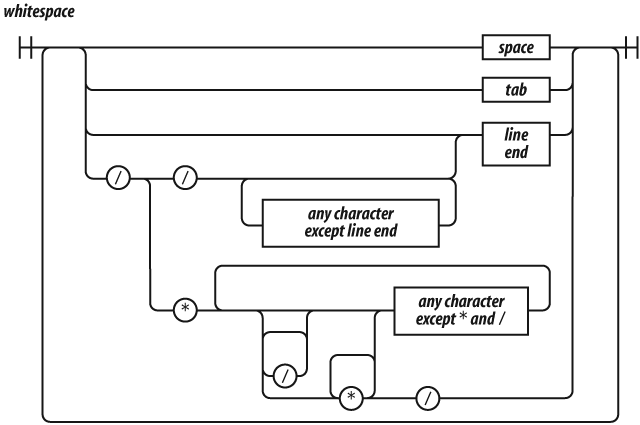
Whitespace can take the form of formatting characters or comments. Whitespace is usually insignificant, but it is occasionally necessary to use whitespace to separate sequences of characters that would otherwise be combined into a single token. For example, in:
var that = this;the space between var and that cannot be
removed, but the other spaces can be removed.
JavaScript offers two forms of comments, block comments formed with
/* */ and line-ending comments starting with
//. Comments should be used liberally to improve the
readability of your programs. Take care that the comments always
accurately describe the code. Obsolete comments are worse than no
comments.
The /* */ form of block comments came from a language
called PL/I. PL/I chose those strange pairs as the symbols for comments
because they were unlikely to occur in that language’s programs, except
perhaps in string literals. In JavaScript, those pairs can also occur in
regular expression literals, so block comments are not safe for
commenting out blocks of code. For example:
/*
    var rm_a = /a*/.match(s);
*/
causes a syntax error. So, it is recommended that
/* */ comments be avoided and
// comments be used instead. In this book, //
will be used exclusively.
A name is a letter optionally followed by one or more letters, digits, or underbars. A name cannot be one of these reserved words:
abstract
boolean break byte
case catch char class const continue
debugger default delete do double
else enum export extends
false final finally float for function
goto
if implements import in instanceof int interface
long
native new null
package private protected public
return
short static super switch synchronized
this throw throws transient true try typeof
var volatile void
while with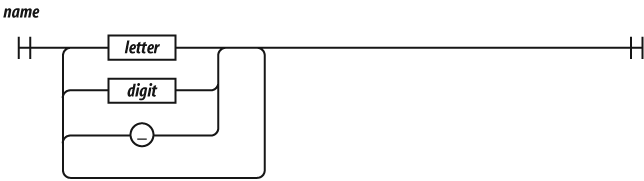
Most of the reserved words in this list are not used in the language.
The list does not include some words that should have been reserved but
were not, such as undefined, NaN, and
Infinity. It is not permitted to name a variable or
parameter with a reserved word. Worse, it is not permitted to use a
reserved word as the name of an object property in an object literal or
following a dot in a refinement.
Names are used for statements, variables, parameters, property names, operators, and labels.

JavaScript has a single number type. Internally, it is represented as
64-bit floating point, the same as Java’s double. Unlike
most other programming languages, there is no separate integer type, so
1 and 1.0 are the same value. This is a
significant convenience because problems of overflow in short integers
are completely avoided, and all you need to know about a number is that
it is a number. A large class of numeric type errors is avoided.



If a number literal has an exponent part, then the value of the
literal is computed by multiplying the part before the e by
10 raised to the power of the part after the
e. So 100 and 1e2 are the same
number.
Negative numbers can be formed by using the - prefix
operator.
The value NaN is a number value that is the result of an
operation that cannot produce a normal result. NaN is not
equal to any value, including itself. You can detect NaN
with the isNaN( number )
function.
The value Infinity represents all values greater than
1.79769313486231570e+308.
Numbers have methods (see Chapter 8). JavaScript has a
Math object that contains a set of methods that act on
numbers. For example, the Math.floor(
number ) method can be used to
convert a number into an integer.
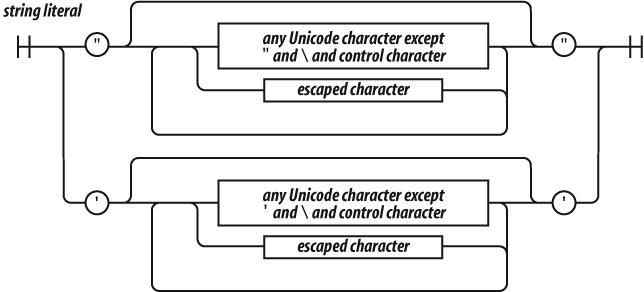
A string literal can be wrapped in single quotes or double quotes. It
can contain zero or more characters. The \ (backslash) is
the escape character. JavaScript was built at a time when Unicode was a
16-bit character set, so all characters in JavaScript are 16 bits
wide.
JavaScript does not have a character type. To represent a character, make a string with just one character in it.
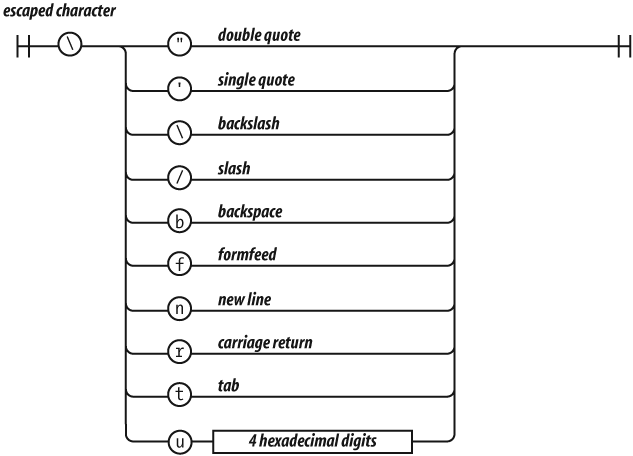
The escape sequences allow for inserting characters into strings that
are not normally permitted, such as backslashes, quotes, and control
characters. The \u convention allows for specifying
character code points numerically.
"A" === "\u0041"Strings have a length property. For example,
"seven".length is 5.
Strings are immutable. Once it is made, a string can never be
changed. But it is easy to make a new string by concatenating other
strings together with the + operator. Two strings
containing exactly the same characters in the same order are considered
to be the same string. So:
'c' + 'a' + 't' === 'cat'is true.
Strings have methods (see Chapter 8):
'cat'.toUpperCase( ) === 'CAT'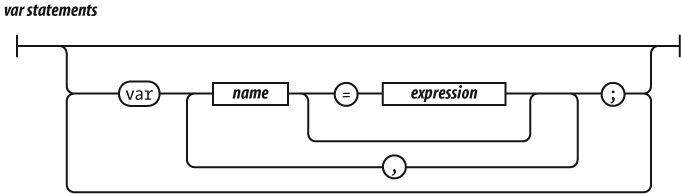
A compilation unit contains a set of executable statements. In web
browsers, each <script> tag delivers a compilation
unit that is compiled and immediately executed. Lacking a linker,
JavaScript throws them all together in a common global namespace. There
is more on global variables in Appendix A.
When used inside of a function, the var statement
defines the function’s private variables.
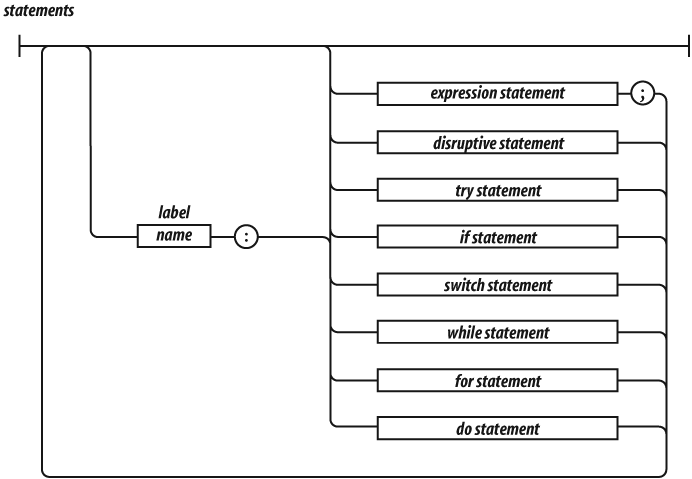
The switch, while, for, and
do statements are allowed to have an optional
label prefix that interacts with the
break statement.
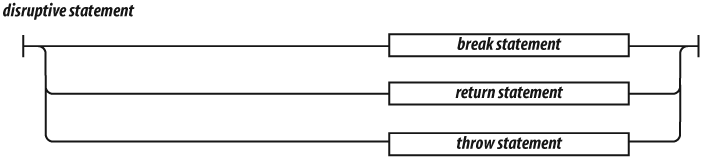
Statements tend to be executed in order from top to bottom. The
sequence of execution can be altered by the conditional statements
(if and switch), by the looping statements
(while, for, and do), by the
disruptive statements (break, return, and
throw), and by function invocation.

A block is a set of statements wrapped in curly braces. Unlike many other languages, blocks in JavaScript do not create a new scope, so variables should be defined at the top of the function, not in blocks.

The if statement changes the flow of the program based
on the value of the expression. The then block is executed if
the expression is truthy; otherwise, the optional
else branch is taken.
Here are the falsy values:
false
null
undefined
The empty string ''
The number 0
The number NaN
All other values are truthy, including true, the string
'false', and all objects.
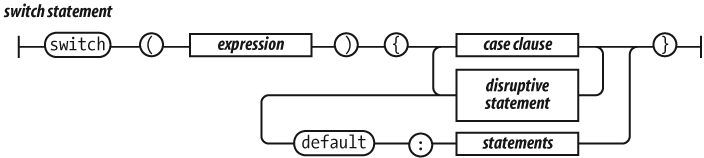
The switch statement performs a multiway branch. It
compares the expression for equality with all of the specified cases.
The expression can produce a number or a string. When an exact match is
found, the statements of the matching case clause are executed. If there
is no match, the optional default statements are
executed.

A case clause contains one or more case expressions. The
case expressions need not be constants. The statement following a clause
should be a disruptive statement to prevent fall through into the next
case. The break statement can be used to exit
from a switch.

The while statement performs a simple loop. If the
expression is falsy, then the loop will break. While the expression is
truthy, the block will be executed.
The for statement is a more complicated looping
statement. It comes in two forms.
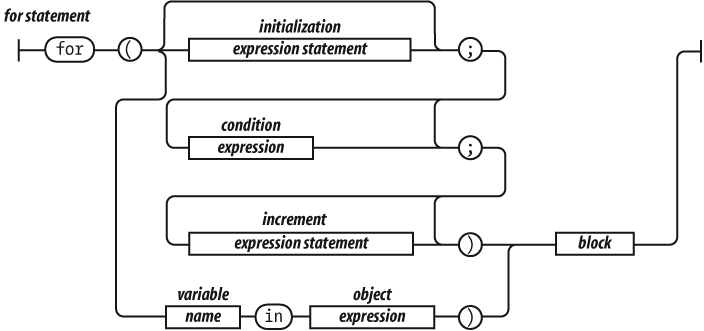
The conventional form is controlled by three optional clauses: the
initialization, the condition, and the
increment. First, the initialization is done, which typically
initializes the loop variable. Then, the condition is
evaluated. Typically, this tests the loop variable against a completion
criterion. If the condition is omitted, then a
condition of true is assumed. If the
condition is falsy, the loop breaks. Otherwise, the block is
executed, then the increment executes, and then the loop
repeats with the condition.
The other form (called for in) enumerates the property
names (or keys) of an object. On each iteration, another property name
string from the object is assigned to the
variable.
It is usually necessary to test
object.hasOwnProperty(variable)
to determine whether the property name is truly a member of the object
or was found instead on the prototype chain.
for (myvar in obj) {
    if (obj.hasOwnProperty(myvar)) {
        ...
    }
}
The do statement is like the while
statement except that the expression is tested after the block is
executed instead of before. That means that the block will always be
executed at least once.

The try statement executes a block and catches any
exceptions that were thrown by the block. The catch clause
defines a new variable that will receive the exception
object.

The throw statement raises an exception. If the
throw statement is in a try block, then
control goes to the catch clause. Otherwise, the function
invocation is abandoned, and control goes to the catch
clause of the try in the calling function.
The expression is usually an object literal containing a
name property and a message property. The
catcher of the exception can use that information to determine what to
do.

The return statement causes the early return from a
function. It can also specify the value to be returned. If a return
expression is not specified, then the return value will be
undefined.
JavaScript does not allow a line end between the return and the expression.

The break statement causes the exit from a loop
statement or a switch statement. It can optionally have a
label that will cause an exit from the labeled statement.
JavaScript does not allow a line end between the break and the label.
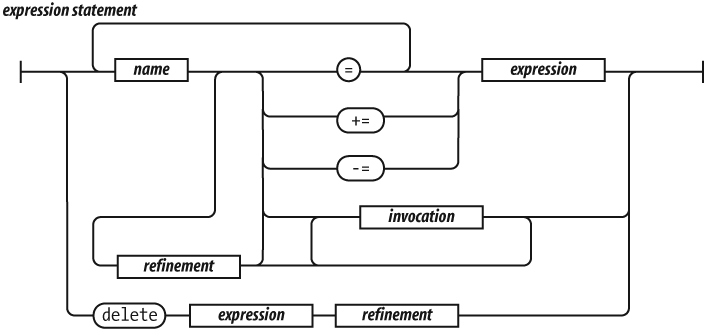
An expression statement can either assign values to one
or more variables or members, invoke a method, delete a property from an
object. The = operator is used for assignment. Do not
confuse it with the === equality operator. The
+= operator can add or concatenate.
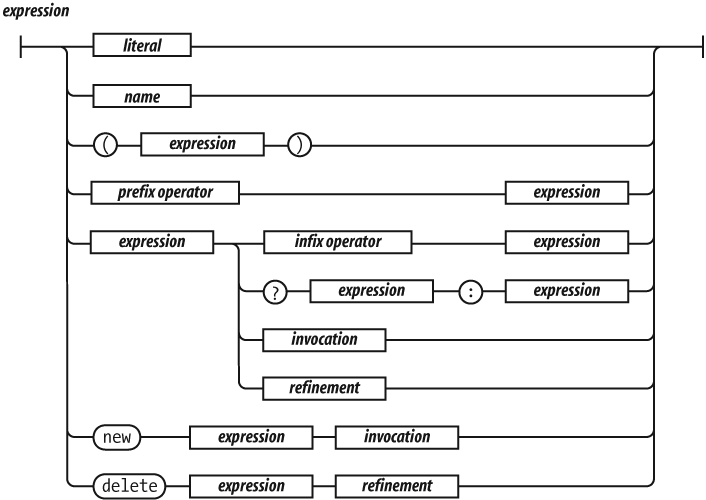
The simplest expressions are a literal value (such as a string or
number), a variable, a built-in value (true,
false, null, undefined,
NaN, or Infinity), an invocation expression
preceded by new, a refinement expression preceded by
delete, an expression wrapped in parentheses, an expression
preceded by a prefix operator, or an expression followed by:
An infix operator and another expression
The ? ternary operator followed by another
expression, then by :, and then by yet another
expression
An invocation
A refinement
The ? ternary operator takes three operands. If the
first operand is truthy, it produces the value of the second operand.
But if the first operand is falsy, it produces the value of the third
operand.
The operators at the top of the operator precedence list in Table 2-1 have higher precedence. They bind the tightest. The operators at the bottom have the lowest precedence. Parentheses can be used to alter the normal precedence, so:
2 + 3 * 5 === 17
(2 + 3) * 5 === 25
Table 2-1. Operator precedence
. [] ( ) |
Refinement and invocation |
delete new typeof + - ! |
Unary operators |
* / % |
Multiplication, division, remainder |
+ - |
Addition/concatenation, subtraction |
>= <= > < |
Inequality |
=== !== |
Equality |
&& |
Logical and |
\|\| |
Logical or |
?: |
Ternary |
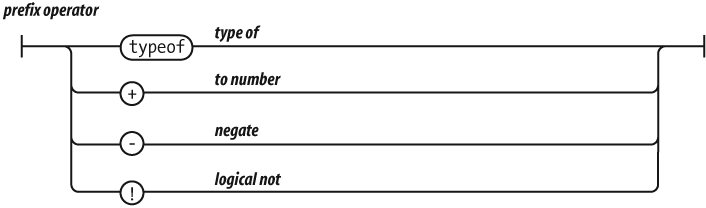
The values produced by typeof are 'number',
'string', 'boolean', 'undefined',
'function', and 'object'. If the operand is an
array or null, then the result is 'object',
which is wrong. There will be more about typeof in Chapter 6 and Appendix A.
If the operand of ! is truthy, it produces
false. Otherwise, it produces true.
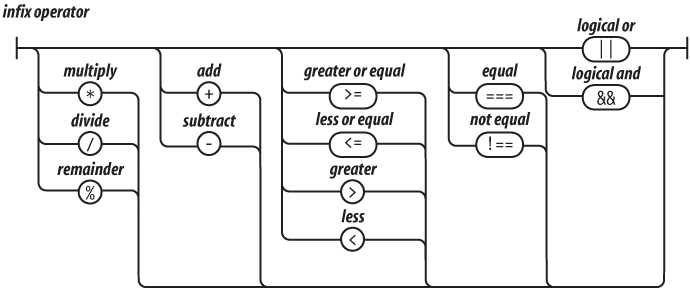
The + operator adds or concatenates. If you want it to
add, make sure both operands are numbers.
The / operator can produce a noninteger result even if
both operands are integers.
The && operator produces the value of its first
operand if the first operand is falsy. Otherwise, it produces the value
of the second operand.
The || operator produces the value of its first operand
if the first operand is truthy. Otherwise, it produces the value of the
second operand.

Invocation causes the execution of a function value. The invocation operator is a pair of parentheses that follow the function value. The parentheses can contain arguments that will be delivered to the function. There will be much more about functions in Chapter 4.

A refinement is used to specify a property or element of an object or array. This will be described in detail in the next chapter.
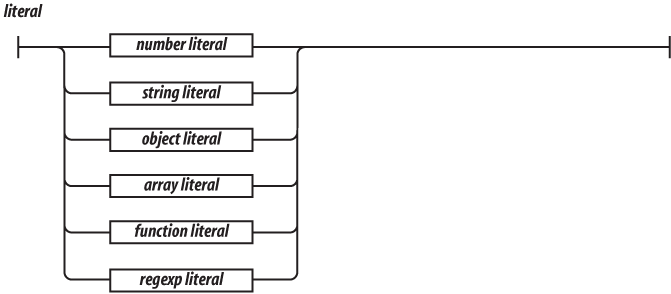
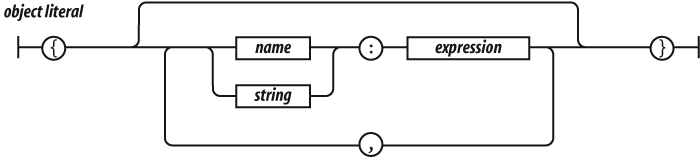
Object literals are a convenient notation for specifying new objects. The names of the properties can be specified as names or as strings. The names are treated as literal names, not as variable names, so the names of the properties of the object must be known at compile time. The values of the properties are expressions. There will be more about object literals in the next chapter.

Array literals are a convenient notation for specifying new arrays. There will be more about array literals in Chapter 6.

There will be more about regular expressions in Chapter 7.



A function literal defines a function value. It can have an optional name that it can use to call itself recursively. It can specify a list of parameters that will act as variables initialized by the invocation arguments. The body of the function includes variable definitions and statements. There will be more about functions in Chapter 4.
Upon a homely object Love can wink.
—William Shakespeare, The Two Gentlemen of Verona
The simple types of JavaScript are numbers, strings, booleans
(true and false), null, and
undefined. All other values are objects. Numbers,
strings, and booleans are object-like in that they have methods, but
they are immutable. Objects in JavaScript are mutable keyed collections.
In JavaScript, arrays are objects, functions are objects, regular
expressions are objects, and, of course, objects are objects.
An object is a container of properties, where a property has a name
and a value. A property name can be any string, including the empty
string. A property value can be any JavaScript value except for
undefined.
Objects in JavaScript are class-free. There is no constraint on the names of new properties or on the values of properties. Objects are useful for collecting and organizing data. Objects can contain other objects, so they can easily represent tree or graph structures.
JavaScript includes a prototype linkage feature that allows one object to inherit the properties of another. When used well, this can reduce object initialization time and memory consumption.
Object literals provide a very convenient notation for creating new object values. An object literal is a pair of curly braces surrounding zero or more name/value pairs. An object literal can appear anywhere an expression can appear:
var empty_object = {};

var stooge = {
    "first-name": "Jerome",
    "last-name": "Howard"
};
A property’s name can be any string, including the empty string. The
quotes around a property’s name in an object literal are optional if the
name would be a legal JavaScript name and not a reserved word. So quotes
are required around "first-name", but are optional around
first_name. Commas are used to separate the pairs.
A property’s value can be obtained from any expression, including another object literal. Objects can nest:
var flight = {
    airline: "Oceanic",
    number: 815,
    departure: {
        IATA: "SYD",
        time: "2004-09-22 14:55",
        city: "Sydney"
    },
    arrival: {
        IATA: "LAX",
        time: "2004-09-23 10:42",
        city: "Los Angeles"
    }
};
Values can be retrieved from an object by wrapping a string
expression in a [ ] suffix. If the string expression is a
string literal, and if it is a legal JavaScript name and not a reserved
word, then the . notation can be used instead. The
. notation is preferred because it is more compact and it
reads better:
stooge["first-name"]     // "Jerome"
flight.departure.IATA    // "SYD"
The undefined value is produced if an attempt is made to
retrieve a nonexistent member:
stooge["middle-name"]    // undefined
flight.status            // undefined
stooge["FIRST-NAME"]     // undefined
The || operator can be used to fill in default
values:
var middle = stooge["middle-name"] || "(none)";
var status = flight.status || "unknown";
Attempting to retrieve values from undefined will throw
a TypeError exception. This can be guarded against with the
&& operator:
flight.equipment                              // undefined
flight.equipment.model                        // throw "TypeError"
flight.equipment && flight.equipment.model    // undefined
A value in an object can be updated by assignment. If the property name already exists in the object, the property value is replaced:
stooge['first-name'] = 'Jerome';If the object does not already have that property name, the object is augmented:
stooge['middle-name'] = 'Lester';
stooge.nickname = 'Curly';
flight.equipment = {
    model: 'Boeing 777'
};
flight.status = 'overdue';
Objects are passed around by reference. They are never copied:
var x = stooge;
x.nickname = 'Curly';
var nick = stooge.nickname;
    // nick is 'Curly' because x and stooge
    // are references to the same object

var a = {}, b = {}, c = {};
    // a, b, and c each refer to a
    // different empty object
a = b = c = {};
    // a, b, and c all refer to
    // the same empty object
Every object is linked to a prototype object from which it can
inherit properties. All objects created from object literals are linked
to Object.prototype, an object that comes standard with
JavaScript.
When you make a new object, you can select the object that should be
its prototype. The mechanism that JavaScript provides to do this is
messy and complex, but it can be significantly simplified. We will add a
create method to the Object function. The
beget method creates a new object that uses an old object
as its prototype. There will be much more about functions in the next
chapter.
if (typeof Object.create !== 'function') {
     Object.create = function (o) {
         var F = function () {};
         F.prototype = o;
         return new F();
     };
}
var another_stooge = Object.create(stooge);
The prototype link has no effect on updating. When we make changes to an object, the object’s prototype is not touched:
another_stooge['first-name'] = 'Harry';
another_stooge['middle-name'] = 'Moses';
another_stooge.nickname = 'Moe';
The prototype link is used only in retrieval. If we try to retrieve a
property value from an object, and if the object lacks the property
name, then JavaScript attempts to retrieve the property value from the
prototype object. And if that object is lacking the property, then it
goes to its prototype, and so on until the process finally
bottoms out with Object.prototype. If the desired property
exists nowhere in the prototype chain, then the result is the
undefined value. This is called delegation.
The prototype relationship is a dynamic relationship. If we add a new property to a prototype, that property will immediately be visible in all of the objects that are based on that prototype:
stooge.profession = 'actor';
another_stooge.profession    // 'actor'
We will see more about the prototype chain in Chapter 6.
It is easy to inspect an object to determine what properties it has
by attempting to retrieve the properties and examining the values
obtained. The typeof operator can be very helpful in
determining the type of a property:
typeof flight.number      // 'number'
typeof flight.status      // 'string'
typeof flight.arrival     // 'object'
typeof flight.manifest    // 'undefined'
Some care must be taken because any property on the prototype chain can produce a value:
typeof flight.toString    // 'function'
typeof flight.constructor // 'function'
There are two approaches to dealing with these undesired properties. The first is to have your program look for and reject function values. Generally, when you are reflecting, you are interested in data, and so you should be aware that some values could be functions.
The other approach is to use the hasOwnProperty method,
which returns true if the object has a particular property.
The hasOwnProperty method does not look at the prototype
chain:
flight.hasOwnProperty('number')         // true
flight.hasOwnProperty('constructor')    // false
The for in statement can loop over all of the property
names in an object. The enumeration will include all of the
properties—including functions and prototype properties that you might
not be interested in—so it is necessary to filter out the values you
don’t want. The most common filters are the hasOwnProperty
method and using typeof to exclude functions:
var name;
for (name in another_stooge) {
    if (typeof another_stooge[name] !== 'function') {
        document.writeln(name + ': ' + another_stooge[name]);
    }
}
There is no guarantee on the order of the names, so be prepared for
the names to appear in any order. If you want to assure that the
properties appear in a particular order, it is best to avoid the
for in statement entirely and instead make an array
containing the names of the properties in the correct order:
var i;
var properties = [
    'first-name',
    'middle-name',
    'last-name',
    'profession'
];
for (i = 0; i < properties.length; i += 1) {
    document.writeln(properties[i] + ': ' +
            another_stooge[properties[i]]);
    }
By using for instead of for in, we were
able to get the properties we wanted without worrying about what might
be dredged up from the prototype chain, and we got them in the correct
order.
The delete operator can be used to remove a property
from an object. It will remove a property from the object if it has one.
It will not touch any of the objects in the prototype linkage.
Removing a property from an object may allow a property from the prototype linkage to shine through:
another_stooge.nickname    // 'Moe'

// Remove nickname from another_stooge, revealing
// the nickname of the prototype.

delete another_stooge.nickname;

another_stooge.nickname    // 'Curly'
JavaScript makes it easy to define global variables that can hold all of the assets of your application. Unfortunately, global variables weaken the resiliency of programs and should be avoided.
One way to minimize the use of global variables is to create a single global variable for your application:
var MYAPP = {};That variable then becomes the container for your application:
MYAPP.stooge = {
    "first-name": "Joe",
    "last-name": "Howard"
};

MYAPP.flight = {
    airline: "Oceanic",
    number: 815,
    departure: {
        IATA: "SYD",
        time: "2004-09-22 14:55",
        city: "Sydney"
    },
    arrival: {
        IATA: "LAX",
        time: "2004-09-23 10:42",
        city: "Los Angeles"
    }
};
By reducing your global footprint to a single name, you significantly
reduce the chance of bad interactions with other applications, widgets,
or libraries. Your program also becomes easier to read because it is
obvious that MYAPP.stooge refers to a top-level structure.
In the next chapter, we will see ways to use closure for information
hiding, which is another effective global abatement technique.
Why, every fault’s condemn’d ere it be done: Mine were the very cipher of a function. . .
—William Shakespeare, Measure for Measure
The best thing about JavaScript is its implementation of functions. It got almost everything right. But, as you should expect with JavaScript, it didn’t get everything right.
A function encloses a set of statements. Functions are the fundamental modular unit of JavaScript. They are used for code reuse, information hiding, and composition. Functions are used to specify the behavior of objects. Generally, the craft of programming is the factoring of a set of requirements into a set of functions and data structures.
Functions in JavaScript are objects. Objects are collections of
name/value pairs having a hidden link to a prototype object. Objects
produced from object literals are linked to
Object.prototype. Function objects are linked to
Function.prototype (which is itself linked to
Object.prototype). Every function is also created with two
additional hidden properties: the function’s context and the code that
implements the function’s behavior.
Every function object is also created with a prototype
property. Its value is an object with a constructor
property whose value is the function. This is distinct from the hidden
link to Function.prototype. The meaning of this convoluted
construction will be revealed in the next chapter.
Since functions are objects, they can be used like any other value. Functions can be stored in variables, objects, and arrays. Functions can be passed as arguments to functions, and functions can be returned from functions. Also, since functions are objects, functions can have methods.
The thing that is special about functions is that they can be invoked.
Function objects are created with function literals:
// Create a variable called add and store a function
// in it that adds two numbers.

var add = function (a, b) {
    return a + b;
};
A function literal has four parts. The first part is the reserved
word function.
The optional second part is the function’s name. The function can use its name to call itself recursively. The name can also be used by debuggers and development tools to identify the function. If a function is not given a name, as shown in the previous example, it is said to be anonymous.
The third part is the set of parameters of the function, wrapped in
parentheses. Within the parentheses is a set of zero or more parameter
names, separated by commas. These names will be defined as variables in
the function. Unlike ordinary variables, instead of being initialized to
undefined, they will be initialized to the arguments
supplied when the function is invoked.
The fourth part is a set of statements wrapped in curly braces. These statements are the body of the function. They are executed when the function is invoked.
A function literal can appear anywhere that an expression can appear. Functions can be defined inside of other functions. An inner function of course has access to its parameters and variables. An inner function also enjoys access to the parameters and variables of the functions it is nested within. The function object created by a function literal contains a link to that outer context. This is called closure. This is the source of enormous expressive power.
Invoking a function suspends the execution of the current function,
passing control and parameters to the new function. In addition to the
declared parameters, every function receives two additional parameters:
this and arguments. The this
parameter is very important in object oriented programming, and its
value is determined by the invocation pattern. There are four
patterns of invocation in JavaScript: the method invocation pattern, the
function invocation pattern, the constructor invocation pattern, and the
apply invocation pattern. The patterns differ in how the bonus parameter
this is initialized.
The invocation operator is a pair of parentheses that follow any
expression that produces a function value. The parentheses can contain
zero or more expressions, separated by commas. Each expression produces
one argument value. Each of the argument values will be assigned to the
function’s parameter names. There is no runtime error when the number of
arguments and the number of parameters do not match. If there are too
many argument values, the extra argument values will be ignored. If
there are too few argument values, the undefined value will
be substituted for the missing values. There is no type checking on the
argument values: any type of value can be passed to any parameter.
When a function is stored as a property of an object, we call it a
method. When a method is invoked, this is bound to
that object. If an invocation expression contains a refinement (that is,
a . dot expression or
[subscript] expression),
it is invoked as a method:
// Create myObject. It has a value and an increment
// method. The increment method takes an optional
// parameter. If the argument is not a number, then 1
// is used as the default.

var myObject = {
    value: 0,
    increment: function (inc) {
        this.value += typeof inc === 'number' ? inc : 1;
    }
};

myObject.increment(  );
document.writeln(myObject.value);    // 1

myObject.increment(2);
document.writeln(myObject.value);    // 3
A method can use this to access the object so that it
can retrieve values from the object or modify the object. The binding of
this to the object happens at invocation time. This very
late binding makes functions that use this highly reusable.
Methods that get their object context from this are called
public methods.
When a function is not the property of an object, then it is invoked as a function:
var sum = add(3, 4); // sum is 7When a function is invoked with this pattern, this is
bound to the global object. This was a mistake in the design of the
language. Had the language been designed correctly, when the inner
function is invoked, this would still be bound to the
this variable of the outer function. A consequence of this
error is that a method cannot employ an inner function to help it do its
work because the inner function does not share the method’s access to
the object as its this is bound to the wrong value.
Fortunately, there is an easy workaround. If the method defines a
variable and assigns it the value of this, the inner
function will have access to this through that variable. By
convention, the name of that variable is that:
// Augment myObject with a double method.

myObject.double = function (  ) {
    var that = this;    // Workaround.

    var helper = function (  ) {
        that.value = add(that.value, that.value);
    };

    helper(  );    // Invoke helper as a function.
};

// Invoke double as a method.

myObject.double(  );
document.writeln(myObject.value);JavaScript is a prototypal inheritance language. That means that objects can inherit properties directly from other objects. The language is class-free.
This is a radical departure from the current fashion. Most languages today are classical. Prototypal inheritance is powerfully expressive, but is not widely understood. JavaScript itself is not confident in its prototypal nature, so it offers an object-making syntax that is reminiscent of the classical languages. Few classical programmers found prototypal inheritance to be acceptable, and classically inspired syntax obscures the language’s true prototypal nature. It is the worst of both worlds.
If a function is invoked with the new prefix, then a new
object will be created with a hidden link to the value of the function’s
prototype member, and this will be bound to
that new object.
The new prefix also changes the behavior of the
return statement. We will see more about that next.
// Create a constructor function called Quo.
// It makes an object with a status property.

var Quo = function (string) {
    this.status = string;
};

// Give all instances of Quo a public method
// called get_status.

Quo.prototype.get_status = function (  ) {
    return this.status;
};

// Make an instance of Quo.

var myQuo = new Quo("confused");

document.writeln(myQuo.get_status(  ));  // confused
Functions that are intended to be used with the new
prefix are called constructors. By convention, they are kept in
variables with a capitalized name. If a constructor is called without
the new prefix, very bad things can happen without a
compile-time or runtime warning, so the capitalization convention is
really important.
Use of this style of constructor functions is not recommended. We will see better alternatives in the next chapter.
Because JavaScript is a functional object-oriented language, functions can have methods.
The apply method lets us construct an array of arguments
to use to invoke a function. It also lets us choose the value of
this. The apply method takes two parameters.
The first is the value that should be bound to this. The
second is an array of parameters.
// Make an array of 2 numbers and add them.

var array = [3, 4];
var sum = add.apply(null, array);    // sum is 7

// Make an object with a status member.

var statusObject = {
    status: 'A-OK'
};

// statusObject does not inherit from Quo.prototype,
// but we can invoke the get_status method on
// statusObject even though statusObject does not have
// a get_status method.

var status = Quo.prototype.get_status.apply(statusObject);
    // status is 'A-OK'
A bonus parameter that is available to functions when they are
invoked is the arguments array. It gives the function
access to all of the arguments that were supplied with the invocation,
including excess arguments that were not assigned to parameters. This
makes it possible to write functions that take an unspecified number of
parameters:
// Make a function that adds a lot of stuff.

// Note that defining the variable sum inside of
// the function does not interfere with the sum
// defined outside of the function. The function
// only sees the inner one.

var sum = function (  ) {
    var i, sum = 0;
    for (i = 0; i < arguments.length; i += 1) {
        sum += arguments[i];
    }
    return sum;
};

document.writeln(sum(4, 8, 15, 16, 23, 42)); // 108
This is not a particularly useful pattern. In Chapter 6, we will see how we can add a similar method to an array.
Because of a design error, arguments is not really an
array. It is an array-like object. arguments has a
length property, but it lacks all of the array methods. We
will see a consequence of that design error at the end of this
chapter.
When a function is invoked, it begins execution with the first
statement, and ends when it hits the } that closes the
function body. That causes the function to return control to the part of
the program that invoked the function.
The return statement can be used to cause the function
to return early. When return is executed, the function
returns immediately without executing the remaining statements.
A function always returns a value. If the return value
is not specified, then undefined is returned.
If the function was invoked with the new prefix and the
return value is not an object, then this (the
new object) is returned instead.
JavaScript provides an exception handling mechanism. Exceptions are unusual (but not completely unexpected) mishaps that interfere with the normal flow of a program. When such a mishap is detected, your program should throw an exception:
var add = function (a, b) {
    if (typeof a !== 'number' || typeof b !== 'number') {
        throw {
            name: 'TypeError',
            message: 'add needs numbers'
        };
    }
    return a + b;
}
The throw statement interrupts execution of the
function. It should be given an exception object containing
a name property that identifies the type of the exception,
and a descriptive message property. You can also add other
properties.
The exception object will be delivered to the
catch clause of a try statement:
// Make a try_it function that calls the new add
// function incorrectly.

var try_it = function (  ) {
    try {
        add("seven");
    } catch (e) {
        document.writeln(e.name + ': ' + e.message);
    }
}

try_it(  );
If an exception is thrown within a try block, control
will go to its catch clause.
A try statement has a single catch block
that will catch all exceptions. If your handling depends on the type of
the exception, then the exception handler will have to inspect the
name to determine the type of the exception.
JavaScript allows the basic types of the language to be
augmented. In Chapter 3, we saw that adding a method to
Object.prototype makes that method available to all
objects. This also works for functions, arrays, strings, numbers,
regular expressions, and booleans.
For example, by augmenting Function.prototype, we can
make a method available to all functions:
Function.prototype.method = function (name, func) {
    this.prototype[name] = func;
    return this;
};
By augmenting Function.prototype with a
method method, we no longer have to type the name of the
prototype property. That bit of ugliness can now be
hidden.
JavaScript does not have a separate integer type, so it is sometimes
necessary to extract just the integer part of a number. The method
JavaScript provides to do that is ugly. We can fix it by adding an
integer method to Number.prototype. It uses
either Math.ceil or Math.floor, depending on
the sign of the number:
Number.method('integer', function (  ) {
    return Math[this < 0 ? 'ceil' : 'floor'](this);
});

document.writeln((-10 / 3).integer(  ));  // −3
JavaScript lacks a method that removes spaces from the ends of a string. That is an easy oversight to fix:
String.method('trim', function (  ) {
    return this.replace(/^\s+|\s+$/g, '');
});

document.writeln('"' + "   neat   ".trim(  ) + '"');
Our trim method uses a regular expression. We will see
much more about regular expressions in Chapter 7.
By augmenting the basic types, we can make significant improvements to the expressiveness of the language. Because of the dynamic nature of JavaScript’s prototypal inheritance, all values are immediately endowed with the new methods, even values that were created before the methods were created.
The prototypes of the basic types are public structures, so care must be taken when mixing libraries. One defensive technique is to add a method only if the method is known to be missing:
// Add a method conditionally.

Function.prototype.method = function (name, func) {
    if (!this.prototype[name]) {
        this.prototype[name] = func;
        return this;
    }
};
Another concern is that the for in statement interacts
badly with prototypes. We saw a couple of ways to mitigate that in Chapter 3: we can use
the hasOwnProperty method to screen out inherited
properties, and we can look for specific types.
A recursive function is a function that calls itself, either directly or indirectly. Recursion is a powerful programming technique in which a problem is divided into a set of similar subproblems, each solved with a trivial solution. Generally, a recursive function calls itself to solve its subproblems.
The Towers of Hanoi is a famous puzzle. The equipment includes three posts and a set of discs of various diameters with holes in their centers. The setup stacks all of the discs on the source post with smaller discs on top of larger discs. The goal is to move the stack to the destination post by moving one disc at a time to another post, never placing a larger disc on a smaller disc. This puzzle has a trivial recursive solution:
var hanoi = function hanoi(disc, src, aux, dst) {
    if (disc > 0) {
        hanoi(disc − 1, src, dst, aux);
        document.writeln('Move disc ' + disc +
                ' from ' + src + ' to ' + dst);
        hanoi(disc − 1, aux, src, dst);
    }
};

hanoi(3, 'Src', 'Aux', 'Dst');
It produces this solution for three discs:
Move disc 1 from Src to Dst
Move disc 2 from Src to Aux
Move disc 1 from Dst to Aux
Move disc 3 from Src to Dst
Move disc 1 from Aux to Src
Move disc 2 from Aux to Dst
Move disc 1 from Src to Dst
The hanoi function moves a stack of discs from one post
to another, using the auxiliary post if necessary. It breaks the problem
into three subproblems. First, it uncovers the bottom disc by moving the
substack above it to the auxiliary post. It can then move the bottom
disc to the destination post. Finally, it can move the substack from the
auxiliary post to the destination post. The movement of the substack is
handled by calling itself recursively to work out those subproblems.
The hanoi function is passed the number of the disc it
is to move and the three posts it is to use. When it calls itself, it is
to deal with the disc that is above the disc it is currently working on.
Eventually, it will be called with a nonexistent disc number. In that
case, it does nothing. That act of nothingness gives us confidence that
the function does not recurse forever.
Recursive functions can be very effective in manipulating tree structures such as the browser’s Document Object Model (DOM). Each recursive call is given a smaller piece of the tree to work on:
// Define a walk_the_DOM function that visits every
// node of the tree in HTML source order, starting
// from some given node. It invokes a function,
// passing it each node in turn. walk_the_DOM calls
// itself to process each of the child nodes.

var walk_the_DOM = function walk(node, func) {
    func(node);
    node = node.firstChild;
    while (node) {
        walk(node, func);
        node = node.nextSibling;
    }
};

// Define a getElementsByAttribute function. It
// takes an attribute name string and an optional
// matching value. It calls walk_the_DOM, passing it a
// function that looks for an attribute name in the
// node. The matching nodes are accumulated in a
// results array.

var getElementsByAttribute = function (att, value) {
    var results = [];

    walk_the_DOM(document.body, function (node) {
        var actual = node.nodeType === 1 && node.getAttribute(att);
        if (typeof actual === 'string' &&
                (actual === value || typeof value !== 'string')) {
            results.push(node);
        }
    });

    return results;
};
Some languages offer the tail recursion optimization. This means that if a function returns the result of invoking itself recursively, then the invocation is replaced with a loop, which can significantly speed things up. Unfortunately, JavaScript does not currently provide tail recursion optimization. Functions that recurse very deeply can fail by exhausting the return stack:
// Make a factorial function with tail
// recursion. It is tail recursive because
// it returns the result of calling itself.

// JavaScript does not currently optimize this form.

var factorial = function factorial(i, a) {
    a = a || 1;
    if (i < 2) {
        return a;
    }
    return factorial(i − 1, a * i);
};

document.writeln(factorial(4));    // 24
Scope in a programming language controls the visibility and lifetimes of variables and parameters. This is an important service to the programmer because it reduces naming collisions and provides automatic memory management:
var foo = function (  ) {
    var a = 3, b = 5;

    var bar = function (  ) {
        var b = 7, c = 11;

// At this point, a is 3, b is 7, and c is 11

        a += b + c;

// At this point, a is 21, b is 7, and c is 11

    };

// At this point, a is 3, b is 5, and c is not defined

    bar(  );

// At this point, a is 21, b is 5

};
Most languages with C syntax have block scope. All variables defined in a block (a list of statements wrapped with curly braces) are not visible from outside of the block. The variables defined in a block can be released when execution of the block is finished. This is a good thing.
Unfortunately, JavaScript does not have block scope even though its block syntax suggests that it does. This confusion can be a source of errors.
JavaScript does have function scope. That means that the parameters and variables defined in a function are not visible outside of the function, and that a variable defined anywhere within a function is visible everywhere within the function.
In many modern languages, it is recommended that variables be declared as late as possible, at the first point of use. That turns out to be bad advice for JavaScript because it lacks block scope. So instead, it is best to declare all of the variables used in a function at the top of the function body.
The good news about scope is that inner functions get access to the
parameters and variables of the functions they are defined within (with
the exception of this and arguments). This is
a very good thing.
Our getElementsByAttribute function worked because it
declared a results variable, and the inner function that it
passed to walk_the_DOM also had access to the
results variable.
A more interesting case is when the inner function has a longer lifetime than its outer function.
Earlier, we made a myObject that had a
value and an increment method. Suppose we
wanted to protect the value from unauthorized changes.
Instead of initializing myObject with an object literal,
we will initialize myObject by calling a function that
returns an object literal. That function defines a value
variable. That variable is always available to the
increment and getValue methods, but the
function’s scope keeps it hidden from the rest of the program:
var myObject = (function () {
    var value = 0;

    return {
        increment: function (inc) {
            value += typeof inc === 'number' ? inc : 1;
        },
        getValue: function (  ) {
            return value;
        }
    };
}());
We are not assigning a function to myObject. We are
assigning the result of invoking that function. Notice the
( ) on the last line. The function returns an object
containing two methods, and those methods continue to enjoy the
privilege of access to the value variable.
The Quo constructor from earlier in this chapter
produced an object with a status property and a
get_status method. But that doesn’t seem very interesting.
Why would you call a getter method on a property you could access
directly? It would be more useful if the status property
were private. So, let’s define a different kind of quo
function to do that:
// Create a maker function called quo. It makes an
// object with a get_status method and a private
// status property.

var quo = function (status) {
    return {
        get_status: function (  ) {
            return status;
        }
    };
};

// Make an instance of quo.

var myQuo = quo("amazed");

document.writeln(myQuo.get_status(  ));
This quo function is designed to be used without the
new prefix, so the name is not capitalized. When we call
quo, it returns a new object containing a
get_status method. A reference to that object is stored in
myQuo. The get_status method still has
privileged access to quo’s status property
even though quo has already returned.
get_status does not have access to a copy of the parameter;
it has access to the parameter itself. This is possible because the
function has access to the context in which it was created. This is
called closure.
Let’s look at a more useful example:
// Define a function that sets a DOM node's color
// to yellow and then fades it to white.

var fade = function (node) {
    var level = 1;
    var step = function (  ) {
        var hex = level.toString(16);
        node.style.backgroundColor = '#FFFF' + hex + hex;
        if (level < 15) {
            level += 1;
            setTimeout(step, 100);
        }
    };
    setTimeout(step, 100);
};

fade(document.body);
We call fade, passing it document.body (the
node created by the HTML <body> tag).
fade sets level to 1. It defines a
step function. It calls setTimeout, passing it
the step function and a time (100 milliseconds). It then
returns—fade has finished.
Suddenly, about a 10th of a second later, the step
function gets invoked. It makes a base 16 character from
fade’s level. It then modifies the background
color of fade’s node. It then looks at fade’s
level. If it hasn’t gotten to white yet, it then increments
fade’s level and uses setTimeout
to schedule itself to run again.
Suddenly, the step function gets invoked again. But this
time, fade ’s level is 2. fade
returned a while ago, but its variables continue to live as long as they
are needed by one or more of fade’s inner functions.
It is important to understand that the inner function has access to the actual variables of the outer functions and not copies in order to avoid the following problem.
// BAD EXAMPLE

// Make a function that assigns event handler functions to an array
 of nodes the wrong way.
// When you click on a node, an alert box is supposed to display the ordinal
of the node.
// But it always displays the number of nodes instead.

var add_the_handlers = function (nodes) {
    var i;
    for (i = 0; i < nodes.length; i += 1) {
        nodes[i].onclick = function (e) {
            alert(i);
        };
    }
};

// END BAD EXAMPLE
The add_the_handlers function was intended to give each
handler a unique number i. It fails because the handler
functions are bound to the variable i, not the value of the
variable i at the time the function was made.
// BETTER EXAMPLE

// Make a function that assigns event handler functions to an array of nodes.
// When you click on a node, an alert box will display the ordinal of the node.

var add_the_handlers = function (nodes) {
    var helper = function (i) {
       return function (e) {
          alert(i);
       };
    };
    var i;
    for (i = 0; i < nodes.length; i += 1) {
        modes[i].onclick = helper(i);
    }
};
Avoid creating functions within a loop. It can be wasteful
computationally,and it can cause confusion, as we saw with the bad
example. We avoid the confusion by creating a helper function outside of
the loop that will deliver a function that binds to the current value of
i.
Functions can make it easier to deal with discontinuous events. For example, suppose there is a sequence that begins with a user interaction, making a request of the server, and finally displaying the server’s response. The naïve way to write that would be:
request = prepare_the_request(  );
response = send_request_synchronously(request);
display(response);
The problem with this approach is that a synchronous request over the network will leave the client in a frozen state. If either the network or the server is slow, the degradation in responsiveness will be unacceptable.
A better approach is to make an asynchronous request, providing a callback function that will be invoked when the server’s response is received. An asynchronous function returns immediately, so the client isn’t blocked:
request = prepare_the_request(  );
send_request_asynchronously(request, function (response) {
    display(response);
    });
We pass a function parameter to the
send_request_asynchronously function that will be called
when the response is available.
We can use functions and closure to make modules. A module is a function or object that presents an interface but that hides its state and implementation. By using functions to produce modules, we can almost completely eliminate our use of global variables, thereby mitigating one of JavaScript’s worst features.
For example, suppose we want to augment String with a
deentityify method. Its job is to look for HTML entities in
a string and replace them with their equivalents. It makes sense to keep
the names of the entities and their equivalents in an object. But where
should we keep the object? We could put it in a global variable, but
global variables are evil. We could define it in the function itself,
but that has a runtime cost because the literal must be evaluated every
time the function is invoked. The ideal approach is to put it in a
closure, and perhaps provide an extra method that can add additional
entities:
String.method('deentityify', function (  ) {

// The entity table. It maps entity names to
// characters.

    var entity = {
        quot: '"',
        lt:   '<',
        gt:   '>'
    };

// Return the deentityify method.

    return function (  ) {

// This is the deentityify method. It calls the string
// replace method, looking for substrings that start
// with '&' and end with ';'. If the characters in
// between are in the entity table, then replace the
// entity with the character from the table. It uses
// a regular expression (Chapter 7).

        return this.replace(/&([^&;]+);/g,
            function (a, b) {
                var r = entity[b];
                return typeof r === 'string' ? r : a;
            }
        );
    };
}(  ));
Notice the last line. We immediately invoke the function we just made
with the ( ) operator. That invocation creates and returns
the function that becomes the deentityify method.
document.writeln(
'<">'.deentityify( )); // <">The module pattern takes advantage of function scope and closure to
create relationships that are binding and private. In this example, only
the deentityify method has access to the entity data
structure.
The general pattern of a module is a function that defines private variables and functions; creates privileged functions which, through closure, will have access to the private variables and functions; and that returns the privileged functions or stores them in an accessible place.
Use of the module pattern can eliminate the use of global variables. It promotes information hiding and other good design practices. It is very effective in encapsulating applications and other singletons.
It can also be used to produce objects that are secure. Let’s suppose we want to make an object that produces a serial number:
var serial_maker = function (  ) {

// Produce an object that produces unique strings. A
// unique string is made up of two parts: a prefix
// and a sequence number. The object comes with
// methods for setting the prefix and sequence
// number, and a gensym method that produces unique
// strings.

    var prefix = '';
    var seq = 0;
    return {
        set_prefix: function (p) {
            prefix = String(p);
        },
        set_seq: function (s) {
            seq = s;
        },
        gensym: function ( ) {
            var result = prefix + seq;
            seq += 1;
            return result;
        }
    };
};
var seqer = serial_maker( );
seqer.set_prefix('Q');
seqer.set_seq(1000);
var unique = seqer.gensym( ); // unique is "Q1000"
The methods do not make use of this or
that. As a result, there is no way to compromise the
seqer. It isn’t possible to get or change the
prefix or seq except as permitted by the
methods. The seqer object is mutable, so the methods could
be replaced, but that still does not give access to its secrets.
seqer is simply a collection of functions, and those
functions are capabilities that grant specific powers to use or modify
the secret state.
If we passed seqer.gensym to a third party’s function,
that function would be able to generate unique strings, but would be
unable to change the prefix or seq.
Some methods do not have a return value. For example, it is typical
for methods that set or change the state of an object to return nothing.
If we have those methods return this instead of
undefined, we can enable cascades. In a cascade,
we can call many methods on the same object in sequence in a single
statement. An Ajax library that enables cascades would allow us to write
in a style like this:
getElement('myBoxDiv')
    .move(350, 150)
    .width(100)
    .height(100)
    .color('red')
    .border('10px outset')
    .padding('4px')
    .appendText("Please stand by")
    .on('mousedown', function (m) {
        this.startDrag(m, this.getNinth(m));
    }).
    .on('mousemove', 'drag')
    .on('mouseup', 'stopDrag')
    .later(2000, function (  ) {
        this
            .color('yellow')
            .setHTML("What hath God wraught?")
            .slide(400, 40, 200, 200);
    })
    tip('This box is resizeable');
In this example, the getElement function produces an
object that gives functionality to the DOM element with
id="myBoxDiv". The methods allow us to move the element,
change its dimensions and styling, and add behavior. Each of those
methods returns the object, so the result of the invocation can be used
for the next invocation.
Cascading can produce interfaces that are very expressive. It can help control the tendency to make interfaces that try to do too much at once.
Functions are values, and we can manipulate function values in interesting ways. Currying allows us to produce a new function by combining a function and an argument:
var add1 = add.curry(1);
document.writeln(add1(6));    // 7
add1 is a function that was created by passing 1 to
add ’s curry method. The add1
function adds 1 to its argument. JavaScript does not have a
curry method, but we can fix that by augmenting
Function.prototype:
Function.method('curry', function (  ) {
    var args = arguments, that = this;
    return function (  ) {
        return that.apply(null, args.concat(arguments));
    };
});    // Something isn't right...
The curry method works by creating a closure that holds
that original function and the arguments to curry. It returns a function
that, when invoked, returns the result of calling that original
function, passing it all of the arguments from the invocation of
curry and the current invocation. It uses the
Array concat method to concatenate the
two arrays of arguments together.
Unfortunately, as we saw earlier, the arguments array is
not an array, so it does not have the concat method. To
work around that, we will apply the array slice method on
both of the arguments arrays. This produces arrays that
behave correctly with the concat method:
Function.method('curry', function (  ) {
    var slice = Array.prototype.slice,
        args = slice.apply(arguments),
        that = this;
    return function (  ) {
        return that.apply(null, args.concat(slice.apply(arguments)));
    };
});
Functions can use objects to remember the results of previous operations, making it possible to avoid unnecessary work. This optimization is called memoization. JavaScript’s objects and arrays are very convenient for this.
Let’s say we want a recursive function to compute Fibonacci numbers. A Fibonacci number is the sum of the two previous Fibonacci numbers. The first two are 0 and 1:
var fibonacci = function (n) {
    return n < 2 ? n : fibonacci(n − 1) + fibonacci(n − 2);
};

for (var i = 0; i <= 10; i += 1) {
    document.writeln('// ' + i + ': ' + fibonacci(i));
}

// 0: 0
// 1: 1
// 2: 1
// 3: 2
// 4: 3
// 5: 5
// 6: 8
// 7: 13
// 8: 21
// 9: 34
// 10: 55
This works, but it is doing a lot of unnecessary work. The
fibonacci function is called 453 times. We call it 11
times, and it calls itself 442 times in computing values that were
probably already recently computed. If we memoize the function,
we can significantly reduce its workload.
We will keep our memoized results in a memo array that
we can hide in a closure. When our function is called, it first looks to
see if it already knows the result. If it does, it can immediately
return it:
var fibonacci = (function (  ) {
    var memo = [0, 1];
    var fib = function (n) {
        var result = memo[n];
        if (typeof result !== 'number') {
            result = fib(n − 1) + fib(n − 2);
            memo[n] = result;
        }
        return result;
    };
    return fib;
}( ));
This function returns the same results, but it is called only 29 times. We called it 11 times. It called itself 18 times to obtain the previously memoized results.
We can generalize this by making a function that helps us make
memoized functions. The memoizer function will take an
initial memo array and the formula function.
It returns a recur function that manages the memo store and that calls
the formula function as needed. We pass the
recur function and the function’s parameters to the
formula function:
var memoizer = function (memo, formula) {
    var recur = function (n) {
        var result = memo[n];
        if (typeof result !== 'number') {
            result = formula(recur, n);
            memo[n] = result;
        }
        return result;
    };
    return recur;
};
We can now define fibonacci with the memoizer, providing
the initial memo array and formula
function:
var fibonacci = memoizer([0, 1], function (recur, n) {
    return recur(n − 1) + recur(n − 2);
});
By devising functions that produce other functions, we can significantly reduce the amount of work we have to do. For example, to produce a memoizing factorial function, we only need to supply the basic factorial formula:
var factorial = memoizer([1, 1], function (recur, n) {
    return n * recur(n − 1);
});
Divides one thing entire to many objects; Like perspectives, which rightly gazed upon Show nothing but confusion. . .
—William Shakespeare, The Tragedy of King Richard the Second
Inheritance is an important topic in most programming languages.
In the classical languages (such as Java), inheritance (or
extends) provides two useful services. First, it is a form
of code reuse. If a new class is mostly similar to an existing class,
you only have to specify the differences. Patterns of code reuse are
extremely important because they have the potential to significantly
reduce the cost of software development. The other benefit of classical
inheritance is that it includes the specification of a system of types.
This mostly frees the programmer from having to write explicit casting
operations, which is a very good thing because when casting, the safety
benefits of a type system are lost.
JavaScript, being a loosely typed language, never casts. The lineage of an object is irrelevant. What matters about an object is what it can do, not what it is descended from.
JavaScript provides a much richer set of code reuse patterns. It can ape the classical pattern, but it also supports other patterns that are more expressive. The set of possible inheritance patterns in JavaScript is vast. In this chapter, we’ll look at a few of the most straightforward patterns. Much more complicated constructions are possible, but it is usually best to keep it simple.
In classical languages, objects are instances of classes, and a class can inherit from another class. JavaScript is a prototypal language, which means that objects inherit directly from other objects.
JavaScript is conflicted about its prototypal nature. Its prototype mechanism is obscured by some complicated syntactic business that looks vaguely classical. Instead of having objects inherit directly from other objects, an unnecessary level of indirection is inserted such that objects are produced by constructor functions.
When a function object is created, the Function
constructor that produces the function object runs some code like
this:
this.prototype = {constructor: this};The new function object is given a prototype property
whose value is an object containing a constructor property
whose value is the new function object. The prototype
object is the place where inherited traits are to be deposited. Every
function gets a prototype object because the language does
not provide a way of determining which functions are intended to be used
as constructors. The constructor property is not useful. It
is the prototype object that is important.
When a function is invoked with the constructor invocation pattern
using the new prefix, this modifies the way in which the function is
executed. If the new operator were a method instead of an
operator, it could have been implemented like this:
Function.method('new', function (  ) {

// Create a new object that inherits from the
// constructor's prototype.

    var that = Object.beget(this.prototype);

// Invoke the constructor, binding -this- to
// the new object.

    var other = this.apply(that, arguments);

// If its return value isn't an object,
// substitute the new object.

    return (typeof other === 'object' && other) || that;
});
We can define a constructor and augment its
prototype:
var Mammal = function (name) {
    this.name = name;
};

Mammal.prototype.get_name = function (  ) {
    return this.name;
};

Mammal.prototype.says = function (  ) {
    return this.saying || '';
};
Now, we can make an instance:
var myMammal = new Mammal('Herb the Mammal');
var name = myMammal.get_name(  ); // 'Herb the Mammal'
We can make another pseudoclass that inherits from
Mammal by defining its constructor function
and replacing its prototype with an instance of
Mammal:
var Cat = function (name) {
    this.name = name;
    this.saying = 'meow';
};

// Replace Cat.prototype with a new instance of Mammal

Cat.prototype = new Mammal(  );

// Augment the new prototype with
// purr and get_name methods.

Cat.prototype.purr = function (n) {
    var i, s = '';
    for (i = 0; i < n; i += 1) {
        if (s) {
            s += '-';
        }
        s += 'r';
    }
    return s;
};
Cat.prototype.get_name = function (  ) {
    return this.says(  ) + ' ' + this.name + ' ' + this.says(  );
};

var myCat = new Cat('Henrietta');
var says = myCat.says(  ); // 'meow'
var purr = myCat.purr(5); // 'r-r-r-r-r'
var name = myCat.get_name(  );
//            'meow Henrietta meow'
The pseudoclassical pattern was intended to look sort of
object-oriented, but it is looking quite alien. We can hide some of the
ugliness by using the method method and defining an
inherits method:
Function.method('inherits', function (Parent) {
    this.prototype = new Parent(  );
    return this;
});
Our inherits and method methods return
this, allowing us to program in a cascade style. We can now
make our Cat with one statement.
var Cat = function (name) {
    this.name = name;
    this.saying = 'meow';
}.
    inherits(Mammal).
    method('purr', function (n) {
        var i, s = '';
        for (i = 0; i < n; i += 1) {
            if (s) {
                s += '-';
            }
            s += 'r';
        }
        return s;
    }).
    method('get_name', function (  ) {
        return this.says(  ) + ' ' + this.name + ' ' + this.says(  );
    });
By hiding the prototype jazz, it now looks a bit less
alien. But have we really improved anything? We now have constructor
functions that act like classes, but at the edges, there may be
surprising behavior. There is no privacy; all properties are public.
There is no access to super methods.
Even worse, there is a serious hazard with the use of constructor
functions. If you forget to include the new prefix when
calling a constructor function, then this will not be bound
to a new object. Sadly, this will be bound to the global
object, so instead of augmenting your new object, you will be clobbering
global variables. That is really bad. There is no compile warning, and
there is no runtime warning.
This is a serious design error in the language. To mitigate this
problem, there is a convention that all constructor functions are named
with an initial capital, and that nothing else is spelled with an
initial capital. This gives us a prayer that visual inspection can find
a missing new. A much better alternative is to not use
new at all.
The pseudoclassical form can provide comfort to programmers who are unfamiliar with JavaScript, but it also hides the true nature of the language. The classically inspired notation can induce programmers to compose hierarchies that are unnecessarily deep and complicated. Much of the complexity of class hierarchies is motivated by the constraints of static type checking. JavaScript is completely free of those constraints. In classical languages, class inheritance is the only form of code reuse. JavaScript has more and better options.
It sometimes happens that a constructor is given a very large number of parameters. This can be troublesome because it can be very difficult to remember the order of the arguments. In such cases, it can be much friendlier if we write the constructor to accept a single object specifier instead. That object contains the specification of the object to be constructed. So, instead of:
var myObject = maker(f, l, m, c, s);we can write:
var myObject = maker({
    first: f,
    last: l,
    middle: m
    state: s,
    city: c
});
The arguments can now be listed in any order, arguments can be left out if the constructor is smart about defaults, and the code is much easier to read.
This can have a secondary benefit when working with JSON (see Appendix E). JSON text can only describe data, but sometimes the data represents an object, and it would be useful to associate the data with its methods. This can be done trivially if the constructor takes an object specifier because we can simply pass the JSON object to the constructor and it will return a fully constituted object.
In a purely prototypal pattern, we dispense with classes. We focus instead on the objects. Prototypal inheritance is conceptually simpler than classical inheritance: a new object can inherit the properties of an old object. This is perhaps unfamiliar, but it is really easy to understand. You start by making a useful object. You can then make many more objects that are like that one. The classification process of breaking an application down into a set of nested abstract classes can be completely avoided.
Let’s start by using an object literal to make a useful object:
var myMammal = {
    name : 'Herb the Mammal',
    get_name : function (  ) {
        return this.name;
    },
    says : function (  ) {
        return this.saying || '';
    }
};
Once we have an object that we like, we can make more instances with
the Object.create method from Chapter 3. We can then customize the new
instances:
var myCat = Object.create(myMammal);
myCat.name = 'Henrietta';
myCat.saying = 'meow';
myCat.purr = function (n) {
    var i, s = '';
    for (i = 0; i < n; i += 1) {
        if (s) {
            s += '-';
        }
        s += 'r';
    }
    return s;
};
myCat.get_name = function (  ) {
    return this.says() + ' ' + this.name + ' ' + this.says();
};
This is differential inheritance. By customizing a new object, we specify the differences from the object on which it is based.
Sometimes is it useful for data structures to inherit from other data
structures. Here is an example: Suppose we are parsing a language such
as JavaScript or TEX in which a pair of curly braces
indicates a scope. Items defined in a scope are not visible outside of
the scope. In a sense, an inner scope inherits from its outer scope.
JavaScript objects are very good at representing this relationship. The
block function is called when a left curly brace is
encountered. The parse function will look up symbols from
scope, and augment scope when it defines new
symbols:
var block = function (  ) {

// Remember the current scope. Make a new scope that
// includes everything from the current one.

    var oldScope = scope;
    scope = Object.create(scope);

// Advance past the left curly brace.

    advance('{');

// Parse using the new scope.

    parse(scope);

// Advance past the right curly brace and discard the
// new scope, restoring the old one.

    advance('}');
    scope = oldScope;
};
One weakness of the inheritance patterns we have seen so far is that we get no privacy. All properties of an object are visible. We get no private variables and no private methods. Sometimes that doesn’t matter, but sometimes it matters a lot. In frustration, some uninformed programmers have adopted a pattern of pretend privacy. If they have a property that they wish to make private, they give it an odd-looking name, with the hope that other users of the code will pretend that they cannot see the odd looking members. Fortunately, we have a much better alternative in an application of the module pattern.
We start by making a function that will produce objects. We will give
it a name that starts with a lowercase letter because it will not
require the use of the new prefix. The function contains
four steps:
It creates a new object. There are lots of ways to make an
object. It can make an object literal, or it can call a constructor
function with the new prefix, or it can use the
Object.create method to make a new instance from an
existing object, or it can call any function that returns an
object.
It optionally defines private instance variables and methods.
These are just ordinary vars of the function.
It augments that new object with methods. Those methods will have
privileged access to the parameters and the vars defined in
the second step.
It returns that new object.
Here is a pseudocode template for a functional constructor (boldface text added for emphasis):
var constructor = function (spec, my) {
    var that, other private instance variables;
    my = my || {};

    Add shared variables and functions to my

    that = a new object;

    Add privileged methods to that

    return that;
};
The spec object contains all of the information that the
constructor needs to make an instance. The contents of the
spec could be copied into private variables or transformed
by other functions. Or the methods can access information from
spec as they need it. (A simplification is to replace
spec with a single value. This is useful when the object
being constructed does not need a whole spec object.)
The my object is a container of secrets that are shared
by the constructors in the inheritance chain. The use of the
my object is optional. If a my object is not
passed in, then a my object is made.
Next, declare the private instance variables and private methods for
the object. This is done by simply declaring variables. The variables
and inner functions of the constructor become the private members of the
instance. The inner functions have access to spec and
my and that and the private variables.
Next, add the shared secrets to the my object. This is
done by assignment:
my.member = value;Now, we make a new object and assign it to that. There
are lots of ways to make a new object. We can use an object literal. We
can call a pseudoclassical constructor with the new
operator. We can use the Object.create method on a
prototype object. Or, we can call another functional constructor,
passing it a spec object (possibly the same
spec object that was passed to this constructor) and the
my object. The my object allows the other
constructor to share the material that we put into my. The
other constructor may also put its own shared secrets into
my so that our constructor can take advantage of it.
Next, we augment that, adding the privileged methods
that make up the object’s interface. We can assign new functions to
members of that. Or, more securely, we can define the
functions first as private methods, and then assign them to
that:
var methodical = function (  ) {
    ...
};
that.methodical = methodical;
The advantage to defining methodical in two steps is
that if other methods want to call methodical, they can
call methodical( ) instead of
that.methodical( ). If the instance is damaged or tampered
with so that that.methodical is replaced, the methods that
call methodical will continue to work the same because
their private methodical is not affected by modification of
the instance.
Finally, we return that.
Let’s apply this pattern to our mammal example. We don’t need
my here, so we’ll just leave it out, but we will use a
spec object.
The name and saying properties are now
completely private. They are accessible only via the privileged
get_name and says methods:
var mammal = function (spec) {
    var that = {};

    that.get_name = function (  ) {
        return spec.name;
    };

    that.says = function (  ) {
        return spec.saying || '';
    };

    return that;
};

var myMammal = mammal({name: 'Herb'});
In the pseudoclassical pattern, the Cat constructor
function had to duplicate work that was done by the Mammal
constructor. That isn’t necessary in the functional pattern because the
Cat constructor will call the Mammal
constructor, letting Mammal do most of the work of object
creation, so Cat only has to concern itself with the
differences:
var cat = function (spec) {
    spec.saying = spec.saying || 'meow';
    var that = mammal(spec);
    that.purr = function (n) {
        var i, s = '';
        for (i = 0; i < n; i += 1) {
            if (s) {
                s += '-';
            }
            s += 'r';
        }
        return s;
    };
    that.get_name = function () {
        return that.says() + ' ' + spec.name + ' ' + that.says();
    };
    return that;
};

var myCat = cat({name: 'Henrietta'});
The functional pattern also gives us a way to deal with super
methods. We will make a superior method that takes a method
name and returns a function that invokes that method. The function will
invoke the original method even if the property is changed:
Object.method('superior', function (name) {
    var that = this,
        method = that[name];
    return function (  ) {
        return method.apply(that, arguments);
    };
});
Let’s try it out on a coolcat that is just like
cat except it has a cooler get_name method
that calls the super method. It requires just a little bit of
preparation. We will declare a super_get_name variable and
assign it the result of invoking the superior method:
var coolcat = function (spec) {
    var that = cat(spec),
        super_get_name = that.superior('get_name');
    that.get_name = function (n) {
        return 'like ' + super_get_name(  ) + ' baby';
    };
    return that;
};

var myCoolCat = coolcat({name: 'Bix'});
var name = myCoolCat.get_name(  );
//        'like meow Bix meow baby'
The functional pattern has a great deal of flexibility. It requires less effort than the pseudoclassical pattern, and gives us better encapsulation and information hiding and access to super methods.
If all of the state of an object is private, then the object is
tamper-proof. Properties of the object can be replaced or deleted, but
the integrity of the object is not compromised. If we create an object
in the functional style, and if all of the methods of the object make no
use of this or that, then the object is
durable. A durable object is simply a collection of functions
that act as capabilities.
A durable object cannot be compromised. Access to a durable object does not give an attacker the ability to access the internal state of the object except as permitted by the methods.
We can compose objects out of sets of parts. For example, we can make
a function that can add simple event processing features to any object.
It adds an on method, a fire method, and a
private event registry:
var eventuality = function (that) {
    var registry = {};

    that.fire = function (event) {

// Fire an event on an object. The event can be either
// a string containing the name of the event or an
// object containing a type property containing the
// name of the event. Handlers registered by the 'on'
// method that match the event name will be invoked.

        var array,
            func,
            handler,
            i,
            type = typeof event === 'string' ? event : event.type;

// If an array of handlers exist for this event, then
// loop through it and execute the handlers in order.

        if (registry.hasOwnProperty(type)) {
            array = registry[type];
            for (i = 0; i < array.length; i += 1) {
                handler = array[i];

// A handler record contains a method and an optional
// array of parameters. If the method is a name, look
// up the function.

                func = handler.method;
                if (typeof func === 'string') {
                    func = this[func];
                }

// Invoke a handler. If the record contained
// parameters, then pass them. Otherwise, pass the
// event object.

                func.apply(this,
                    handler.parameters || [event]);
            }
        }
        return this;
    };

    that.on = function (type, method, parameters) {

// Register an event. Make a handler record. Put it
// in a handler array, making one if it doesn't yet
// exist for this type.

        var handler = {
            method: method,
            parameters: parameters
        };
        if (registry.hasOwnProperty(type)) {
            registry[type].push(handler);
        } else {
            registry[type] = [handler];
        }
        return this;
    };
    return that;
};
We could call eventuality on any individual object,
bestowing it with event handling methods. We could also call it in a
constructor function before that is returned:
eventuality(that);In this way, a constructor could assemble objects from a set of parts. JavaScript’s loose typing is a big benefit here because we are not burdened with a type system that is concerned about the lineage of classes. Instead, we can focus on the character of their contents.
If we wanted eventuality to have access to the object’s
private state, we could pass it the my bundle.
Thee I’ll chase hence, thou wolf in sheep’s array.
—William Shakespeare, The First Part of Henry the Sixth
An array is a linear allocation of memory in which elements are accessed by integers that are used to compute offsets. Arrays can be very fast data structures. Unfortunately, JavaScript does not have anything like this kind of array.
Instead, JavaScript provides an object that has some array-like characteristics. It converts array subscripts into strings that are used to make properties. It is significantly slower than a real array, but it can be more convenient to use. Retrieval and updating of properties work the same as with objects, except that there is a special trick with integer property names. Arrays have their own literal format. Arrays also have a much more useful set of built-in methods, described in Chapter 8.
Array literals provide a very convenient notation for creating new
array values. An array literal is a pair of square brackets surrounding
zero or more values separated by commas. An array literal can appear
anywhere an expression can appear. The first value will get the property
name '0', the second value will get the property name
'1', and so on:
var empty = [];
var numbers = [
    'zero', 'one', 'two', 'three', 'four',
    'five', 'six', 'seven', 'eight', 'nine'
];

empty[1]          // undefined
numbers[1]        // 'one'

empty.length      // 0
numbers.length    // 10
The object literal:
var numbers_object = {
    '0': 'zero',  '1': 'one',   '2': 'two',
    '3': 'three', '4': 'four',  '5': 'five',
    '6': 'six',   '7': 'seven', '8': 'eight',
    '9': 'nine'
};
produces a similar result. Both numbers and
numbers_object are objects containing 10 properties, and
those properties have exactly the same names and values. But there are
also significant differences. numbers inherits from
Array.prototype, whereas numbers_object
inherits from Object.prototype, so numbers
inherits a larger set of useful methods. Also, numbers gets
the mysterious length property, while
numbers_object does not.
In most languages, the elements of an array are all required to be of the same type. JavaScript allows an array to contain any mixture of values:
var misc = [
    'string', 98.6, true, false, null, undefined,
    ['nested', 'array'], {object: true}, NaN,
    Infinity
];
misc.length    // 10
Every array has a length property. Unlike most other
languages, JavaScript’s array length is not an upper bound.
If you store an element with a subscript that is greater than or equal
to the current length, the length will
increase to contain the new element. There is no array bounds error.
The length property is the largest integer property name
in the array plus one. This is not necessarily the number of properties
in the array:
var myArray = [];
myArray.length             // 0

myArray[1000000] = true;
myArray.length             // 1000001
// myArray contains one property.
The [] postfix subscript operator converts its
expression to a string using the expression’s toString
method if it has one. That string will be used as the property name. If
the string looks like a positive integer that is greater than or equal
to the array’s current length and is less than
4,294,967,295, then the length of the array is set to the
new subscript plus one.
The length can be set explicitly. Making the
length larger does not allocate more space for the array.
Making the length smaller will cause all properties with a
subscript that is greater than or equal to the new length
to be deleted:
numbers.length = 3;
// numbers is ['zero', 'one', 'two']
A new element can be appended to the end of an array by assigning to
the array’s current length:
numbers[numbers.length] = 'shi';
// numbers is ['zero', 'one', 'two', 'shi']
It is sometimes more convenient to use the push method
to accomplish the same thing:
numbers.push('go');
// numbers is ['zero', 'one', 'two', 'shi', 'go']
Since JavaScript’s arrays are really objects, the delete
operator can be used to remove elements from an array:
delete numbers[2];
// numbers is ['zero', 'one', undefined, 'shi', 'go']
Unfortunately, that leaves a hole in the array. This is because the elements to the right of the deleted element retain their original names. What you usually want is to decrement the names of each of the elements to the right.
Fortunately, JavaScript arrays have a splice method. It
can do surgery on an array, deleting some number of elements and
replacing them with other elements. The first argument is an ordinal in
the array. The second argument is the number of elements to delete. Any
additional arguments get inserted into the array at that point:
numbers.splice(2, 1);
// numbers is ['zero', 'one', 'shi', 'go']
The property whose value is 'shi' has its key changed
from '3' to '2'. Because every property after
the deleted property must be removed and reinserted with a new key, this
might not go quickly for large arrays.
Since JavaScript’s arrays are really objects, the
for in statement can be used to iterate
over all of the properties of an array. Unfortunately,
for in makes no guarantee about the order of the
properties, and most array applications expect the elements to be
produced in numerical order. Also, there is still the problem with
unexpected properties being dredged up from the prototype chain.
Fortunately, the conventional for statement avoids these
problems. JavaScript’s for statement is similar to that in
most C-like languages. It is controlled by three clauses—the first
initializes the loop, the second is the while condition, and the third
does the increment:
var i;
for (i = 0; i < myArray.length; i += 1) {
    document.writeln(myArray[i]);
}
A common error in JavaScript programs is to use an object when an array is required or an array when an object is required. The rule is simple: when the property names are small sequential integers, you should use an array. Otherwise, use an object.
JavaScript itself is confused about the difference between arrays and
objects. The typeof operator reports that the type of an
array is 'object', which isn’t very helpful.
JavaScript does not have a good mechanism for distinguishing between
arrays and objects. We can work around that deficiency by defining our
own is_array function:
var is_array = function (value) {
    return value && typeof value === 'object' && value.constructor === Array;
};
Unfortunately, it fails to identify arrays that were constructed in a different window or frame. If we want to accurately detect those foreign arrays, we have to work a little harder:
var is_array = function (value) {
    return Object.prototype.toString.apply(value) === '[object
Array]';
};
JavaScript provides a set of methods for acting on arrays. The
methods are functions stored in Array.prototype. In Chapter 3, we saw that
Object.prototype can be augmented.
Array.prototype can be augmented as well.
For example, suppose we want to add an array method that
will allow us to do computation on an array:
Array.method('reduce', function (f, value) {
    var i;
    for (i = 0; i < this.length; i += 1) {
        value = f(this[i], value);
    }
    return value;
});
By adding a function to Array.prototype, every array
inherits the method. In this case, we defined a reduce
method that takes a function and a starting value. For each element of
the array, it calls the function with an element and the value, and
computes a new value. When it is finished, it returns the value. If we
pass in a function that adds two numbers, it computes the sum. If we
pass in a function that multiplies two numbers, it computes the
product:
// Create an array of numbers.

var data = [4, 8, 15, 16, 23, 42];

// Define two simple functions. One will add two
// numbers. The other will multiply two numbers.

var add = function (a, b) {
    return a + b;
};

var mult = function (a, b) {
    return a * b;
};

// Invoke the data's reduce method, passing in the
// add function.

var sum = data.reduce(add, 0);    // sum is 108

// Invoke the reduce method again, this time passing
// in the multiply function.

var product = data.reduce(mult, 1);
    // product is 7418880
Because an array is really an object, we can add methods directly to an individual array:
// Give the data array a total function.

data.total = function (  ) {
    return this.reduce(add, 0);
};

total = data.total(  );    // total is 108
Since the string 'total' is not an integer, adding a
total property to an array does not change its
length. Arrays are most useful when the property names are
integers, but they are still objects, and objects can accept any string
as a property name.
It is not useful to use the Object.create method
from Chapter 3 on
arrays because it produces an object, not an array. The object produced
will inherit the array’s values and methods, but it will not have the
special length property.
JavaScript arrays usually are not initialized. If you ask for a new
array with [], it will be empty. If you access a missing
element, you will get the undefined value. If you are aware
of that, or if you will naturally set every element before you attempt
to retrieve it, then all is well. But if you are implementing algorithms
that assume that every element starts with a known value (such as 0),
then you must prep the array yourself. JavaScript should have provided
some form of an Array.dim method to do this, but we can
easily correct this oversight:
Array.dim = function (dimension, initial) {
    var a = [], i;
    for (i = 0; i < dimension; i += 1) {
        a[i] = initial;
    }
    return a;
};

// Make an array containing 10 zeros.

var myArray = Array.dim(10, 0);
JavaScript does not have arrays of more than one dimension, but like most C languages, it can have arrays of arrays:
var matrix = [
    [0, 1, 2],
    [3, 4, 5],
    [6, 7, 8]
];
matrix[2][1]    // 7
To make a two-dimensional array or an array of arrays, you must build the arrays yourself:
for (i = 0; i < n; i += 1) {
    my_array[i] = [];
}

// Note: Array.dim(n, []) will not work here.
// Each element would get a reference to the same
// array, which would be very bad.
The cells of an empty matrix will initially have the value
undefined. If you want them to have a different initial
value, you must explicitly set them. Again, JavaScript should have
provided better support for matrixes. We can correct that, too:
Array.matrix = function (m, n, initial) {
    var a, i, j, mat = [];
    for (i = 0; i < m; i += 1) {
        a = [];
        for (j = 0; j < n; j += 1) {
            a[j] = initial;
        }
        mat[i] = a;
    }
    return mat;
};

// Make a 4 * 4 matrix filled with zeros.

var myMatrix = Array.matrix(4, 4, 0);

document.writeln(myMatrix[3][3]);    // 0

// Method to make an identity matrix.

Array.identity = function (n) {
    var i, mat = Array.matrix(n, n, 0);
    for (i = 0; i < n; i += 1) {
        mat[i][i] = 1;
    }
    return mat;
};

myMatrix = Array.identity(4);

document.writeln(myMatrix[3][3]);    // 1
Whereas the contrary bringeth bliss, And is a pattern of celestial peace. Whom should we match with Henry, being a king. . .
—William Shakespeare, The First Part of Henry the Sixth
Many of JavaScript’s features were borrowed from other languages. The syntax came from Java, functions came from Scheme, and prototypal inheritance came from Self. JavaScript’s Regular Expression feature was borrowed from Perl.
A regular expression is the specification of the syntax of a
simple language. Regular expressions are used with methods to search,
replace, and extract information from strings. The methods that work
with regular expressions are regexp.exec,
regexp.test, string.match,
string.replace, string.search, and
string.split. These will all be described in Chapter 8. Regular
expressions usually have a significant performance advantage over
equivalent string operations in JavaScript.
Regular expressions came from the mathematical study of formal languages. Ken Thompson adapted Stephen Kleene’s theoretical work on type-3 languages into a practical pattern matcher that could be embedded in tools such as text editors and programming languages.
The syntax of regular expressions in JavaScript conforms closely to the original formulations from Bell Labs, with some reinterpretation and extension adopted from Perl. The rules for writing regular expressions can be surprisingly complex because they interpret characters in some positions as operators, and in slightly different positions as literals. Worse than being hard to write, this makes regular expressions hard to read and dangerous to modify. It is necessary to have a fairly complete understanding of the full complexity of regular expressions to correctly read them. To mitigate this, I have simplified the rules a little. As presented here, regular expressions will be slightly less terse, but they will also be slightly easier to use correctly. And that is a good thing because regular expressions can be very difficult to maintain and debug.
Today’s regular expressions are not strictly regular, but they can be very useful. Regular expressions tend to be extremely terse, even cryptic. They are easy to use in their simplest form, but they can quickly become bewildering. JavaScript’s regular expressions are difficult to read in part because they do not allow comments or whitespace. All of the parts of a regular expression are pushed tightly together, making them almost indecipherable. This is a particular concern when they are used in security applications for scanning and validation. If you cannot read and understand a regular expression, how can you have confidence that it will work correctly for all inputs? Yet, despite their obvious drawbacks, regular expressions are widely used.
Here is an example. It is a regular expression that matches URLs. The pages of this book are not infinitely wide, so I broke it into two lines. In a JavaScript program, the regular expression must be on a single line. Whitespace is significant:
var parse_url = /^(?:([A-Za-z]+):)?(\/{0,3})([0-9.\-A-Za-z]+)
(?::(\d+))?(?:\/([^?#]*))?(?:\?([^#]*))?(?:#(.*))?$/;

var url = "http://www.ora.com:80/goodparts?q#fragment";
Let’s call parse_url’s exec method. If it
successfully matches the string that we pass it, it will return an array
containing pieces extracted from the url:
var url = "http://www.ora.com:80/goodparts?q#fragment";

var result = parse_url.exec(url);

var names = ['url', 'scheme', 'slash', 'host', 'port',
    'path', 'query', 'hash'];

var blanks = '       ';
var i;

for (i = 0; i < names.length; i += 1) {
    document.writeln(names[i] + ':' +
        blanks.substring(names[i].length), result[i]);
}
This produces:
url:    http://www.ora.com:80/goodparts?q#fragment
scheme: http
slash:  //
host:   www.ora.com
port:   80
path:   goodparts
query:  q
hash:   fragment
In Chapter 2, we
used railroad diagrams to describe the JavaScript language. We can also
use them to describe the languages defined by regular expressions. That
may make it easier to see what a regular expression does. This is a
railroad diagram for parse_url.
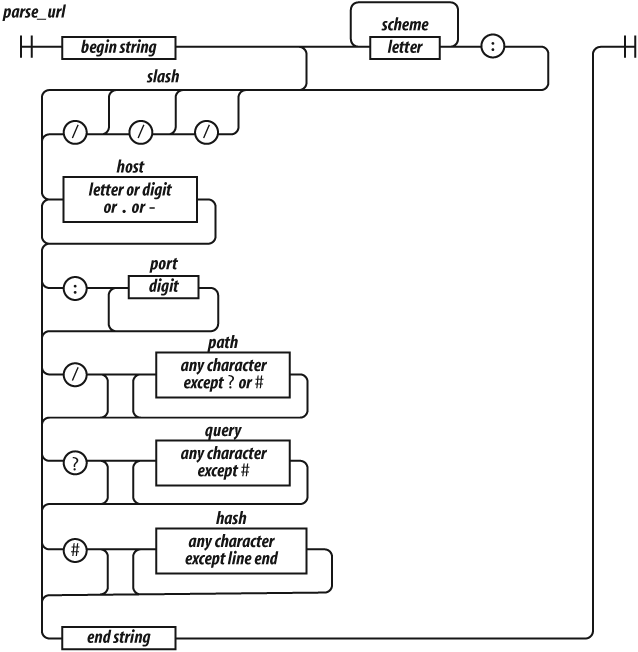
Regular expressions cannot be broken into smaller pieces the way that
functions can, so the track representing parse_url is a
long one.
Let’s factor parse_url into its parts to see how it
works.
^The ^ character indicates the beginning of the string.
It is an anchor that prevents exec from skipping over a
non-URL-like prefix.
(?:([A-Za-z]+):)?This factor matches a scheme name, but only if it is followed by a
: (colon). The (?: . . . )
indicates a noncapturing group. The suffix ? indicates that
the group is optional.
It means repeat zero or one time. The ( . . . ) indicates a
capturing group. A capturing group copies the text it matches and places
it in the result array. Each capturing group is given a
number. This first capturing group is 1, so a copy of the text matched
by this capturing group will appear in result[1]. The [ . .
. ] indicates a character class. This character class,
A-Za-z, contains 26 uppercase letters and 26 lowercase
letters. The hyphens indicate ranges, from A to Z. The suffix
+ indicates that the character class will be matched one or
more times. The group is followed by the : character, which
will be matched literally.
(\/{0,3})The next factor is capturing group 2. \/ indicates that
a / (slash) character should be matched. It is escaped with
\ (backslash) so that it is not misinterpreted as the end
of the regular expression literal. The suffix {0,3}
indicates that the / will be matched 0 or 1 or 2 or 3
times.
([0-9.\-A-Za-z]+)The next factor is capturing group 3. It will match a host name,
which is made up of one or more digits, letters, or . or
-. The - was escaped as \- to
prevent it from being confused with a range hyphen.
(?::(\d+))?The next factor optionally matches a port number, which is a sequence
of one or more digits preceded by a :. \d
represents a digit character. The series of one or more digits will be
capturing group 4.
(?:\/([^?#]*))?We have another optional group. This one begins with a
/. The character class [^?#] begins with a
^, which indicates that the class includes all characters
except ? and #. The * indicates that the character class is
matched zero or more times.
Note that I am being sloppy here. The class of all characters except ? and # includes line-ending characters, control characters, and lots of other characters that really shouldn’t be matched here. Most of the time this will do what we want, but there is a risk that some bad text could slip through. Sloppy regular expressions are a popular source of security exploits. It is a lot easier to write sloppy regular expressions than rigorous regular expressions.
(?:\?([^#]*))?Next, we have an optional group that begins with a ?. It
contains capturing group 6, which contains zero or more characters that
are not #.
(?:#(.*))?We have a final optional group that begins with #. The
. will match any character except a line-ending
character.
$The $ represents the end of the string. It assures us
that there was no extra material after the end of the URL.
Those are the factors of the regular expression
parse_url.[1]
It is possible to make regular expressions that are more complex than
parse_url, but I wouldn’t recommend it. Regular expressions
are best when they are short and simple. Only then can we have
confidence that they are working correctly and that they could be
successfully modified if necessary.
There is a very high degree of compatibility between JavaScript language processors. The part of the language that is least portable is the implementation of regular expressions. Regular expressions that are very complicated or convoluted are more likely to have portability problems. Nested regular expressions can also suffer horrible performance problems in some implementations. Simplicity is the best strategy.
Let’s look at another example: a regular expression that matches numbers. Numbers can have an integer part with an optional minus sign, an optional fractional part, and an optional exponent part.
var parse_number = /^-?\d+(?:\.\d*)?(?:e[+\-]?\d+)?$/i;

var test = function (num) {
    document.writeln(parse_number.test(num));
};

test('1');                // true
test('number');           // false
test('98.6');             // true
test('132.21.86.100');    // false
test('123.45E-67');       // true
test('123.45D-67');       // false
parse_number successfully identified the strings that
conformed to our specification and those that did not, but for those
that did not, it gives us no information on why or where they failed the
number test.
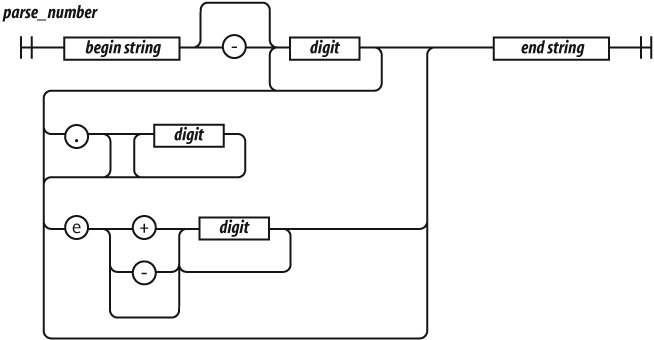
Let’s break down parse_number.
/^ $/iWe again use ^ and $ to anchor the regular
expression. This causes all of the characters in the text to be matched
against the regular expression. If we had omitted the anchors, the
regular expression would tell us if a string contains a number. With the
anchors, it tells us if the string contains only a number. If we
included just the ^, it would match strings starting with a
number. If we included just the $, it would match strings
ending with a number.
The i flag causes case to be ignored when matching
letters. The only letter in our pattern is e. We want that
e to also match E. We could have written the
e factor as [Ee] or (?:E|e), but
we didn’t have to because we used the i flag:
-?The ? suffix on the minus sign indicates that the minus
sign is optional:
\d+\d means the same as [0-9]. It matches a
digit. The + suffix causes it to match one or more
digits:
(?:\.\d*)?The (?: . . . )? indicates an optional noncapturing
group. It is usually better to use noncapturing groups instead of the
less ugly capturing groups because capturing has a performance penalty.
The group will match a decimal point followed by zero or more
digits:
(?:e[+\-]?\d+)?This is another optional noncapturing group. It matches
e (or E), an optional sign, and one or more
digits.
[1] When you press
them all together again, it is visually quite confusing:
/^(?:([A-Za-z]+):)?(\/{0,3})([0-9.\-A-Za-z]+)(?::(\d+))?(?:\/([^?#]*))?(?:\?([^#]*))?(?:#(.*))?$/
There are two ways to make a RegExp object. The
preferred way, as we saw in the examples, is to use a regular expression
literal.

Regular expression literals are enclosed in slashes. This can be a little tricky because slash is also used as the division operator and in comments.
There are three flags that can be set on a RegExp. They
are indicated by the letters g, i, and
m, as listed in Table 7-1. The
flags are appended directly to the end of the RegExp
literal:
// Make a regular expression object that matches
// a JavaScript string.

var my_regexp = /"(?:\\.|[^\\\"])*"/g;
Table 7-1. Flags for regular expressions
| Flag | Meaning |
|---|---|
g |
Global (match multiple times; the precise meaning of this varies with the method) |
i |
Insensitive (ignore character case) |
m |
Multiline (^ and $ can match line-ending characters) |
The other way to make a regular expression is to use the
RegExp constructor. The constructor takes a string and
compiles it into a RegExp object. Some care must be taken
in building the string because backslashes have a somewhat different
meaning in regular expressions than in string literals. It is usually
necessary to double the backslashes and escape the quotes:
// Make a regular expression object that matches
// a JavaScript string.

var my_regexp = new RegExp("\"(?:\\\\.|[^\\\\\\\"])*\"", 'g');
The second parameter is a string specifying the flags. The
RegExp constructor is useful when a regular expression must
be generated at runtime using material that is not available to the
programmer.
RegExp objects contain the properties listed in Table 7-2.
Table 7-2. Properties of RegExp objects
| Property | Use |
|---|---|
global |
true if the g
flag was used. |
ignoreCase |
true if the i
flag was used. |
lastIndex |
The index at which to start the next
exec match. Initially it is zero. |
multiline |
true if the m
flag was used. |
source |
The source text of the regular expression. |
RegExp objects made by regular expression literals share
a single instance:
function make_a_matcher(  ) {
    return /a/gi;
}

var x = make_a_matcher(  );
var y = make_a_matcher(  );

// Beware: x and y are the same object!

x.lastIndex = 10;

document.writeln(y.lastIndex);    // 10
Let’s look more closely at the elements that make up regular expressions.

A regexp choice contains one or more regexp
sequences. The sequences are separated by the |
(vertical bar) character. The choice matches if any of the sequences
match. It attempts to match each of the sequences in order. So:
"into".match(/in|int/)matches the in in into. It wouldn’t match
int because the match of in was
successful.

A regexp sequence contains one or more regexp factors. Each factor can optionally be followed by a quantifier that determines how many times the factor is allowed to appear. If there is no quantifier, then the factor will be matched one time.
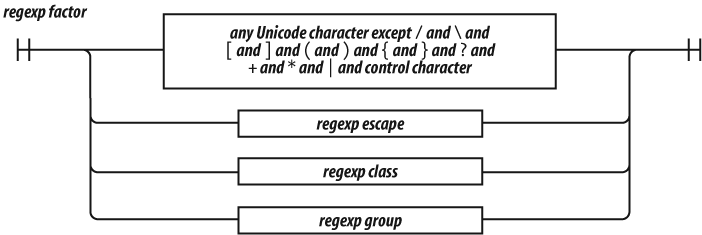
A regexp factor can be a character, a parenthesized group, a character class, or an escape sequence. All characters are treated literally except for the control characters and the special characters:
\ / [ ] ( ) { } ? + * | . ^ $which must be escaped with a \ prefix if they are to be
matched literally. When in doubt, any special character can be given a
\ prefix to make it literal. The \ prefix
does not make letters or digits literal.
An unescaped . matches any character except a
line-ending character.
An unescaped ^ matches the beginning of the text when
the lastIndex property is zero. It can also match
line-ending characters when the m flag is specified.
An unescaped $ matches the end of the text. It can also
match line-ending characters when the m flag is
specified.
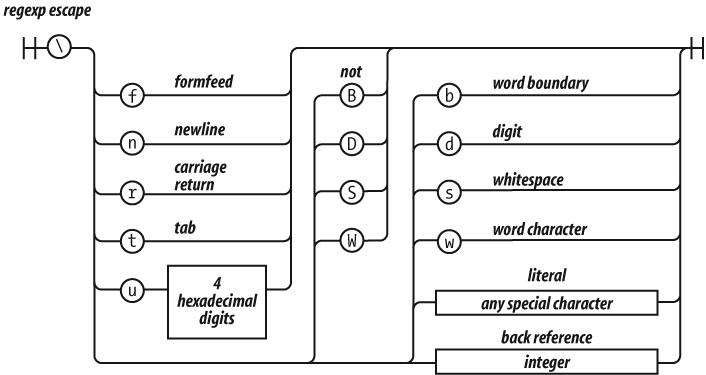
The backslash character indicates escapement in regexp factors as well as in strings, but in regexp factors, it works a little differently.
As in strings, \f is the formfeed character,
\n is the newline character, \r is the
carriage return character, \t is the tab character, and
\u allows for specifying a Unicode character as a 16-bit
hex constant. In regexp factors, \b is not the
backspace character.
\d is the same as [0-9]. It matches a
digit. \D is the opposite: [^0-9].
\s is the same as
[\f\n\r\t\u000B\u0020\u00A0\u2028\u2029]. This is a partial
set of Unicode whitespace characters. \S is the opposite:
[^\f\n\r\t\u000B\u0020\u00A0\u2028\u2029].
\w is the same as [0-9A-Z_a-z].
\W is the opposite: [^0-9A-Z_a-z]. This is
supposed to represent the characters that appear in words.
Unfortunately, the class it defines is useless for working with
virtually any real language. If you need to match a class of letters,
you must specify your own class.
A simple letter class is
[A-Za-z\u00C0-\u1FFF\u2800-\uFFFD]. It includes all of
Unicode’s letters, but it also includes thousands of characters that are
not letters. Unicode is large and complex. An exact letter class of the
Basic Multilingual Plane is possible, but would be huge and inefficient.
JavaScript’s regular expressions provide extremely poor support for
internationalization.
\b was intended to be a word-boundary anchor that would
make it easier to match text on word boundaries. Unfortunately, it uses
\w to find word boundaries, so it is completely useless for
multilingual applications. This is not a good part.
\1 is a reference to the text that was captured by group
1 so that it can be matched again. For example, you could search text
for duplicated words with:
var doubled_words = /([A-Za-z\u00C0-\u1FFF\u2800-\uFFFD]+)\s+\1/gi;doubled_words looks for occurrences of words (strings
containing 1 or more letters) followed by whitespace followed by the
same word.
\2 is a reference to group 2, \3 is a
reference to group 3, and so on.
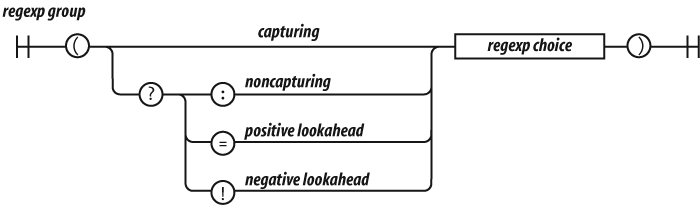
There are four kinds of groups:
Capturing
A capturing group is a regexp choice wrapped in parentheses. The
characters that match the group will be captured. Every capture group is
given a number. The first capturing ( in the regular
expression is group 1. The second capturing ( in the
regular expression is group 2.
Noncapturing
A noncapturing group has a (?: prefix. A noncapturing group
simply matches; it does not capture the matched text. This has the
advantage of slight faster performance. Noncapturing groups do not
interfere with the numbering of capturing groups.
Positive lookahead
A positive lookahead group has a (?= prefix. It is like a
noncapturing group except that after the group matches, the text is
rewound to where the group started, effectively matching nothing. This
is not a good part.
Negative lookahead
A negative lookahead group has a (?! prefix. It is like a
positive lookahead group, except that it matches only if it fails to
match. This is not a good part.
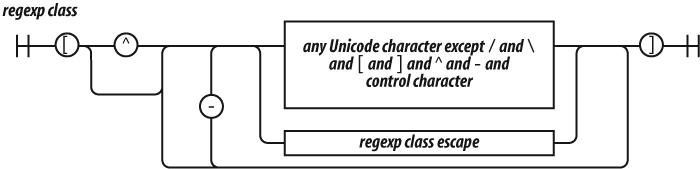
A regexp class is a convenient way of specifying one of a
set of characters. For example, if we wanted to match a vowel, we could
write (?:a|e|i|o|u), but it is more conveniently written as
the class [aeiou].
Classes provide two other conveniences. The first is that ranges of characters can be specified. So, the set of 32 ASCII special characters:
! " # $ % & ' ( ) * +, - . / :
; < = > ? @ [ \ ] ^ _ ` { | } ˜
could be written as:
(?:!|"|#|\$|%|&|'|\(|\)|\*|\+|,|-|\.|\/|:|;|<|=|>|@|\[|\\|]|\^|_|` |\{|\||\}|˜)but is slightly more nicely written as:
[!-\/:-@\[-`{-˜]which includes the characters from ! through
/ and : through @ and
[ through ` and { through
˜. It is still pretty nasty looking.
The other convenience is the complementing of a class. If the first
character after the [ is ^, then the class
excludes the specified characters.
So [^!-\/:-@\[-`{-˜] matches any character that is
not one of the ASCII special characters.
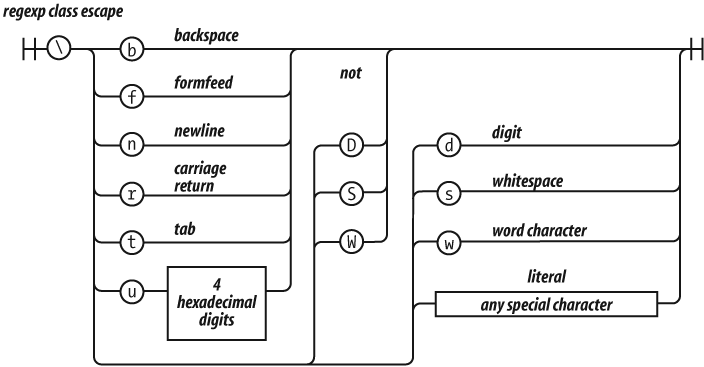
The rules of escapement within a character class are slightly
different than those for a regexp factor. [\b] is the
backspace character. Here are the special characters that should be
escaped in a character class:
- / [ \ ] ^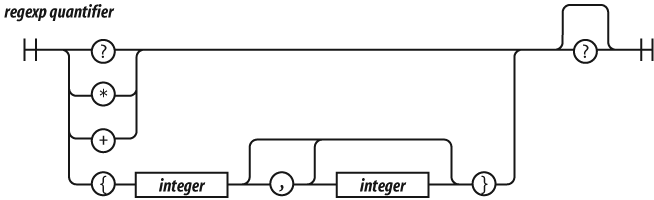
A regexp factor may have a regexp quantifier suffix
that determines how many times the factor should match. A number wrapped
in curly braces means that the factor should match that many times. So,
/www/ matches the same as /w{3}/.
{3,6} will match 3, 4, 5, or 6 times. {3,}
will match 3 or more times.
? is the same as {0,1}. * is
the same as {0,}. + is the same as
{1,}.
Matching tends to be greedy, matching as many repetitions as possible
up to the limit, if there is one. If the quantifier has an extra
? suffix, then matching tends to be lazy, attempting to
match as few repetitions as possible. It is usually best to stick with
the greedy matching.
Though this be madness, yet there is method in ’t.
—William Shakespeare, The Tragedy of Hamlet, Prince of Denmark
JavaScript includes a small set of standard methods that are available on the standard types.
Array
array.concat(item…)
The concat method produces a new array containing a shallow
copy of this array with the
items appended to it. If an
item is an array, then each of its elements is
appended individually. Also see
array.push(item...)
later in this chapter.
var a = ['a', 'b', 'c'];
var b = ['x', 'y', 'z'];
var c = a.concat(b, true);
// c is ['a', 'b', 'c', 'x', 'y', 'z', true]array.join(separator)
The join method makes a string from an
array . It does this by making a string of each of
the array ’s elements, and then concatenating them
all together with a separator between them. The
default separator is ','. To join
without separation, use an empty string as the
separator.
If you are assembling a string from a large number of pieces, it is
usually faster to put the pieces into an array and join
them than it is to concatenate the pieces with the +
operator:
var a = ['a', 'b', 'c'];
a.push('d');
var c = a.join(''); // c is 'abcd';array.pop( )
The pop and push methods make an
array work like a stack. The pop
method removes and returns the last element in this
array . If the array is
empty, it returns undefined.
var a = ['a', 'b', 'c'];
var c = a.pop(  );    // a is ['a', 'b'] & c is 'c'
pop can be implemented like this:
Array.method('pop', function (  ) {
    return this.splice(this.length - 1, 1)[0];
});array.push(item…)
The push method appends items to the
end of an array. Unlike the concat method, it modifies the
array and appends array items whole. It returns
the new length of the array:
var a = ['a', 'b', 'c'];
var b = ['x', 'y', 'z'];
var c = a.push(b, true);
// a is ['a', 'b', 'c', ['x', 'y', 'z'], true]
// c is 5;
push can be implemented like this:
Array.method('push', function (  ) {
    this.splice.apply(
        this,
        [this.length, 0].concat(Array.prototype.slice.apply(arguments)));
    return this.length;
});array.reverse( )
The reverse method modifies the array
by reversing the order of the elements. It returns the
array:
var a = ['a', 'b', 'c'];
var b = a.reverse(  );
// both a and b are ['c', 'b', 'a']array.shift( )
The shift method removes the first element from an
array and returns it. If the
array is empty, it returns undefined.
shift is usually much slower than pop:
var a = ['a', 'b', 'c'];
var c = a.shift(  );    // a is ['b', 'c'] & c is 'a'
shift can be implemented like this:
Array.method('shift', function (  ) {
    return this.splice(0, 1)[0];
});array.slice(start, end )
The slice method makes a shallow copy of a portion of an
array . The first element copied will be
array [ start
]. It will stop before copying array
[ end ]. The
end parameter is optional, and the default is
array .length. If either parameter is
negative, array .length will be added
to them in an attempt to make them nonnegative. If
start is greater than or equal to
array .length, the result will be a
new empty array. Do not confuse slice with
splice. Also see string
.slice later in this chapter.
var a = ['a', 'b', 'c'];
var b = a.slice(0, 1);    // b is ['a']
var c = a.slice(1);       // c is ['b', 'c']
var d = a.slice(1, 2); // d is ['b']array.sort(comparefn )
The sort method sorts the contents of an
array in place. It sorts arrays of numbers
incorrectly:
var n = [4, 8, 15, 16, 23, 42];
n.sort(  );
// n is [15, 16, 23, 4, 42, 8]
JavaScript’s default comparison function assumes that the elements to be sorted are strings. It isn’t clever enough to test the type of the elements before comparing them, so it converts the numbers to strings as it compares them, ensuring a shockingly incorrect result.
Fortunately, you may replace the comparison function with your own.
Your comparison function should take two parameters and return
0 if the two parameters are equal, a negative number if the
first parameter should come first, and a positive number if the second
parameter should come first. (Old-timers might be reminded of the
FORTRAN II arithmetic IF statement.)
n.sort(function (a, b) {
    return a − b;
});
// n is [4, 8, 15, 16, 23, 42];
That function will sort numbers, but it doesn’t sort strings. If we want to be able to sort any array of simple values, we must work harder:
var m = ['aa', 'bb', 'a', 4, 8, 15, 16, 23, 42];
m.sort(function (a, b) {
    if (a === b) {
        return 0;
    }
    if (typeof a === typeof b) {
        return a < b ? −1 : 1;
    }
    return typeof a < typeof b ? −1 : 1;
});
// m is [4, 8, 15, 16, 23, 42, 'a', 'aa', 'bb']
If case is not significant, your comparison function should convert
the operands to lowercase before comparing them. Also see
string .localeCompare later in this
chapter.
With a smarter comparison function, we can sort an array of objects. To make things easier for the general case, we will write a function that will make comparison functions:
// Function by takes a member name string and returns
// a comparison function that can be used to sort an
// array of objects that contain that member.

var by = function (name) {
    return function (o, p) {
        var a, b;
        if (typeof o === 'object' && typeof p === 'object' && o && p) {
            a = o[name];
            b = p[name];
            if (a === b) {
                return 0;
            }
            if (typeof a === typeof b) {
                return a < b ? −1 : 1;
            }
            return typeof a < typeof b ? −1 : 1;
        } else {
            throw {
                name: 'Error',
                message: 'Expected an object when sorting by ' + name;
            };
        }
    };
};

var s = [
    {first: 'Joe',   last: 'Besser'},
    {first: 'Moe',   last: 'Howard'},
    {first: 'Joe',   last: 'DeRita'},
    {first: 'Shemp', last: 'Howard'},
    {first: 'Larry', last: 'Fine'},
    {first: 'Curly', last: 'Howard'}
];
s.sort(by('first'));    // s is [
//    {first: 'Curly', last: 'Howard'},
//    {first: 'Joe',   last: 'DeRita'},
//    {first: 'Joe',   last: 'Besser'},
//    {first: 'Larry', last: 'Fine'},
//    {first: 'Moe',   last: 'Howard'},
//    {first: 'Shemp', last: 'Howard'}
// ]
The sort method is not stable, so:
s.sort(by('first')).sort(by('last'));is not guaranteed to produce the correct sequence. If you want to
sort on multiple keys, you again need to do more work. We can modify
by to take a second parameter, another compare
method that will be called to break ties when the major key produces a
match:
// Function by takes a member name string and an
// optional minor comparison function and returns
// a comparison function that can be used to sort an
// array of objects that contain that member. The
// minor comparison function is used to break ties
// when the o[name] and p[name] are equal.

var by = function (name, minor) {
    return function (o, p) {
        var a, b;
        if (o && p && typeof o === 'object' && typeof p === 'object') {
            a = o[name];
            b = p[name];
            if (a === b) {
                return typeof minor === 'function' ? minor(o, p) : 0;
            }
            if (typeof a === typeof b) {
                return a < b ? −1 : 1;
            }
            return typeof a < typeof b ? −1 : 1;
        } else {
            throw {
                name: 'Error',
                message: 'Expected an object when sorting by ' + name;
            };
        }
    };
};

s.sort(by('last', by('first')));    // s is [
//    {first: 'Joe',   last: 'Besser'},
//    {first: 'Joe',   last: 'DeRita'},
//    {first: 'Larry', last: 'Fine'},
//    {first: 'Curly', last: 'Howard'},
//    {first: 'Moe',   last: 'Howard'},
//    {first: 'Shemp', last: 'Howard'}
// ]array.splice(start, deleteCount,
item…)
The splice method removes elements from an
array, replacing them with new
item s. The start parameter
is the number of a position within the array . The
deleteCount parameter is the number of elements to
delete starting from that position. If there are additional parameters,
those item s will be inserted at the position. It
returns an array containing the deleted elements.
The most popular use of splice is to delete elements
from an array. Do not confuse splice with
slice:
var a = ['a', 'b', 'c'];
var r = a.splice(1, 1, 'ache', 'bug');
// a is ['a', 'ache', 'bug', 'c']
// r is ['b']
splice can be implemented like this:
Array.method('splice', function (start, deleteCount) {
    var max = Math.max,
        min = Math.min,
        delta,
        element,
        insertCount = max(arguments.length - 2, 0),
        k = 0,
        len = this.length,
        new_len,
        result = [],
        shift_count;

    start = start || 0;
    if (start < 0) {
        start += len;
    }
    start = max(min(start, len), 0);
    deleteCount = max(min(typeof deleteCount === 'number' ?
            deleteCount : len, len − start), 0);
    delta = insertCount − deleteCount;
    new_len = len + delta;
    while (k < deleteCount) {
        element = this[start + k];
        if (element !== undefined) {
            result[k] = element;
        }
        k += 1;
    }
    shift_count = len - start - deleteCount;
    if (delta < 0) {
        k = start + insertCount;
        while (shift_count) {
            this[k] = this[k − delta];
            k += 1;
            shift_count −= 1;
        }
        this.length = new_len;
    } else if (delta > 0) {
        k = 1;
        while (shift_count) {
            this[new_len − k] = this[len − k];
            k += 1;
            shift_count −= 1;
         }
            this.length = new_len;
     }
    for (k = 0; k < insertCount; k += 1) {
        this[start + k] = arguments[k + 2];
    }
    return result;
});array.unshift(item…)
The unshift method is like the push method
except that it shoves the item s onto the front of
this array instead of at the end. It returns the
array ’s new length:
var a = ['a', 'b', 'c'];
var r = a.unshift('?', '@');
// a is ['?', '@', 'a', 'b', 'c']
// r is 5
unshift can be implemented like this:
Array.method('unshift', function (  ) {
    this.splice.apply(this,
        [0, 0].concat(Array.prototype.slice.apply(arguments)));
    return this.length;
});
Function
function.apply(thisArg, argArray
)
The apply method invokes a function,
passing in the object that will be bound to this and an
optional array of arguments. The apply method is used in
the apply invocation pattern (Chapter 4):
Function.method('bind', function (that) {

// Return a function that will call this function as
// though it is a method of that object.

    var method = this,
        slice = Array.prototype.slice,
        args = slice.apply(arguments, [1]);
    return function (  ) {
        return method.apply(that,
            args.concat(slice.apply(arguments, [0])));
    };
});

var x = function (  ) {
    return this.value;
}.bind({value: 666});
alert(x(  )); // 666
Number
number.toExponential(fractionDigits )
The toExponential method converts this
number to a string in the exponential form. The
optional fractionDigits parameter controls the
number of decimal places. It should be between 0 and 20:
document.writeln(Math.PI.toExponential(0));
document.writeln(Math.PI.toExponential(2));
document.writeln(Math.PI.toExponential(7));
document.writeln(Math.PI.toExponential(16));
document.writeln(Math.PI.toExponential(  ));

// Produces

3e+0
3.14e+0
3.1415927e+0
3.1415926535897930e+0
3.141592653589793e+0number.toFixed(fractionDigits )
The toFixed method converts this
number to a string in the decimal form. The
optional fractionDigits parameter controls the
number of decimal places. It should be between 0 and 20. The default is
0:
document.writeln(Math.PI.toFixed(0));
document.writeln(Math.PI.toFixed(2));
document.writeln(Math.PI.toFixed(7));
document.writeln(Math.PI.toFixed(16));
document.writeln(Math.PI.toFixed(  ));

// Produces

3
3.14
3.1415927
3.1415926535897930
3number.toPrecision(precision )
The toPrecision method converts this
number to a string in the decimal form. The
optional precision parameter controls the number
of digits of precision. It should be between 1 and 21:
document.writeln(Math.PI.toPrecision(2));
document.writeln(Math.PI.toPrecision(7));
document.writeln(Math.PI.toPrecision(16));
document.writeln(Math.PI.toPrecision(  ));

// Produces

3.1
3.141593
3.141592653589793
3.141592653589793number.toString(radix )
The toString method converts this
number to a string. The optional
radix parameter controls radix, or base. It should
be between 2 and 36. The default radix is base 10.
The radix parameter is most commonly used with
integers, but it can be used on any number.
The most common case, number
.toString( ), can be written more simply as
String( number ):
document.writeln(Math.PI.toString(2));
document.writeln(Math.PI.toString(8));
document.writeln(Math.PI.toString(16));
document.writeln(Math.PI.toString(  ));

// Produces

11.001001000011111101101010100010001000010110100011
3.1103755242102643
3.243f6a8885a3
3.141592653589793
Object
object.hasOwnProperty(name )
The hasOwnProperty method returns true if the
object contains a property having the
name . The prototype chain is not examined. This
method is useless if the name is
hasOwnProperty:
var a = {member: true};
var b = Object.create(a);              // from Chapter 3
var t = a.hasOwnProperty('member');   // t is true
var u = b.hasOwnProperty('member');   // u is false
var v = b.member;                     // v is true
RegExp
regexp.exec(string )
The exec method is the most powerful (and slowest) of the
methods that use regular expressions. If it successfully matches the
regexp and the string, it
returns an array. The 0 element of the array will contain the substring
that matched the regexp . The 1 element is the
text captured by group 1, the 2 element is the text captured by group 2,
and so on. If the match fails, it returns null.
If the regexp has a g flag, things
are a little more complicated. The searching begins not at position 0 of
the string, but at position regexp
.lastIndex (which is initially zero). If the match is
successful, then regexp .lastIndex
will be set to the position of the first character after the match. An
unsuccessful match resets regexp
.lastIndex to 0.
This allows you to search for several occurrences of a pattern in a
string by calling exec in a loop. There are a couple things
to watch out for. If you exit the loop early, you must reset
regexp .lastIndex to 0 yourself
before entering the loop again. Also, the ^ factor matches
only when regexp .lastIndex is 0:
// Break a simple html text into tags and texts.
// (See string.replace for the entityify method.)

// For each tag or text, produce an array containing
// [0] The full matched tag or text
// [1] The /, if there is one
// [2] The tag name
// [3] The attributes, if any

var text = '<html><body bgcolor=linen><p>' +
        'This is <b>bold<\/b>!<\/p><\/body><\/html>';
var tags = /[^<>]+|<(\/?)([A-Za-z]+)([^<>]*)>/g;
var a, i;

while ((a = tags.exec(text))) {
    for (i = 0; i < a.length; i += 1) {
        document.writeln(('// [' + i + '] ' + a[i]).entityify(  ));
    }
    document.writeln(  );
}

// Result:

// [0] <html>
// [1]
// [2] html
// [3]

// [0] <body bgcolor=linen>
// [1]
// [2] body
// [3]  bgcolor=linen

// [0] <p>
// [1]
// [2] p
// [3]

// [0] This is
// [1] undefined
// [2] undefined
// [3] undefined

// [0] <b>
// [1]
// [2] b
// [3]

// [0] bold
// [1] undefined
// [2] undefined
// [3] undefined

// [0] </b>
// [1] /
// [2] b
// [3]

// [0] !
// [1] undefined
// [2] undefined
// [3] undefined

// [0] </p>
// [1] /
// [2] p
// [3]

// [0] </body>
// [1] /
// [2] body
// [3]

// [0] </html>
// [1] /
// [2] html
// [3]regexp.test(string )
The test method is the simplest (and fastest) of the
methods that use regular expressions. If the
regexp matches the string,
it returns true ; otherwise, it returns false.
Do not use the g flag with this method:
var b = /&.+;/.test('frank & beans');
// b is true
test could be implemented as:
RegExp.method('test', function (string) {
    return this.exec(string) !== null;
});
String
string.charAt(pos )
The charAt method returns the character at position
pos in this string . If
pos is less than zero or greater than or equal to
string .length, it returns the empty
string. JavaScript does not have a character type. The result of this
method is a string:
var name = 'Curly';
var initial = name.charAt(0);    // initial is 'C'
charAt could be implemented as:
String.method('charAt', function (pos) {
return this.slice(pos, pos + 1);
});string.charCodeAt(pos )
The charCodeAt method is the same as charAt
except that instead of returning a string, it returns an integer
representation of the code point value of the character at position
pos in that string . If
pos is less than zero or greater than or equal to
string .length, it returns
NaN:
var name = 'Curly';
var initial = name.charCodeAt(0); // initial is 67string.concat(string…)
The concat method makes a new string by concatenating other
strings together. It is rarely used because the + operator
is more convenient:
var s = 'C'.concat('a', 't'); // s is 'Cat'string.indexOf(searchString, position
)
The indexOf method searches for a
searchString within a
string. If it is found, it returns the position of
the first matched character; otherwise, it returns −1. The optional
position parameter causes the search to begin at
some specified position in the string:
var text = 'Mississippi';
var p = text.indexOf('ss');    // p is 2
p = text.indexOf('ss', 3);     // p is 5
p = text.indexOf('ss', 6); // p is −1string.lastIndexOf(searchString,
position )
The lastIndexOf method is like the indexOf
method, except that it searches from the end of the string instead of
the front:
var text = 'Mississippi';
var p = text.lastIndexOf('ss');    // p is 5
p = text.lastIndexOf('ss', 3);     // p is 2
p = text.lastIndexOf('ss', 6); // p is 5string.localeCompare(that )
The localeCompare method compares two strings. The rules
for how the strings are compared are not specified. If this
string is less than that
string, the result is negative. If they are equal, the result is zero.
This is similar to the convention for the array
.sort comparison function:
var m = ['AAA', 'A', 'aa', 'a', 'Aa', 'aaa'];
m.sort(function (a, b) {
    return a.localeCompare(b);
});
// m (in some locale) is
// ['a', 'A', 'aa', 'Aa', 'aaa', 'AAA']string.match(regexp )
The match method matches a string and a regular expression.
How it does this depends on the g flag. If there is no
g flag, then the result of calling
string .match(
regexp ) is the same as calling
regexp .exec(
string ). However, if the
regexp has the g flag, then it
produces an array of all the matches but excludes the capturing
groups:
var text = '<html><body bgcolor=linen><p>' +
        'This is <b>bold<\/b>!<\/p><\/body><\/html>';
var tags = /[^<>]+|<(\/?)([A-Za-z]+)([^<>]*)>/g;
var a, i;

a = text.match(tags);
for (i = 0; i < a.length; i += 1) {
    document.writeln(('// [' + i + '] ' + a[i]).entityify(  ));
}

// The result is

// [0] <html>
// [1] <body bgcolor=linen>
// [2] <p>
// [3] This is
// [4] <b>
// [5] bold
// [6] </b>
// [7] !
// [8] </p>
// [9] </body>
// [10] </html>string.replace(searchValue,
replaceValue )
The replace method does a search and replace operation on
this string, producing a new string. The
searchValue argument can be a string or a regular
expression object. If it is a string, only the first occurrence
of the searchValue is replaced, so:
var result = "mother_in_law".replace('_', '-');will produce "mother-in_law", which might be a
disappointment.
If searchValue is a regular expression and if
it has the g flag, then it will replace all occurrences. If
it does not have the g flag, then it will replace only the
first occurrence.
The replaceValue can be a string or a function.
If replaceValue is a string, the character
$ has special meaning:
// Capture 3 digits within parens

var oldareacode = /\((\d{3})\)/g;
var p = '(555)666-1212'.replace(oldareacode, '$1-');
// p is '555-666-1212'| Dollar sequence | Replacement |
|---|---|
$$ |
$ |
$& |
The matched text |
$
number |
Capture group text |
$` |
The text preceding the match |
$' |
The text following the match |
If the replaceValue is a function, it will be
called for each match, and the string returned by the function will be
used as the replacement text. The first parameter passed to the function
is the matched text. The second parameter is the text of capture group
1, the next parameter is the text of capture group 2, and so on:
String.method('entityify', function ( ) {
var character = {
'<' : '<',
'>' : '>',
'&' : '&',
'"' : '"'
};
// Return the string.entityify method, which
// returns the result of calling the replace method.
// Its replaceValue function returns the result of
// looking a character up in an object. This use of
// an object usually outperforms switch statements.
return function ( ) {
return this.replace(/[<>&"]/g, function (c) {
return character[c];
});
};
}( ));
alert("<&>".entityify( )); // <&>string.search(regexp )
The search method is like the indexOf method,
except that it takes a regular expression object instead of a string. It
returns the position of the first character of the first match, if there
is one, or −1 if the search fails. The g flag is ignored.
There is no position parameter:
var text = 'and in it he says "Any damn fool could';
var pos = text.search(/["']/); // pos is 18string.slice(start, end )
The slice method makes a new string by copying a portion of
another string. If the start
parameter is negative, it adds string
.length to it. The end parameter is
optional, and its default value is string
.length. If the end parameter is
negative, then string .length is
added to it. The end parameter is one greater than
the position of the last character. To get n characters
starting at position p, use string
.slice(p, p + n). Also see string
.substring and array
.slice, later and earlier in this chapter,
respectively.
var text = 'and in it he says "Any damn fool could';
var a = text.slice(18);
// a is '"Any damn fool could'
var b = text.slice(0, 3);
// b is 'and'
var c = text.slice(−5);
// c is 'could'
var d = text.slice(19, 32);
// d is 'Any damn fool'string.split(separator, limit )
The split method creates an array of strings by splitting
this string into pieces. The optional
limit parameter can limit the number of pieces
that will be split. The separator parameter can be
a string or a regular expression.
If the separator is the empty string, an array
of single characters is produced:
var digits = '0123456789';
var a = digits.split('', 5);
// a is ['0', '1', '2', '3', '4']
Otherwise, the string is searched for all
occurrences of the separator. Each unit of text
between the separators is copied into the array. The g flag
is ignored:
var ip = '192.168.1.0';
var b = ip.split('.');
// b is ['192', '168', '1', '0']

var c = '|a|b|c|'.split('|');
// c is ['', 'a', 'b', 'c', '']

var text = 'last,  first ,middle';
var d = text.split(/\s*,\s*/);
// d is [
//    'last',
//    'first',
//    'middle'
// ]
There are some special cases to watch out for. Text from capturing groups will be included in the split:
var e = text.split(/\s*(,)\s*/);
// e is [
//    'last',
//    ',',
//    'first',
//    ',',
//    'middle'
// ]
Some implementations suppress empty strings in the output array when
the separator is a regular expression:
var f = '|a|b|c|'.split(/\|/);
// f is ['a', 'b', 'c'] on some systems, and
// f is ['', 'a', 'b', 'c', ''] on othersstring.substring(start, end )
The substring method is the same as the slice
method except that it doesn’t handle the adjustment for negative
parameters. There is no reason to use the substring method.
Use slice instead.
string.toLocaleLowerCase( )
The toLocaleLowerCase method produces a new string that is
made by converting this string to lowercase using
the rules for the locale. This is primarily for the benefit of Turkish
because in that language `I’ converts to 1, not
`i’.
string.toLocaleUpperCase( )
The toLocaleUpperCase method produces a new string that is
made by converting this string to uppercase using
the rules for the locale. This is primarily for the benefit of Turkish,
because in that language `i’ converts to ` ‘,
not `I’.
‘,
not `I’.
string.toLowerCase( )
The toLowerCase method produces a new string that is made
by converting this string to lowercase.
string.toUpperCase( )
The toUpperCase method produces a new string that is made
by converting this string to uppercase.
String.fromCharCode(char…)
The String.fromCharCode function produces a string from a
series of numbers.
var a = String.fromCharCode(67, 97, 116);
// a is 'Cat'
Here is a silly stately style indeed!
—William Shakespeare, The First Part of Henry the Sixth
Computer programs are the most complex things that humans make. Programs are made up of a huge number of parts, expressed as functions, statements, and expressions that are arranged in sequences that must be virtually free of error. The runtime behavior has little resemblance to the program that implements it. Software is usually expected to be modified over the course of its productive life. The process of converting one correct program into a different correct program is extremely challenging.
Good programs have a structure that anticipates—but is not overly burdened by—the possible modifications that will be required in the future. Good programs also have a clear presentation. If a program is expressed well, then we have the best chance of being able to understand it so that it can be successfully modified or repaired.
These concerns are true for all programming languages, and are especially true for JavaScript. JavaScript’s loose typing and excessive error tolerance provide little compile-time assurance of our programs’ quality, so to compensate, we should code with strict discipline.
JavaScript contains a large set of weak or problematic features that can undermine our attempts to write good programs. We should obviously avoid JavaScript’s worst features. Surprisingly, perhaps, we should also avoid the features that are often useful but occasionally hazardous. Such features are attractive nuisances, and by avoiding them, a large class of potential errors is avoided.
The long-term value of software to an organization is in direct proportion to the quality of the codebase. Over its lifetime, a program will be handled by many pairs of hands and eyes. If a program is able to clearly communicate its structure and characteristics, it is less likely to break when it is modified in the never-too-distant future.
JavaScript code is often sent directly to the public. It should always be of publication quality. Neatness counts. By writing in a clear and consistent style, your programs become easier to read.
Programmers can debate endlessly on what constitutes good style. Most programmers are firmly rooted in what they’re used to, such as the prevailing style where they went to school, or at their first job. Some have had profitable careers with no sense of style at all. Isn’t that proof that style doesn’t matter? And even if style doesn’t matter, isn’t one style as good as any other?
It turns out that style matters in programming for the same reason that it matters in writing. It makes for better reading.
Computer programs are sometimes thought of as a write-only medium, so it matters little how it is written as long as it works. But it turns out that the likelihood a program will work is significantly enhanced by our ability to read it, which also increases the likelihood that it actually works as intended. It is also the nature of software to be extensively modified over its productive life. If we can read and understand it, then we can hope to modify and improve it.
Throughout this book I have used a consistent style. My intention was to make the code examples as easy to read as possible. I used whitespace consistently to give you more cues about the meaning of my programs.
I indented the contents of blocks and object literals four spaces. I
placed a space between if and ( so that the
if didn’t look like a function invocation. Only in
invocations do I make ( adjacent with the preceding symbol.
I put spaces around all infix operators except for . and
[, which do not get spaces because they have higher
precedence. I use a space after every comma and colon.
I put at most one statement on a line. Multiple statements on a line
can be misread. If a statement doesn’t fit on a line, I will break it
after a comma or a binary operator. That gives more protection against
copy/paste errors that are masked by semicolon insertion. (The tragedy
of semicolon insertion will be revealed in Appendix A.) I indent the remainder
of the statement an extra four spaces, or eight spaces if four would be
ambiguous (such as a line break in the condition part of an
if statement).
I always use blocks with structured statements such as
if and while because it is less error prone. I
have seen:
if (a)
    b(  );
become:
if (a)
    b(  );
    c(  );
which is an error that is very difficult to spot. It looks like:
if (a) {
    b(  );
    c(  );
}
but it means:
if (a) {
    b(  );
}
c(  );
Code that appears to mean one thing but actually means another is likely to cause bugs. A pair of braces is really cheap protection against bugs that can be expensive to find.
I always use the K&R style, putting the { at the end
of a line instead of the front, because it avoids a horrible design
blunder in JavaScript’s return statement.
I included some comments. I like to put comments in my programs to leave information that will be read at a later time by people (possibly myself) who will need to understand what I was thinking. Sometimes I think about comments as a time machine that I use to send important messages to future me.
I struggle to keep comments up-to-date. Erroneous comments can make programs even harder to read and understand. I can’t afford that.
I tried to not waste your time with useless comments like this:
i = 0; // Set i to zero.In JavaScript, I prefer to use line comments. I reserve block comments for formal documentation and for commenting out.
I prefer to make the structure of my programs self-illuminating, eliminating the need for comments. I am not always successful, so while my programs are awaiting perfection, I am writing comments.
JavaScript has C syntax, but its blocks don’t have scope. So, the
convention that variables should be declared at their first use is
really bad advice in JavaScript. JavaScript has function scope, but not
block scope, so I declare all of my variables at the beginning of each
function. JavaScript allows variables to be declared after they are
used. That feels like a mistake to me, and I don’t want to write
programs that look like mistakes. I want my mistakes to stand out.
Similarly, I never use an assignment expression in the condition part of
an if because:
if (a = b) { ... }is probably intended to be:
if (a === b) { ... }I want to avoid idioms that look like mistakes.
I never allow switch cases to fall through to the next case. I once found a bug in my code caused by an unintended fall through immediately after having made a vigorous speech about why fall through was sometimes useful. I was fortunate in that I was able to learn from the experience. When reviewing the features of a language, I now pay special attention to features that are sometimes useful but occasionally dangerous. Those are the worst parts because it is difficult to tell whether they are being used correctly. That is a place where bugs hide.
Quality was not a motivating concern in the design, implementation, or standardization of JavaScript. That puts a greater burden on the users of the language to resist the language’s weaknesses.
JavaScript provides support for large programs, but it also provides forms and idioms that work against large programs. For example, JavaScript provides conveniences for the use of global variables, but global variables become increasingly problematic as programs scale in complexity.
I use a single global variable to contain an application or library. Every object has its own namespace, so it is easy to use objects to organize my code. Use of closure provides further information hiding, increasing the strength of my modules.
Thus, expecting thy reply, I profane my lips on thy foot, my eyes on thy picture, and my heart on thy every part. Thine, in the dearest design of industry. . .
—William Shakespeare, Love’s Labor’s Lost
I was invited last year to contribute a chapter to Andy Oram’s and Greg Wilson’s Beautiful Code (O’Reilly), an anthology on the theme of beauty as expressed in computer programs. I wanted to write my chapter in JavaScript. I wanted to use it to present something abstract, powerful, and useful to show that the language was up to it. And I wanted to avoid the browser and other venues in which JavaScript is typecast. I wanted to show something respectable with some heft to it.
I immediately thought of Vaughn Pratt’s Top Down Operator Precedence parser, which I use in JSLint (see Appendix C). Parsing is an important topic in computing. The ability to write a compiler for a language in itself is still a test for the completeness of a language.
I wanted to include all of the code for a parser in JavaScript that parses JavaScript. But my chapter was just one of 30 or 40, so I felt constrained in the number of pages I could consume. A further complication was that most of my readers would have no experience with JavaScript, so I also would have to introduce the language and its peculiarities.
So, I decided to subset the language. That way, I wouldn’t have to parse the whole language, and I wouldn’t have to describe the whole language. I called the subset Simplified JavaScript. Selecting the subset was easy: it included just the features that I needed to write a parser. This is how I described it in Beautiful Code:
Simplified JavaScript is just the good stuff, including:
Functions as first class objects
Functions in Simplified JavaScript are lambdas with lexical
scoping.
Dynamic objects with prototypal inheritance
Objects are class-free. We can add a new member to any object by
ordinary assignment. An object can inherit members from another
object.
Object literals and array literals
This is a very convenient notation for creating new objects and arrays.
JavaScript literals were the inspiration for the JSON data interchange
format.
The subset contained the best of the Good Parts. Even though it was a small language, it was very expressive and powerful. JavaScript has lots of additional features that really don’t add very much, and as you’ll find in the appendixes that follow, it has a lot of features with negative value. There was nothing ugly or bad in the subset. All of that fell away.
Simplified JavaScript isn’t strictly a subset. I added a few new
features. The simplest was adding pi as a simple constant.
I did that to demonstrate a feature of the parser. I also demonstrated a
better reserved word policy and showed that reserved words are
unnecessary. In a function, a word cannot be used as both a variable or
parameter name and a language feature. You can use a word for one or the
other, and the programmer gets to choose. That makes a language easier
to learn because you don’t need to be aware of features you don’t use.
And it makes the language easier to extend because it isn’t necessary to
reserve more words to add new features.
I also added block scope. Block scope is not a necessary feature, but not having it confuses experienced programmers. I included block scope because I anticipated that my parser would be used to parse languages that are not JavaScript, and those languages would do scoping correctly. The code I wrote for the parser is written in a style that doesn’t care if block scope is available or not. I recommend that you write that way, too.
When I started thinking about this book, I wanted to take the subset idea further, to show how to take an existing programming language and make significant improvements to it by making no changes except to exclude the low-value features.
We see a lot of feature-driven product design in which the cost of features is not properly accounted. Features can have a negative value to consumers because they make the products more difficult to understand and use. We are finding that people like products that just work. It turns out that designs that just work are much harder to produce than designs that assemble long lists of features.
Features have a specification cost, a design cost, and a development cost. There is a testing cost and a reliability cost. The more features there are, the more likely one will develop problems or will interact badly with another. In software systems, there is a storage cost, which was becoming negligible, but in mobile applications is becoming significant again. There are ascending performance costs because Moore’s Law doesn’t apply to batteries.
Features have a documentation cost. Every feature adds pages to the manual, increasing training costs. Features that offer value to a minority of users impose a cost on all users. So, in designing products and programming languages, we want to get the core features—the good parts—right because that is where we create most of the value.
We all find the good parts in the products that we use. We value simplicity, and when simplicity isn’t offered to us, we make it ourselves. My microwave oven has tons of features, but the only ones I use are cook and the clock. And setting the clock is a struggle. We cope with the complexity of feature-driven design by finding and sticking with the good parts.
It would be nice if products and programming languages were designed to have only good parts.
That will prove awful both in deed and word.
—William Shakespeare, Pericles, Prince of Tyre
In this appendix, I present the problematic features of JavaScript that are not easily avoided. You must be aware of these things and be prepared to cope.
The worst of all of JavaScript’s bad features is its dependence on global variables. A global variable is a variable that is visible in every scope. Global variables can be a convenience in very small programs, but they quickly become unwieldy as programs get larger. Because a global variable can be changed by any part of the program at any time, they can significantly complicate the behavior of the program. Use of global variables degrades the reliability of the programs that use them.
Global variables make it harder to run independent subprograms in the same program. If the subprograms happen to have global variables that share the same names, then they will interfere with each other and likely fail, usually in difficult to diagnose ways.
Lots of languages have global variables. For example, Java’s
public static members are global variables. The problem
with JavaScript isn’t just that it allows them, it requires them.
JavaScript does not have a linker. All compilation units are loaded into
a common global object.
There are three ways to define global variables. The first is to
place a var statement outside of any function:
var foo = value;The second is to add a property directly to the global object. The
global object is the container of all global variables. In web browsers,
the global object goes by the name window:
window.foo = value;The third is to use a variable without declaring it. This is called implied global:
foo = value;This was intended as a convenience to beginners by making it unnecessary to declare variables before using them. Unfortunately, forgetting to declare a variable is a very common mistake. JavaScript’s policy of making forgotten variables global creates bugs that can be very difficult to find.
JavaScript’s syntax comes from C. In all other C-like languages, a block (a set of statements wrapped in curly braces) creates a scope. Variables declared in a block are not visible outside of the block. JavaScript uses the block syntax, but does not provide block scope: a variable declared in a block is visible everywhere in the function containing the block. This can be surprising to programmers with experience in other languages.
In most languages, it is generally best to declare variables at the site of first use. That turns out to be a bad practice in JavaScript because it does not have block scope. It is better to declare all variables at the top of each function.
JavaScript has a mechanism that tries to correct faulty programs by automatically inserting semicolons. Do not depend on this. It can mask more serious errors.
It sometimes inserts semicolons in places where they are not welcome.
Consider the consequences of semicolon insertion on the
return statement. If a return statement
returns a value, that value expression must begin on the same line as
the return:
return
{
    status: true
};
This appears to return an object containing a status
member. Unfortunately, semicolon insertion turns it into a statement
that returns undefined. There is no warning that semicolon
insertion caused the misinterpretation of the program. The problem can
be avoided if the { is placed at the end of the previous
line and not at the beginning of the next line:
return {
    status: true
};
The following words are reserved in JavaScript:
abstract boolean break byte case catch char class const continue
 debugger default delete do double else enum export extends false final
 finally float for
 function goto if implements import in instanceof int interface long native new null
 package private protected public return short static super switch synchronized this
 throw throws transient true try typeof var volatile void while with
Most of these words are not used in the language.
They cannot be used to name variables or parameters. When reserved words are used as keys in object literals, they must be quoted. They cannot be used with the dot notation, so it is sometimes necessary to use the bracket notation instead:
var method;                // ok
var class;                 // illegal
object = {box: value};     // ok
object = {case: value};    // illegal
object = {'case': value};  // ok
object.box = value;        // ok
object.case = value;       // illegal
object['case'] = value;    // ok
JavaScript was designed at a time when Unicode was expected to have at most 65,536 characters. It has since grown to have a capacity of more than 1 million characters.
JavaScript’s characters are 16 bits. That is enough to cover the original 65,536 (which is now known as the Basic Multilingual Plane). Each of the remaining million characters can be represented as a pair of characters. Unicode considers the pair to be a single character. JavaScript thinks the pair is two distinct characters.
The typeof operator returns a string that identifies the
type of its operand. So:
typeof 98.6produces 'number'. Unfortunately:
typeof nullreturns 'object' instead of 'null'. Oops. A
better test for null is simply:
my_value === nullA bigger problem is testing a value for objectness.
typeof cannot distinguish between null and
objects, but you can because null is falsy and all objects
are truthy:
if (my_value && typeof my_value === 'object') {
    // my_value is an object or an array!
}
Also see the later sections “NaN” and “Phony Arrays.”
Implementations disagree on the type of regular expression objects. Some implementations report that:
typeof /a/is 'object', and others say that it is
'function'. It might have been more useful to report
'regexp', but the standard does not allow that.
parseInt is a function that converts a string into an
integer. It stops when it sees a nondigit, so
parseInt("16") and
parseInt("16 tons") produce the same
result. It would be nice if the function somehow informed us about the
extra text, but it doesn’t.
If the first character of the string is 0, then the string is
evaluated in base 8 instead of base 10. In base 8, 8 and 9 are not
digits, so parseInt("08") and parseInt("09")
produce 0 as their result. This error causes problems in programs that
parse dates and times. Fortunately, parseInt can take a
radix parameter, so that parseInt("08", 10) produces 8. I
recommend that you always provide the radix parameter.
The + operator can add or concatenate. Which one it does
depends on the types of the parameters. If either operand is an empty
string, it produces the other operand converted to a string. If both
operands are numbers, it produces the sum. Otherwise, it converts both
operands to strings and concatenates them. This complicated behavior is
a common source of bugs. If you intend + to add, make sure
that both operands are numbers.
Binary floating-point numbers are inept at handling decimal fractions, so 0.1 + 0.2 is not equal to 0.3. This is the most frequently reported bug in JavaScript, and it is an intentional consequence of having adopted the IEEE Standard for Binary Floating-Point Arithmetic (IEEE 754). This standard is well-suited for many applications, but it violates most of the things you learned about numbers in middle school. Fortunately, integer arithmetic in floating point is exact, so decimal representation errors can be avoided by scaling.
For example, dollar values can be converted to whole cents values by multiplying them by 100. The cents then can be accurately added. The sum can be divided by 100 to convert back into dollars. People have a reasonable expectation when they count money that the results will be exact.
The value NaN is a special quantity defined by IEEE 754.
It stands for not a number, even though:
typeof NaN === 'number' // trueThe value can be produced by attempting to convert a string to a number when the string is not in the form of a number. For example:
+ '0'       // 0
+ 'oops'    // NaN
If NaN is an operand in an arithmetic operation, then
NaN will be the result. So, if you have a chain of formulas
that produce NaN as a result, at least one of the inputs
was NaN, or NaN was generated somewhere.
You can test for NaN. As we have seen,
typeof does not distinguish between numbers and
NaN, and it turns out that NaN is not equal to
itself. So, surprisingly:
NaN === NaN    // false
NaN !== NaN    // true
JavaScript provides an isNaN function that can
distinguish between numbers and NaN:
isNaN(NaN)       // true
isNaN(0)         // false
isNaN('oops')    // true
isNaN('0')       // false
The isFinite function is the best way of determining
whether a value can be used as a number because it rejects
NaN and Infinity. Unfortunately,
isFinite will attempt to convert its operand to a number,
so it is not a good test if a value is not actually a number. You may
want to define your own isNumber function:
var isNumber = function isNumber(value) {
            return typeof value === 'number' && isFinite(value);
};
JavaScript does not have real arrays. That isn’t all bad. JavaScript’s arrays are really easy to use. There is no need to give them a dimension, and they never generate out-of-bounds errors. But their performance can be considerably worse than real arrays.
The typeof operator does not distinguish between arrays
and objects. To determine that a value is an array, you also need to
consult its constructor property:
if (Object.prototype.toString.apply(my_value) === '[object Array]'){
   // my_value is truly an array!
}
That test will give a false negative if an array was created in a different frame or window. This test is more reliable when the value might have been created in another frame:
if (my_value && typeof my_value === 'object' &&
        typeof my_value.length === 'number' &&
        !(my_value.propertyIsEnumerable('length')) {
    // my_value is truly an array!
}
The arguments array is not an array; it is an object
with a length member. These tests will not identify the
arguments array as an array.
JavaScript has a surprisingly large set of falsy values, shown in See Table A-1.
Table A-1. The many falsy values of JavaScript
| Value | Type |
|---|---|
0 |
Number |
NaN (not a number) |
Number |
'' (empty string) |
String |
false |
Boolean |
null |
Object |
undefined |
Undefined |
These values are all falsy, but they are not interchangeable. For example, this is the wrong way to determine if an object is missing a member:
value = myObject[name];
if (value == null) {
   alert(name + ' not found.');
}
undefined is the value of missing members, but the
snippet is testing for null. It is using the
== operator (see Appendix B), which does type coercion,
instead of the more reliable === operator. Sometimes those
two errors cancel each other out. Sometimes they don’t.
undefined and NaN are not constants. They
are global variables, and you can change their values. That should not
be possible, and yet it is. Don’t do it.
In Chapter 3, the
hasOwnProperty method was offered as a filter to work
around a problem with the for in statement. Unfortunately,
hasOwnProperty is a method, not an operator, so in any
object it could be replaced with a different function or even a value
that is not a function:
var name;
another_stooge.hasOwnProperty = null;       // trouble
for (name in another_stooge) {
    if (another_stooge.hasOwnProperty(name)) { // boom
        document.writeln(name + ': ' + another_stooge[name]);
    }
}
JavaScript’s objects are never truly empty because they can pick up
members from the prototype chain. Sometimes that matters. For example,
suppose you are writing a program that counts the number of occurrences
of each word in a text. We can use the toLowerCase method
to normalize the text to lowercase, and then use the split
method with a regular expression to produce an array of words. We can
then loop through the words and count the number of times we see each
one:
var i;
var word;
var text =
        "This oracle of comfort has so pleased me, " +
        "That when I am in heaven I shall desire " +
        "To see what this child does, " +
        "and praise my Constructor.";

var words = text.toLowerCase(  ).split(/[\s,.]+/);
var count = {};
for (i = 0; i < words.length; i += 1) {
    word = words[i];
    if (count[word]) {
        count[word] += 1;
    } else {
        count[word] = 1;
    }
}
If we look at the results, count['this'] is 2 and
count.heaven is 1, but count.constructor
contains a crazy looking string. The reason is that the
count object inherits from Object.prototype,
and Object.prototype contains a member named
constructor whose value is Object. The
+= operator, like the + operator, does
concatenation rather than addition when its operands are not numbers.
Object is a function, so += converts it to a
string somehow and concatenates a 1 to its butt.
We can avoid problems like this the same way we avoid problems with
for in: by testing for membership with the
hasOwnProperty method or by looking for specific types. In
this case, our test for the truthiness of count[word] was
not specific enough. We could have written instead:
if (typeof count[word] === 'number') {And, I pray thee now, tell me for which of my bad parts didst thou first fall in love with me?
—William Shakespeare, Much Ado About Nothing
In this appendix, I present some of the problematic features of JavaScript that are easily avoided. By simply avoiding these features, you make JavaScript a better language, and yourself a better programmer.
JavaScript has two sets of equality operators: === and
!==, and their evil twins == and
!=. The good ones work the way you would expect. If the two
operands are of the same type and have the same value, then
=== produces true and !==
produces false. The evil twins do the right thing when the
operands are of the same type, but if they are of different types, they
attempt to coerce the values. The rules by which they do that are
complicated and unmemorable. These are some of the interesting
cases:
'' == '0'          // false
0 == ''            // true
0 == '0'           // true

false == 'false'   // false
false == '0'       // true

false == undefined // false
false == null      // false
null == undefined  // true

' \t\r\n ' == 0    // true
The lack of transitivity is alarming. My advice is to never use the
evil twins. Instead, always use === and !==.
All of the comparisons just shown produce false with the
=== operator.
JavaScript has a with statement that was intended to
provide a shorthand when accessing the properties of an object.
Unfortunately, its results can sometimes be unpredictable, so it should
be avoided.
The statement:
with (obj) {
    a = b;
}
does the same thing as:
if (obj.a === undefined) {
    a = obj.b === undefined ? b : obj.b;
} else {
    obj.a = obj.b === undefined ? b : obj.b;
}
So, it is the same as one of these statements:
a = b;
a = obj.b;
obj.a = b;
obj.a = obj.b;
It is not possible to tell from reading the program which of those statements you will get. It can vary from one running of the program to the next. It can even vary while the program is running. If you can’t read a program and understand what it is going to do, it is impossible to have confidence that it will correctly do what you want.
Simply by being in the language, the with statement
significantly slows down JavaScript processors because it frustrates the
lexical binding of variable names. It was well intentioned, but the
language would be better if it didn’t have it.
The eval function passes a string to the JavaScript
compiler and executes the result. It is the single most misused feature
of JavaScript. It is most commonly used by people who have an incomplete
understanding of the language. For example, if you know about the dot
notation, but are ignorant of the subscript notation, you might
write:
eval("myValue = myObject." + myKey + ";");instead of:
myvalue = myObject[myKey];The eval form is much harder to read. This form will be
significantly slower because it needs to run the compiler just to
execute a trivial assignment statement. It also frustrates JSLint (see
Appendix C), so the
tool’s ability to detect problems is significantly reduced.
The eval function also compromises the security of your
application because it grants too much authority to the
eval’d text. And it compromises the performance of the
language as a whole in the same way that the with statement
does.
The Function constructor is another form of
eval, and should similarly be avoided.
The browser provides setTimeout and
setInterval functions that can take string arguments or
function arguments. When given string arguments, setTimeout
and setInterval act as eval. The string
argument form also should be avoided.
The continue statement jumps to the top of the loop. I
have never seen a piece of code that was not improved by refactoring it
to remove the continue statement.
The switch statement was modeled after the FORTRAN IV
computed go to statement. Each case falls through into the
next case unless you explicitly disrupt the flow.
Someone wrote to me once suggesting that JSLint should give a warning when a case falls through into another case. He pointed out that this is a very common source of errors, and it is a difficult error to see in the code. I answered that that was all true, but that the benefit of compactness obtained by falling through more than compensated for the chance of error.
The next day, he reported that there was an error in JSLint. It was misidentifying an error. I investigated, and it turned out that I had a case that was falling through. In that moment, I achieved enlightenment. I no longer use intentional fall throughs. That discipline makes it much easier to find the unintentional fall throughs.
The worst features of a language aren’t the features that are obviously dangerous or useless. Those are easily avoided. The worst features are the attractive nuisances, the features that are both useful and dangerous.
An if or while or do or
for statement can take a block or a single statement. The
single statement form is another attractive nuisance. It offers the
advantage of saving two characters, a dubious advantage. It obscures the
program’s structure so that subsequent manipulators of the code can
easily insert bugs. For example:
if (ok)
    t = true;
can become:
if (ok)
    t = true;
    advance(  );
which looks like:
if (ok) {
    t = true;
    advance(  );
}
but which actually means:
if (ok) {
    t = true;
}
advance(  );
Programs that appear to do one thing but actually do another are much harder to get right. A disciplined and consistent use of blocks makes it easier to get it right.
The increment and decrement operators make it possible to write in an extremely terse style. In languages such as C, they made it possible to write one-liners that could do string copies:
for (p = src, q = dest; !*p; p++, q++) *q = *p;They also encourage a programming style that, as it turns out, is reckless. Most of the buffer overrun bugs that created terrible security vulnerabilities were due to code like this.
In my own practice, I observed that when I used ++ and
--, my code tended to be too tight, too tricky, too
cryptic. So, as a matter of discipline, I don’t use them any more. I
think that as a result, my coding style has become cleaner.
JavaScript has the same set of bitwise operators as Java:
&    and
|    or
^    xor
˜    not
>>   signed right shift
>>>  unsigned right shift
<<   left shift
In Java, the bitwise operators work with integers. JavaScript doesn’t have integers. It only has double precision floating-point numbers. So, the bitwise operators convert their number operands into integers, do their business, and then convert them back. In most languages, these operators are very close to the hardware and very fast. In JavaScript, they are very far from the hardware and very slow. JavaScript is rarely used for doing bit manipulation.
As a result, in JavaScript programs, it is more likely that
& is a mistyped && operator. The
presence of the bitwise operators reduces some of the language’s
redundancy, making it easier for bugs to hide.
JavaScript has a function statement as well as a
function expression. This is confusing because they can
look exactly the same. A function statement is shorthand
for a var statement with a function value.
The statement:
function foo( ) {}means about the same thing as:
var foo = function foo( ) {};Throughout this book, I have been using the second form because it
makes it clear that foo is a variable containing a function
value. To use the language well, it is important to understand that
functions are values.
function statements are subject to hoisting.
This means that regardless of where a function is placed,
it is moved to the top of the scope in which it is defined. This relaxes
the requirement that functions should be declared before used, which I
think leads to sloppiness. It also prohibits the use of
function statements in if statements. It turns
out that most browsers allow function statements in
if statements, but they vary in how that should be
interpreted. That creates portability problems.
The first thing in a statement cannot be a function
expression because the official grammar assumes that a statement that
starts with the word function is a function
statement. The workaround is to wrap the whole invocation in
parentheses:
(function (  ) {
    var hidden_variable;

    // This function can have some impact on
    // the environment, but introduces no new
    // global variables.
}());
JavaScript has a set of typed wrappers. For example:
new Boolean(false)produces an object that has a valueOf method that
returns the wrapped value. This turns out to be completely unnecessary
and occasionally confusing. Don’t use new Boolean or
new Number or
new String.
Also avoid new Object and new Array. Use
{} and [] instead.
JavaScript’s new operator creates a new object that
inherits from the operand’s prototype member, and then calls the
operand, binding the new object to this. This gives the
operand (which had better be a constructor function) a chance to
customize the new object before it is returned to the requestor.
If you forget to use the new operator, you instead get
an ordinary function call, and this is bound to the global
object instead of to a new object. That means that your function will be
clobbering global variables when it attempts to initialize the new
members. That is a very bad thing. There is no compile-time warning.
There is no runtime warning.
By convention, functions that are intended to be used with
new should be given names with initial capital letters, and
names with initial capital letters should be used only with constructor
functions that take the new prefix. This convention gives
us a visual cue that can help spot expensive mistakes that the language
itself is keen to overlook.
An even better coping strategy is to not use new at
all.
In many languages, void is a type that has no values. In
JavaScript, void is an operator that takes an operand and
returns undefined. This is not useful, and it is very
confusing. Avoid void.
What error drives our eyes and ears amiss?
—William Shakespeare, The Comedy of Errors
When C was a young programming language, there were several common
programming errors that were not caught by the primitive compilers, so
an accessory program called lint was developed that would
scan a source file, looking for problems.
As C matured, the definition of the language was strengthened to
eliminate some insecurities, and compilers got better at issuing
warnings. lint is no longer needed.
JavaScript is a young-for-its-age language. It was originally
intended to do small tasks in web pages, tasks for which Java was too
heavy and clumsy. But JavaScript is a very capable language, and it is
now being used in larger projects. Many of the features that were
intended to make the language easy to use are troublesome for larger
projects. A lint for JavaScript is needed: JSLint, a
JavaScript syntax checker and verifier.
JSLint is a code quality tool for JavaScript. It takes a source text and scans it. If it finds a problem, it returns a message describing the problem and an approximate location within the source. The problem is not necessarily a syntax error, although it often is. JSLint looks at some style conventions as well as structural problems. It does not prove that your program is correct. It just provides another set of eyes to help spot problems.
JSLint defines a professional subset of JavaScript, a stricter language than that defined by the third edition of the ECMAScript Language Specification. The subset is closely related to the style recommendations from Chapter 9.
JavaScript is a sloppy language, but inside it there is an elegant, better language. JSLint helps you to program in that better language and to avoid most of the slop.
JSLint can be found at http://www.JSLint.com/.
JavaScript’s biggest problem is its dependence on global variables,
particularly implied global variables. If a variable is not explicitly
declared (usually with the var statement), then JavaScript
assumes that the variable was global. This can mask misspelled names and
other problems.
JSLint expects that all variables and functions will be declared before they are used or invoked. This allows it to detect implied global variables. It is also good practice because it makes programs easier to read.
Sometimes a file is dependent on global variables and functions that are defined elsewhere. You can identify these to JSLint by including a comment in your file that lists the global functions and objects that your program depends on, but that are not defined in your program or script file.
A global declaration comment can be used to list all of the names
that you are intentionally using as global variables. JSLint can use
this information to identify misspellings and forgotten var
declarations. A global declaration can look like this:
/*global getElementByAttribute, breakCycles, hanoi */A global declaration starts with /*global. Notice that
there is no space before the g. You can have as many
/*global comments as you like. They must appear before the
use of the variables they specify.
Some globals can be predefined for you (see the later section “Options”). Select the “Assume a
browser” (browser) option to predefine the standard global
properties that are supplied by web browsers, such as
window and document and alert.
Select the “Assume Rhino” (rhino) option to predefine the
global properties provided by the Rhino environment. Select the “Assume
a Yahoo Widget” (widget) option to predefine the global
properties provided by the Yahoo! Widgets environment.
Since JavaScript is a loosely typed dynamic-object language, it is not possible to determine at compile time if property names are spelled correctly. JSLint provides some assistance with this.
At the bottom of its report, JSLint displays a
/*members*/ comment. It contains all of the names and
string literals that were used with dot notation, subscript notation,
and object literals to name the members of objects. You can look through
the list for misspellings. Member names that were used only once are
shown in italics. This is to make misspellings easier to spot.
You can copy the /*members*/ comment into your script
file. JSLint will check the spelling of all property names against the
list. That way, you can have JSLint look for misspellings for you:
/*members doTell, iDoDeclare, mercySakes,
    myGoodness, ohGoOn, wellShutMyMouth */
The implementation of JSLint accepts an option object that allows you to determine the subset of JavaScript that is acceptable to you. It is also possible to set those options within the source of a script.
An option specification can look like this:
/*jslint nomen: true, evil: false */An option specification starts with /*jslint. Notice
that there is no space before the j. The specification
contains a sequence of name/value pairs, where the names are JSLint
options and the values are true or false. An
option specification takes precedence over the option object. All of the
options default to false. Table C-1 lists the options
available in using JSLint.
Table C-1. JSLint options
| Option | Meaning |
|---|---|
adsafe |
true if ADsafe.org rules
should be enforced |
bitwise |
true if bitwise operators
should not be allowed |
browser |
true if the standard browser
globals should be predefined |
cap |
true if uppercase HTML should
be allowed |
debug |
true if debugger
statements should be allowed |
eqeqeq |
true if ===
should be required |
evil |
true if eval
should be allowed |
for in |
true if unfiltered
for in statements should be allowed |
fragment |
true if HTML fragments should
be allowed |
laxbreak |
true if statement breaks
should not be checked |
nomen |
true if names should be
checked |
on |
true if HTML event handlers
should be allowed |
passfail |
true if the scan should stop
on first error |
plusplus |
true if ++ and
-- should not be allowed |
rhino |
true if the Rhino environment
globals should be predefined |
undef |
true if undefined global
variables are errors |
white |
true if strict whitespace
rules apply |
widget |
true if the Yahoo! Widgets
globals should be predefined |
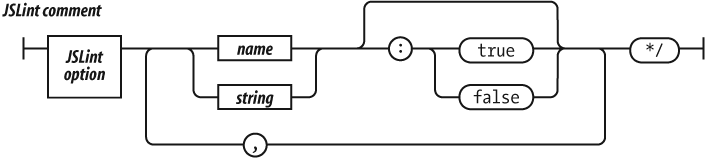
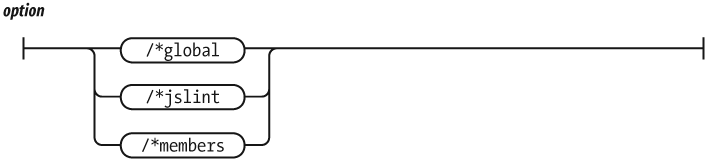
JavaScript uses a C-like syntax, which requires the use of semicolons to delimit statements. JavaScript attempts to make semicolons optional with a semicolon insertion mechanism. This is dangerous.
Like C, JavaScript has ++ and -- and
( operators, which can be prefixes or suffixes. The
disambiguation is done by the semicolon.
In JavaScript, a linefeed can be whitespace, or it can act as a semicolon. This replaces one ambiguity with another.
JSLint expects that every statement be followed by ;
except for for, function, if,
switch, try, and while. JSLint
does not expect to see unnecessary semicolons or the empty
statement.
As a further defense against the masking of errors by the semicolon insertion mechanism, JSLint expects long statements to be broken only after one of these punctuation characters or operators:
, ; : { } ( [ = < > ? ! + - * / % ˜ ^ | &
== != <= >= += -= *= /= %= ^= |= &= << >> || &&
=== !== <<= >>= >>> >>>=
JSLint does not expect to see a long statement broken after an identifier, a string, a number, a closer, or a suffix operator:
) ] . ++ −−JSLint allows you to turn on the “Tolerate sloppy line breaking”
(laxbreak) option.
Semicolon insertion can mask copy/paste errors. If you always break lines after operators, then JSLint can do a better job of finding those errors.
The comma operator can lead to excessively tricky expressions. It can also mask some programming errors.
JSLint expects to see the comma used as a separator, but not as an
operator (except in the initialization and incrementation parts of the
for statement). It does not expect to see elided elements
in array literals. Extra commas should not be used. A comma should not
appear after the last element of an array literal or object literal
because it can be misinterpreted by some browsers.
JSLint expects that if and for statements
will be made with blocks—that is, with statements enclosed in braces
({}).
JavaScript allows an if to be written like this:
if (condition)
    statement;
That form is known to contribute to mistakes in projects where many programmers are working on the same code. That is why JSLint expects the use of a block:
if (condition) {
    statements;
}
Experience shows that this form is more resilient.
In many languages, a block introduces a scope. Variables introduced in a block are not visible outside of the block.
In JavaScript, blocks do not introduce a scope. There is only function-scope. A variable introduced anywhere in a function is visible everywhere in the function. JavaScript’s blocks confuse experienced programmers and lead to errors because the familiar syntax makes a false promise.
JSLint expects blocks with function, if,
switch, while, for,
do, and try statements and nowhere else. An
exception is made for an unblocked if statement on an
else or for in.
An expression statement is expected to be an assignment, a
function/method call, or delete. All other expression
statements are considered errors.
The for in statement allows for looping through the
names of all of the properties of an object. Unfortunately, it also
loops through all of the members that were inherited through the
prototype chain. This has the bad side effect of serving up method
functions when the interest is in the data members.
The body of every for in statement should be wrapped in
an if statement that does filtering. if can
select for a particular type or range of values, it can exclude
functions, or it can exclude properties from the prototype. For
example:
for (name in object) {
    if (object.hasOwnProperty(name)) {
        ....
    }
}
A common error in switch statements is to forget to
place a break statement after each case, resulting in
unintended fall-through. JSLint expects that the statement before the
next case or default is one of these: break,
return, or throw.
JavaScript allows var definitions to occur anywhere
within a function. JSLint is stricter.
JSLint expects that:
A var will be declared only once, and that it will
be declared before it is used.
A function will be declared before it is used.
Parameters will not also be declared as
vars.
JSLint does not expect:
The arguments array to be declared as a
var.
That a variable will be declared in a block. This is because JavaScript blocks do not have block scope. This can have unexpected consequences, so define all variables at the top of the function body.
The with statement was intended to provide a shorthand
in accessing members in deeply nested objects. Unfortunately, it behaves
very badly when setting new members. Never use the with
statement. Use a var instead.
JSLint does not expect to see a with statement.
JSLint does not expect to see an assignment statement in the
condition part of an if or while statement.
This is because it is more likely that:
if (a = b) {
    ...
}
was intended to be:
if (a == b) {
    ...
}
If you really intend an assignment, wrap it in another set of parentheses:
if ((a = b)) {
    ...
}
The == and != operators do type coercion
before comparing. This is bad because it causes
' \f\r \n\t ' == 0 to be true. This can mask
type errors.
When comparing to any of the following values, always use the
=== or !== operators, which do not do type
coercion:
0 '' undefined null false trueIf you want the type coercion, then use the short form. Instead of:
(foo != 0)just say:
(foo)And instead of:
(foo == 0)say:
(!foo)Use of the === and !== operators is always
preferred. There is a “Disallow == and !=”
(eqeqeq) option, which requires the use of ===
and !== in all cases.
JavaScript allows any statement to have a label, and labels have a separate namespace. JSLint is stricter.
JSLint expects labels only on statements that interact with
break: switch, while,
do, and for. JSLint expects that labels will
be distinct from variables and parameters.
JSLint expects that a return, break,
continue, or throw statement will be followed
by a } or case or default.
JSLint expects that + will not be followed by
+ or ++, and that - will not be
followed by - or --. A misplaced space can
turn + + into ++, an error that is difficult
to see. Use parentheses to avoid confusion.
The ++ (increment) and -- (decrement)
operators have been known to contribute to bad code by encouraging
excessive trickiness. They are second only to faulty architecture in
enabling viruses and other security menaces. The JSLint option
plusplus prohibits the use of these operators.
JavaScript does not have an integer type, but it does have bitwise
operators. The bitwise operators convert their operands from
floating-point to integers and back, so they are not nearly as efficient
as they are in C or other languages. They are rarely useful in browser
applications. The similarity to the logical operators can mask some
programming errors. The bitwise option prohibits the use of
these operators.
The eval function and its relatives
(Function, setTimeout, and
setInterval) provide access to the JavaScript compiler.
This is sometimes useful, but in most cases it indicates the presence of
extremely bad coding. The eval function is the most misused
feature of JavaScript.
In most C-like languages, void is a type. In JavaScript,
void is a prefix operator that always returns
undefined. JSLint does not expect to see void
because it is confusing and not very useful.
Regular expressions are written in a terse and cryptic notation. JSLint looks for problems that may cause portability problems. It also attempts to resolve visual ambiguities by recommending explicit escapement.
JavaScript’s syntax for regular expression literals overloads the
/ character. To avoid ambiguity, JSLint expects that the
character preceding a regular expression literal is a ( or
= or : or , character.
Constructors are functions that are designed to be used with the
new prefix. The new prefix creates a new
object based on the function’s prototype, and binds that object to the
function’s implied this parameter. If you neglect to use
the new prefix, no new object will be made, and
this will be bound to the global object. This is a serious
mistake.
JSLint enforces the convention that constructor functions be given
names with initial uppercase letters. JSLint does not expect to see a
function invocation with an initial uppercase name unless it has the
new prefix. JSLint does not expect to see the
new prefix used with functions whose names do not start
with initial uppercase.
JSLint does not expect to see the wrapper forms
new Number, new String, or
new Boolean.
JSLint does not expect to see new Object (use
{} instead).
JSLint does not expect to see new Array (use
[] instead).
JSLint does not do flow analysis to determine that variables are
assigned values before they are used. This is because variables are
given a value (undefined) that is a reasonable default for
many applications.
JSLint does not do any kind of global analysis. It does not attempt
to determine that functions used with new are really
constructors (except by enforcing capitalization conventions), or that
method names are spelled correctly.
JSLint is able to handle HTML text. It can inspect the JavaScript
content contained within <script>...</script>
tags and event handlers. It also inspects the HTML content, looking for
problems that are known to interfere with JavaScript:
All tag names must be in lowercase.
All tags that can take a close tag (such as
</p>) must have a close tag.
All tags are correctly nested.
The entity < must be used for literal
<.
JSLint is less anal than the sycophantic conformity demanded by XHTML, but more strict than the popular browsers.
JSLint also checks for the occurrence of </ in string
literals. You should always write <\/ instead. The extra
backslash is ignored by the JavaScript compiler, but not by the HTML
parser. Tricks like this should not be necessary, and yet they are.
There is an option that allows use of uppercase tag names. There is also an option that allows the use of inline HTML event handlers.
JSLint can also check that JSON data structures are well formed. If
the first character JSLint sees is { or [,
then it strictly enforces the JSON rules. See Appendix E.
If JSLint is able to complete its scan, it generates a function report. It lists the following for each function:
The line number on which it starts.
Its name. In the case of anonymous functions, JSLint will “guess” the name.
The parameters.
Closure: the variables and parameters that are declared in the function that are used by its inner functions.
Variables: the variables declared in the function that are used only by the function.
Unused: the variables that are declared in the function that are not used. This may be an indication of an error.
Outer: variables used by this function that are declared in another function.
Global: global variables that are used by this function.
Label: statement labels that are used by this function.
The report will also include a list of all of the member names that were used.
Thou map of woe, that thus dost talk in signs!
—William Shakespeare, The Tragedy of Titus Andronicus




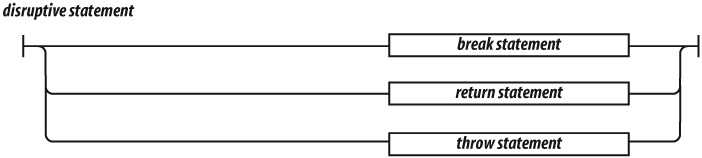

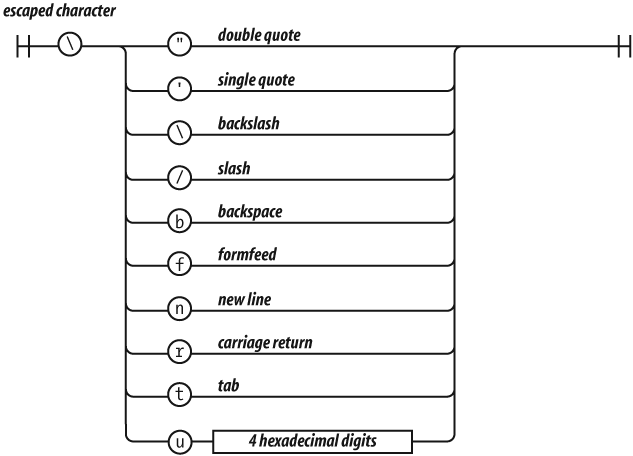

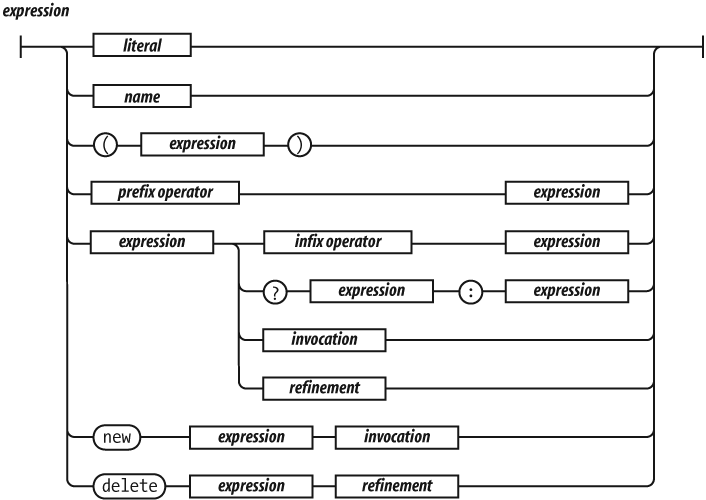
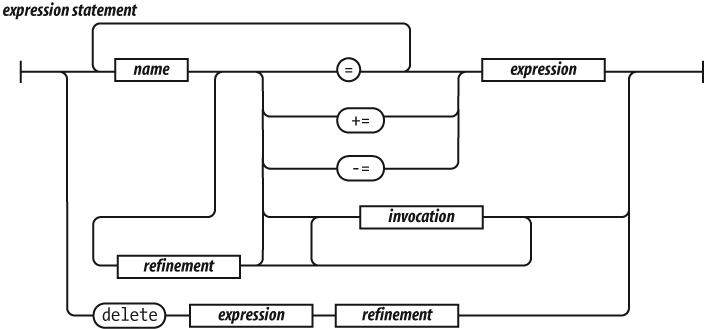
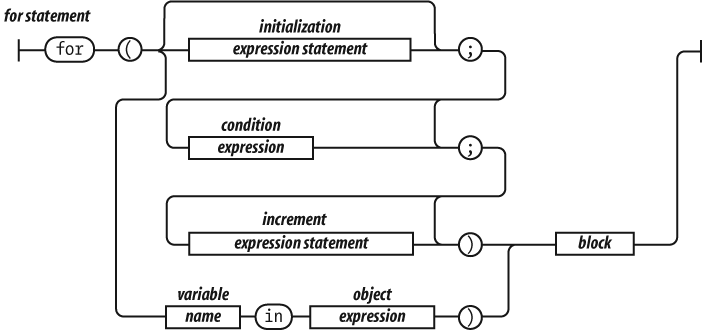




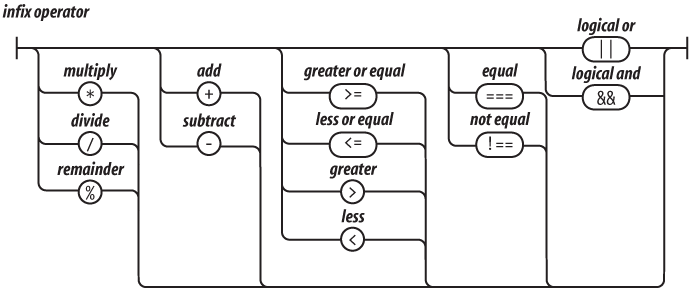


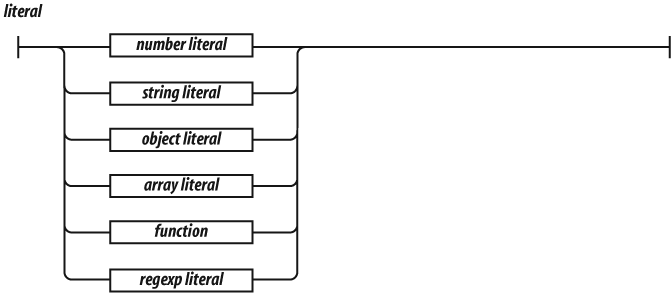
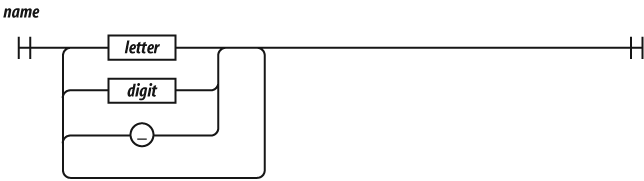

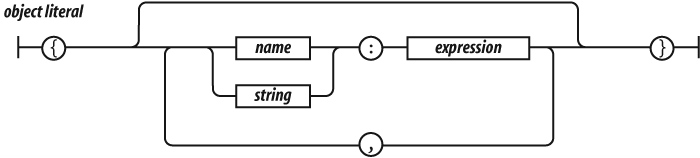

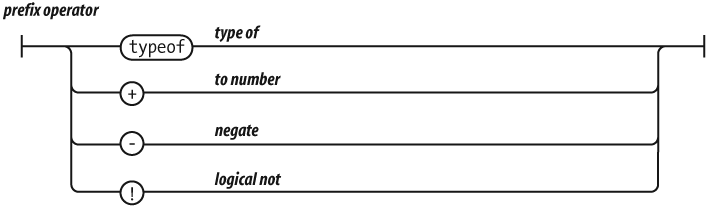


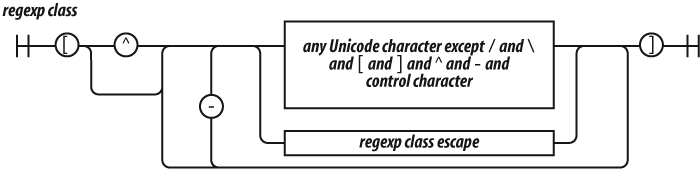
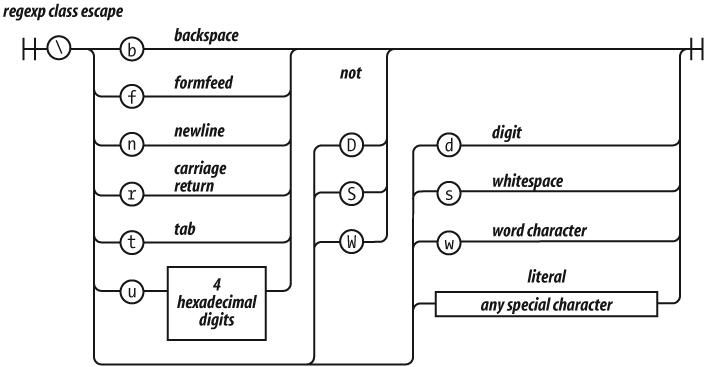
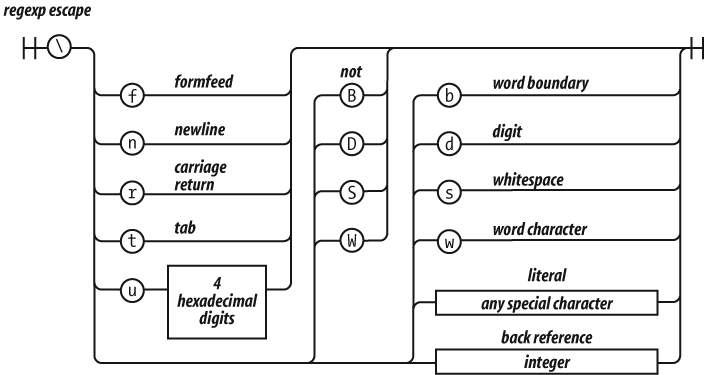
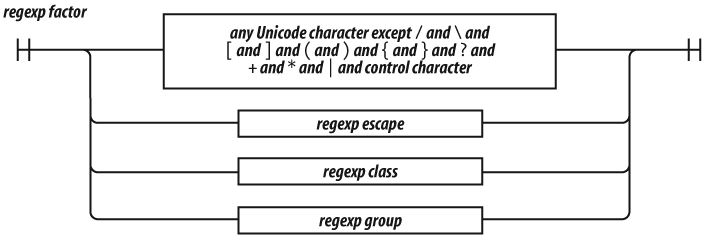
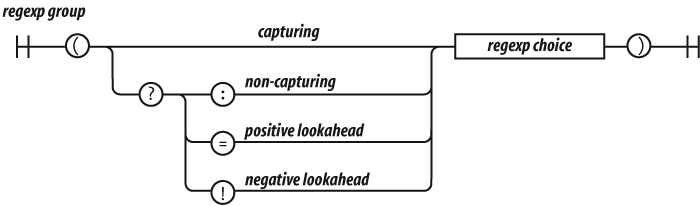

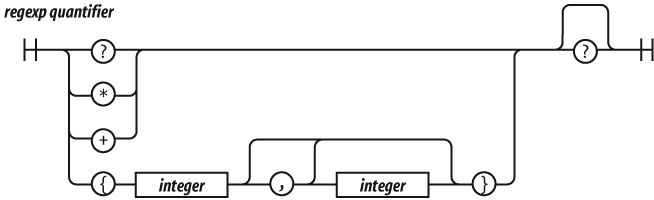


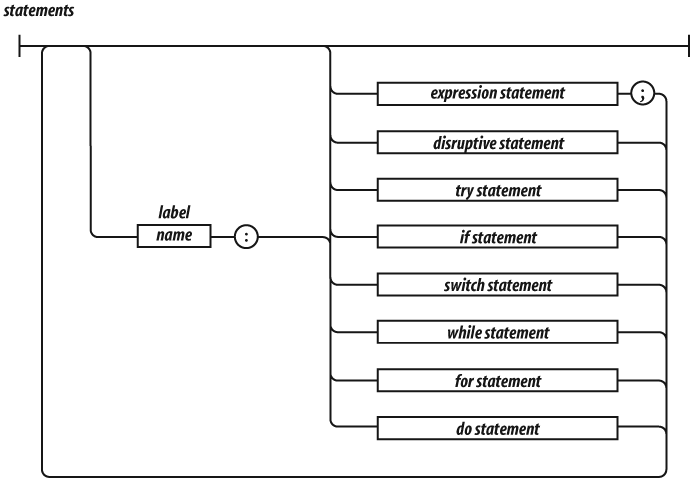
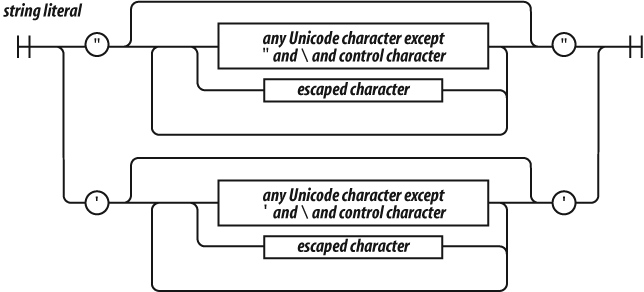
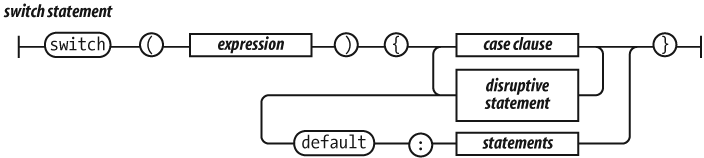


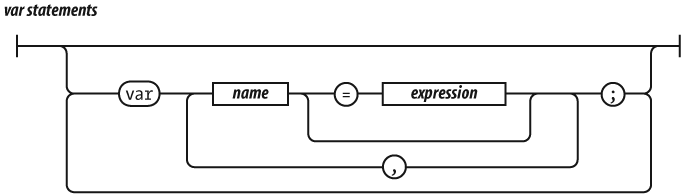

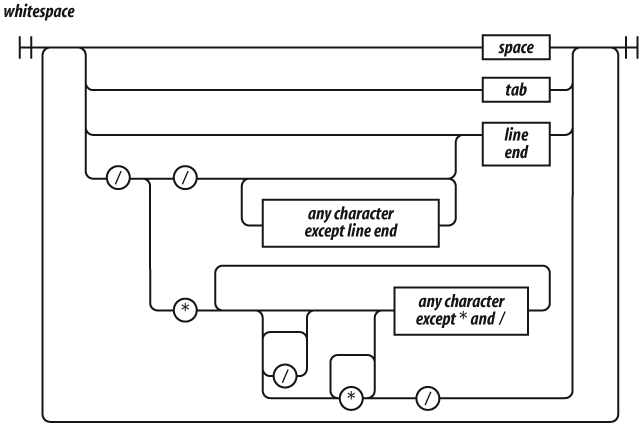
Farewell: the leisure and the fearful time Cuts off the ceremonious vows of love And ample interchange of sweet discourse, Which so long sunder’d friends should dwell upon: God give us leisure for these rites of love! Once more, adieu: be valiant, and speed well!
—William Shakespeare, The Tragedy of Richard the Third
JavaScript Object Notation (JSON) is a lightweight data interchange format. It is based on JavaScript’s object literal notation, one of JavaScript’s best parts. Even though it is a subset of JavaScript, it is language independent. It can be used to exchange data between programs written in all modern programming languages. It is a text format, so it is readable by humans and machines. It is easy to implement and easy to use. There is a lot of material about JSON at http://www.JSON.org/.
JSON has six kinds of values: objects, arrays, strings, numbers,
booleans (true and false), and the special
value null. Whitespace (spaces, tabs, carriage returns, and
newline characters) may be inserted before or after any value. This can
make JSON texts easier for humans to read. Whitespace may be omitted to
reduce transmission or storage costs.
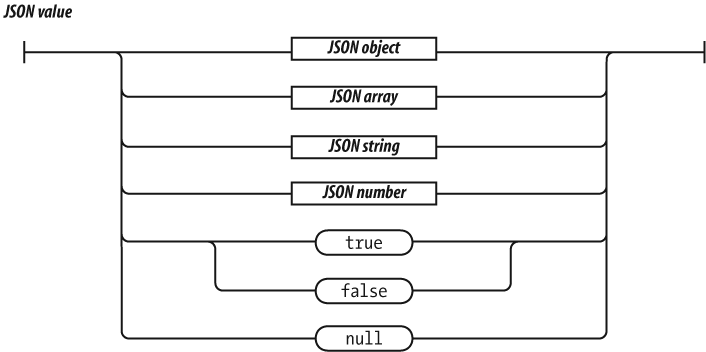
A JSON object is an unordered container of name/value pairs. A name can be any string. A value can be any JSON value, including arrays and objects. JSON objects can be nested to any depth, but generally it is most effective to keep them relatively flat. Most languages have a feature that maps easily to JSON objects, such as an object, struct, record, dictionary, hash table, property list, or associative array.

The JSON array is an ordered sequence of values. A value can be any JSON value, including arrays and objects. Most languages have a feature that maps easily onto JSON arrays, such as an array, vector, list, or sequence.

A JSON string is wrapped in double quotes. The \
character is used for escapement. JSON allows the /
character to be escaped so that JSON can be embedded in HTML
<script> tags. HTML does not allow the sequence
</ except to start the </script> tag.
JSON allows <\/, which produces the same result but does
not confuse HTML.
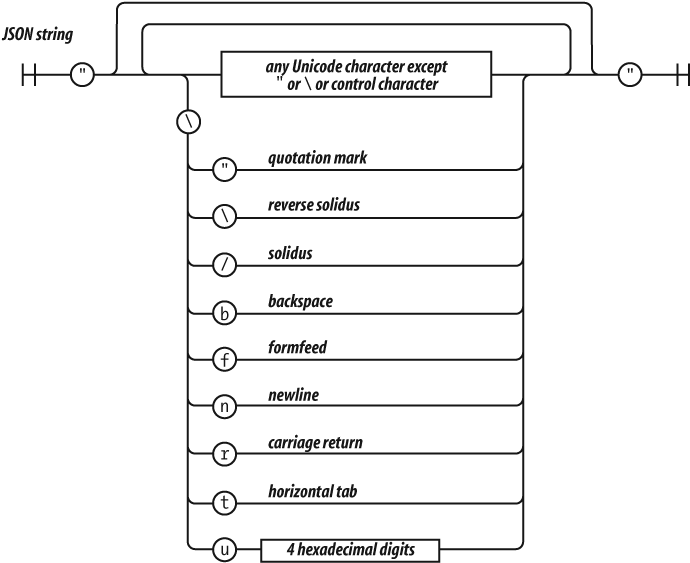
JSON numbers are like JavaScript numbers. A leading zero is not allowed on integers because some languages use that to indicate the octal. That kind of radix confusion is not desirable in a data interchange format. A number can be an integer, real, or scientific.
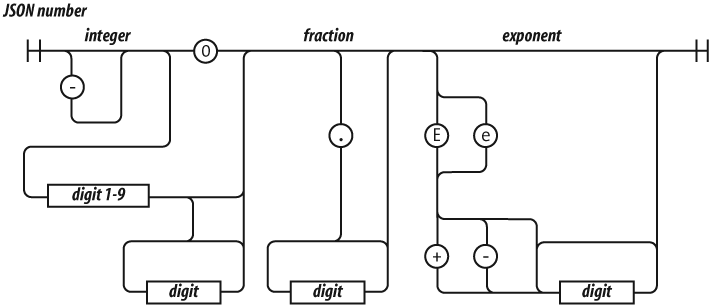
That’s it. That is all of JSON. JSON’s design goals were to be minimal, portable, textual, and a subset of JavaScript. The less we need to agree on in order to interoperate, the more easily we can interoperate.
[
    {
        "first": "Jerome",
        "middle": "Lester",
        "last": "Howard",
        "nick-name": "Curly",
        "born": 1903,
        "died": 1952,
        "quote": "nyuk-nyuk-nyuk!"
    },
    {
        "first": "Harry",
        "middle": "Moses",
        "last": "Howard",
        "nick-name": "Moe",
        "born": 1897,
        "died": 1975,
        "quote": "Why, you!"
    },
    {
        "first": "Louis",
        "last": "Feinberg",
        "nick-name": "Larry",
        "born": 1902,
        "died": 1975,
        "quote": "I'm sorry. Moe, it was an accident!"
    }
]
JSON is particularly easy to use in web applications because JSON is
JavaScript. A JSON text can be turned into a useful data structure with
the eval function:
var myData = eval('(' + myJSONText + ')');(The concatenation of the parentheses around the JSON text is a workaround for an ambiguity in JavaScript’s grammar.)
The eval function has horrendous security problems,
however. Is it safe to use eval to parse a JSON text?
Currently, the best technique for obtaining data from a server in a web
browser is through XMLHttpRequest.
XMLHttpRequest can obtain data only from the same server
that produced the HTML. eval ing text from that server is
no less secure than the original HTML. But, that assumes the server is
malicious. What if the server is simply incompetent?
An incompetent server might not do the JSON encoding correctly. If it builds JSON texts by slapping together some strings rather than using a proper JSON encoder, then it could unintentionally send dangerous material. If it acts as a proxy and simply passes JSON text through without determining whether it is well formed, then it could send dangerous material again.
The danger can be avoided by using the JSON.parse method
instead of eval (see http://www.JSON.org/json2.js). JSON.parse
will throw an exception if the text contains anything dangerous. It is
recommended that you always use JSON.parse instead of
eval to defend against server incompetence. It is also good
practice for the day when the browser provides safe data access to other
servers.
There is another danger in the interaction between external data and
innerHTML. A common Ajax pattern is for the server to send
an HTML text fragment that gets assigned to the innerHTML
property of an HTML element. This is a very bad practice. If the HTML
text contains a <script> tag or its equivalent, then
an evil script will run. This again could be due to server
incompetence.
What specifically is the danger? If an evil script gets to run on your page, it gets access to all of the state and capabilities of the page. It can interact with your server, and your server will not be able to distinguish the evil requests from legitimate requests. The evil script has access to the global object, which gives it access to all of the data in the application except for variables hidden in closures. It has access to the document object, which gives it access to everything that the user sees. It also gives the evil script the capability to dialog with the user. The browser’s location bar and all of the anti-phishing chrome will tell the user that the dialog should be trusted. The document object also gives the evil script access to the network, allowing it to load more evil scripts, or to probe for sites within your firewall, or to send the secrets it has learned to any server in the world.
This danger is a direct consequence of JavaScript’s global object,
which is far and away the worst part of JavaScript’s many bad parts.
These dangers are not caused by Ajax or JSON or
XMLHttpRequest or Web 2.0 (whatever that is). These dangers
have been in the browser since the introduction of JavaScript, and will
remain until JavaScript is replaced or repaired. Be careful.
This is an implementation of a JSON parser in JavaScript:
var json_parse = function () {

// This is a function that can parse a JSON text, producing a JavaScript
// data structure. It is a simple, recursive descent parser.

// We are defining the function inside of another function to avoid creating
// global variables.

     var at,     // The index of the current character
         ch,     // The current character
         escapee = {
             '"':  '"',
             '\\': '\\',
             '/':  '/',
             b:    'b',
             f:    '\f',
             n:    '\n',
             r:    '\r',
             t:    '\t'
         },
         text,

         error = function (m) {

// Call error when something is wrong.

             throw {
                 name:    'SyntaxError',
                 message: m,
                 at:      at,
                 text:    text
             };
         },

         next = function (c) {

// If a c parameter is provided, verify that it matches the current character.

             if (c && c !== ch) {
                 error("Expected '" + c + "' instead of '" + ch + "'");
             }

// Get the next character. When there are no more characters,
// return the empty string.

             ch = text.charAt(at);
             at += 1;
             return ch;
         },

         number = function () {

// Parse a number value.

             var number,
                 string = '';

             if (ch === '-') {
                 string = '-';
                 next('-');
             }
             while (ch >= '0' && ch <= '9') {
                 string += ch;
                 next();
             }
             if (ch === '.') {
                 string += '.';
                 while (next() && ch >= '0' && ch <= '9') {
                     string += ch;
                 }
             }
             if (ch === 'e' || ch === 'E') {
                 string += ch;
                 next();
                 if (ch === '-' || ch === '+') {
                     string += ch;
                     next();
                 }
                 while (ch >= '0' && ch <= '9') {
                     string += ch;
                     next();
                 }
             }
             number = +string;
             if (isNaN(number)) {
                 error("Bad number");
             } else {
                 return number;
             }
         },

         string = function () {

// Parse a string value.

             var hex,
                 i,
                 string = '',
                 uffff;

// When parsing for string values, we must look for " and \ characters.

             if (ch === '"') {
                 while (next()) {
                     if (ch === '"') {
                         next();
                         return string;
                     } else if (ch === '\\') {
                         next();
                         if (ch === 'u') {
                             uffff = 0;
                             for (i = 0; i < 4; i += 1) {
                                 hex = parseInt(next(), 16);
                                 if (!isFinite(hex)) {
                                     break;
                                 }
                                 uffff = uffff * 16 + hex;
                             }
                             string += String.fromCharCode(uffff);
                         } else if (typeof escapee[ch] === 'string') {
                             string += escapee[ch];
                         } else {
                             break;
                         }
                     } else {
                         string += ch;
                     }
                 }
             }
             error("Bad string");
         },

         white = function () {

// Skip whitespace.

             while (ch && ch <= ' ') {
                 next();
             }
         },

         word = function () {

// true, false, or null.

             switch (ch) {
             case 't':
                 next('t');
                 next('r');
                 next('u');
                 next('e');
                 return true;
             case 'f':
                 next('f');
                 next('a');
                 next('l');
                 next('s');
                 next('e');
                 return false;
             case 'n':
                 next('n');
                 next('u');
                 next('l');
                 next('l');
                 return null;
             }
             error("Unexpected '" + ch + "'");
         },

         value,  // Place holder for the value function.

         array = function () {

// Parse an array value.

             var array = [];

             if (ch === '[') {
                 next('[');
                 white();
                 if (ch === ']') {
                     next(']');
                     return array;   // empty array
                 }
                 while (ch) {
                     array.push(value());
                     white();
                     if (ch === ']') {
                         next(']');
                         return array;
                     }
                     next(',');
                     white();
                 }
             }
             error("Bad array");
         },

         object = function () {

// Parse an object value.

             var key,
                 object = {};

             if (ch === '{') {
                 next('{');
                 white();
                 if (ch === '}') {
                     next('}');
                     return object;   // empty object
                 }
                 while (ch) {
                     key = string();
                     white();
                     next(':');
                     object[key] = value();
                     white();
                     if (ch === '}') {
                         next('}');
                         return object;
                     }
                     next(',');
                     white();
                 }
             }
             error("Bad object");
         };

     value = function () {

// Parse a JSON value. It could be an object, an array, a string, a number,
// or a word.

         white();
         switch (ch) {
         case '{':
             return object();
         case '[':
             return array();
         case '"':
             return string();
         case '-':
             return number();
         default:
             return ch >= '0' && ch <= '9' ? number() : word();
         }
     };

// Return the json_parse function. It will have access to all of the above
// functions and variables.

     return function (source, reviver) {
         var result;

         text = source;
         at = 0;
         ch = ' ';
         result = value();
         white();
         if (ch) {
             error("Syntax error");
         }

// If there is a reviver function, we recursively walk the new structure,
// passing each name/value pair to the reviver function for possible
// transformation, starting with a temporary boot object that holds the result
// in an empty key. If there is not a reviver function, we simply return the
// result.

         return typeof reviver === 'function' ?
             function walk(holder, key) {
                 var k, v, value = holder[key];
                 if (value && typeof value === 'object') {
                     for (k in value) {
                         if (Object.hasOwnProperty.call(value, k)) {
                             v = walk(value, k);
                             if (v !== undefined) {
                                 value[k] = v;
                             } else {
                                 delete value[k];
                             }
                         }
                     }
                 }
                 return reviver.call(holder, key, value);
             }({'': result}, '') : result;

     };
}();Douglas Crockford is a Senior JavaScript Architect at Yahoo!, well known for introducing and maintaining the JSON (JavaScript Object Notation) format. He’s a regular speaker at conferences on advanced JavaScript topics, and serves on the ECMAScript committee.
The animal on the cover of JavaScript: The Good Parts is a Plain Tiger butterfly (Danaus chrysippus). Outside of Asia, the insect is also known as the African Monarch. It is a medium-size butterfly characterized by bright orange wings with six black spots and alternating black-and-white stripes.
Its striking looks have been noted for millennia by scientists and artists. The writer Vladimir Nabokov—who was also a noted lepidopterist—had admiring words for the butterfly in an otherwise scathing New York Times book review of Alice Ford’s Audubon’s Butterflies, Moths, and Other Studies (The Studio Publications). In the book, Ford labels drawings made previous to and during Audubon’s time in the 19th century as “scientifi-cally [sic] unsophisticated.”
In response to Ford, Nabokov writes, “The unsophistication is all her own. She might have looked up John Abbot’s prodigious representations of North American lepidoptera, 1797, or the splendid plates of 18th- and early-19th-century German lepidopterists. She might have traveled back some 33 centuries to the times of Tuthmosis IV or Amenophis III and, instead of the obvious scarab, found there frescoes with a marvelous Egyptian butterfly (subtly combining the pattern of our Painted Lady and the body of an African ally of the Monarch).”
While the Plain Tiger’s beauty is part of its charm, its looks can also be deadly. During its larval stages, the butterfly ingests alkaloids that are poisonous to birds—its main predator—which are often attracted to the insect’s markings. After ingesting the Plain Tiger, a bird will vomit repeatedly—occasionally fatally. If the bird lives, it will let other birds know to avoid the insect, which can also be recognized by its leisurely, meandering pattern of flying low to the earth.
The cover image is from Dover’s Animals. The cover font is Adobe ITC Garamond. The text font is Linotype Birka; the heading font is Adobe Myriad Condensed; and the code font is LucasFont’s TheSans Mono Condensed.